Armor Customization
Check out which is your favourite armor combination! / Mira a ver cuál es tu combinación de armadura favorita!
介绍
中文介绍正在准备中,下面暂时显示原文。
[EN]
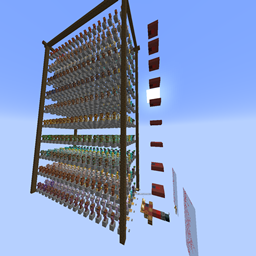
This world was created just to make you see all combinations with the armor trims and material colors and armors. You can press buttons or run triggers to summon armor stands with every combination of trims, colors or armors (respectively), and, if you kill by accident the armor stand with arms (dresser), you can do “/trigger r_a_s” to restore it. Also, there is a button below it, you can press it, and the chat will show up interactive text, depending what you press, the “dresser’s stand” will equip that combination, you can press the capital letters to remove that part.
Remember do “/reload” when join the world.
[ES]
Este mundo ha sido creado para que podais ver todas las combinaciones posibles que hay de, armadura, diseño y color, cada botón invoca un grupo de stands de armadura según cual pulses. El stand que hay con brazos (vestidor), puede ser equipado con la combinación que quieras pulsando el botón que tiene abajo y en el texto interactivo, si te cargas por accidente este stand, puedes hacer “/trigger r_a_s” para restaurarlo, pulsar las mayúsculas desequipa esa pieza de armadura.
Recuerda hacer “/reload” cuando te unas al mundo.
常见问题
Armor Customization 支持哪些 Minecraft 版本?
Armor Customization 支持 Minecraft Java 版 1.19.4–1.20.6,共 3 个版本。下载时注意选择和你游戏版本一致的文件。
Armor Customization 怎么安装?
解压下载的文件,把里面的存档文件夹放进游戏目录的 saves 文件夹(开启了版本隔离的在 versions/版本名/saves),重新打开游戏就能在「单人游戏」里看到。请用 1.19.4–1.20.6 版本打开,版本不对可能导致地图损坏。
Dinocraft1515_YT 的其他作品
查看全部 →
Renewable Vaults
by Dinocraft1515_YT
Vaults now are more usefull, as they now can be opened as many times as you want
1.7万
4 个月前
Modrinth
Renewable Vaults
by Dinocraft1515_YT
Vaults now are more usefull, as they now can be opened as many times as you want
1.7万
4 个月前
Modrinth

Renewable Vaults (Datapack compilated to Mod)
by Dinocraft1515_YT
Vaults now are more usefull, as they now can be opened as many times as you want
8,833
4 个月前
CurseForge

Potion’s recipe book/Libro de recetas de pociones
by Dinocraft1515_YT
A book with all recipes of potions Un libro con todas las recetas de pociones
7,133
3 天前
Modrinth
评论
登录后评论和评分