
介绍


Woolcutter
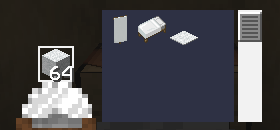
Ever dyed a whole sheep’s worth of wool just to fix one wrong color? Woolcutter adds stonecutter recipes to instantly swap between wool colors, banner colors, bed colors, carpets, wool slabs and cushions — no dye, no crafting table juggling.
Features
Stonecutter
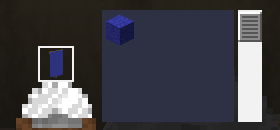
Banners
Swap a banner to another color using the matching colored wool, or trade directly between two colored banners.
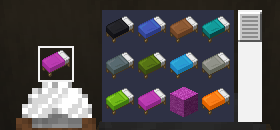
Beds
Swap a bed to another color using the matching colored wool, or trade directly between two colored beds.
Carpet
Turn colored wool into 3x matching colored carpet.
Wool slabs
Turn colored wool into 2x matching colored wool slabs, or turn any wool slab or cushion into a wool slab of any color.
Cushions
Swap a cushion to another color using the matching colored wool, or trade directly between two colored cushions.
Crafting table
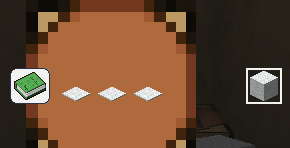
A few extra banner pattern shortcuts:
- Paper + Map -> Globe Banner Pattern
- Paper + Golden Apple -> Mojang Banner Pattern
- Paper + Gold Block -> Piglin Banner Pattern
- Paper + Skeleton Skull -> Skull Banner Pattern
- 3x Carpet -> 1 White Wool
- 2x Wool Slab -> 1 White Wool
Gallery
📦 Compatibility
| | |
|—|—|
| Minecraft versions | 1.19.x · 1.20.x · 1.21.x · 26.1 · 26.2 · 26.3 |
| Type | Data Pack (no mods required) |
| License | MIT |
📥 Installation
Like any data pack: drop the downloaded folder into .minecraft/saves/<your_world>/datapacks/, then run /reload or restart the world.
常见问题
Woolcutter 支持哪些 Minecraft 版本?
Woolcutter 支持 Minecraft Java 版 1.19–26.3,共 29 个版本。下载时注意选择和你游戏版本一致的文件。
Woolcutter 怎么安装?
新建世界时在「数据包」里把下载的 .zip 拖进去;已有的存档,把文件放进存档目录下的 datapacks 文件夹,进游戏输入 /reload 即可生效。服务器同样放在世界目录的 datapacks 里。
Azerxim 的其他作品
查看全部 →
Power Heroes 2 – Comics
Save the world, use your SUPER POWER !!!

Doctor Who Dalek 4 – Invasion
Traveling aboard the T.A.R.D.I.S. and fight evil Daleks.
Quartz UI
A minimalist, white and clear GUI overhaul in 16x — clean and bright, while staying true to vanilla Minecraft's original look and feel.

Woodcutter
Turn the stonecutter into a woodcutting station: convert logs, planks, stairs, slabs and boats for every vanilla and Nether wood type.
评论
登录后评论和评分