
介绍
About Me
Vanilla Viewmodels is a Datapack Library which adds an “animation controller” for your OBJMC rendered viewmodels ingame. To work with the datapack, you must have:
- An Animated (Generic in Blockbench) Model.
- objmc installed locally.
- A Basic Understanding of How Resourcepacks and Datapacks work.
Using Viewmodel?
Pros
- Seamless Item Animations that can be ran per function.
- Thanks to OBJMC, the models can be extremely High-Resolution.
Cons
- The OBJMC shader doesn’t work with an IRIS shader on.
- The Resourcepack Size may bloat due to high res textures exported by objmc
Utility:
- ## How it works. Since objmc only exports model+texture, it should be noted that the datapack adopts certain conventions to make sure that it works as intended. OBJMC, by default, will not “prepare you a datapack/resourcepack” like how plugins like AnimatedJava does. Hence, creating a resourcepack that correctly follows this datapack’s convention is CRUCIAL.
Model in Resourcepack
The optional ‘id’ parameter accepted in the “play-animation” utils command requires a valid item_model component value. Since every objmc animation exports into its own model+texture, you must:
- Create an Item Model JSON that resembles the model.
e.g. 'first_person:weapons/glock' at assets/first_person/items/weapons/glock.json - Animations for the Model MUST be included in this item_model folder, where the “model with animation” is a model toggled when STRING CUSTOM-MODEL-DATA value === ANIMATION-NAME.
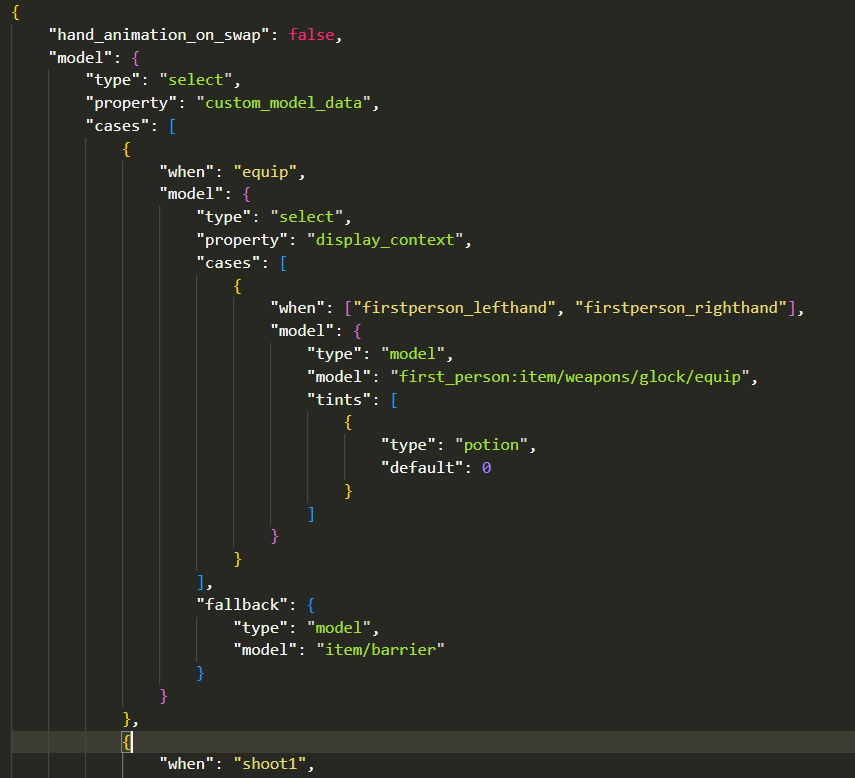
Hence, every animation is a CustomModelData string in the item_model JSON file. Obviously, this implies that adding multiple animations would mean that you’ll have to export every animation into its OBJ sequences => put them through OBJMC.py => take the condensed model and mention it in the item_model component.
Registering Models in Datapack.
To Register an OBJMC Animated Model in the datapack, open the function file vm:global/load and add a registry in the data modify line!

Here’s how a registry entry’s structure looks like:
{
  id: "first_person:weapons/glock", // item_model component
  animations: [
      {
          "name":"equip",
          "start": 0,
          "end": 27,                                      // The Total Ticks of the Animation
          "duration": 30,                                 // Ticks of Animation with Dead Space
          keyframe_functions: [
            { at: 0, function_file: 'test:equip' },       // Run a function file @ 0th keyframe.
            { at: 30, function_file: 'test:end_animation' },
            { at: 25, function_file: 'test:gun_sfx' }
          ]
      },
      {
          "name": "shoot1",
          "start": 0,
          "end": 8,
          "duration": 6,
          "keyframe_functions": [
              { at: 0, function_file: 'gun:shoot' }
          ]
      }
  ]
}
To register an animation that loops infinitely, set the “end” value to -1
- ## Playing an Animation
to play an Animation, run the command:
function vm:animations/play {args:{}}the args:{} field is used to tweak parameters, namely:
id: it stores/applies the *item_model* component value
animation: it stores the name of the animation.
frame: the frame at which the animation should start.
an example command:
function vm:animations/play {args:{id:"first_person:weapons/glock", animation: "equip", frame: 10}}This command will,
- change the item model of the potion item to first_person_weapons/glock
- set the animation-to-be-played to “equip” (this is handled by setting animation name equal to custom_model_data string that changes the model into one with different animation texture data)
- set the starting frame to 0 (potion color is set to 8388608+10)
- ## Stopping an Animation
to stop an animation, simply run the command:
function vm:animations/stopCredits
- Godlander [& the contributors on objmc github repository.] —— For Making OBJMC (and thus, viewmodels) in Minecraft possible!
- GhostScoutW (@ghostscout on discord) —— For making a Guide on how to setup a working viewmodel project with OBJMC!
- pinkiuses (creator of ATMOS: Minecraft Edition) —— For coming up with the idea of using OBJMC as viewmodels!
- And you!
常见问题
Viewmodel 支持哪些 Minecraft 版本?
Viewmodel 支持 Minecraft Java 版 1.20.6–26.3,共 18 个版本。下载时注意选择和你游戏版本一致的文件。
Viewmodel 怎么安装?
新建世界时在「数据包」里把下载的 .zip 拖进去;已有的存档,把文件放进存档目录下的 datapacks 文件夹,进游戏输入 /reload 即可生效。服务器同样放在世界目录的 datapacks 里。
barden 的其他作品
查看全部 →
Death Animations
[players & entities] explode into bits when they die!

Steam Achievement Sound replaces Advancements
Replaces Advancement's Sound with Steam's Achievement Sound

Inventory Saver
save your [[inventory]] with just one command.

Heavy Rain
Makes all Rain in Minecraft hit Hard.
评论
登录后评论和评分