
VanillaUtilities
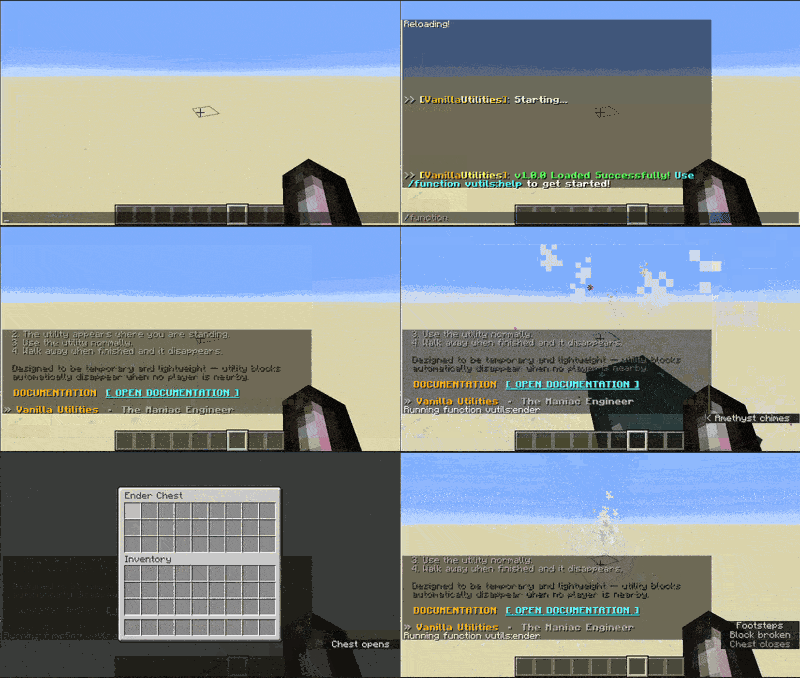
This project adds on-demand, temporary vanilla utility blocks (crafting table, furnace, anvil, grindstone, and more) that spawn in front of you and vanish when you walk away. No mods required.
介绍

VanillaUtilities
VanillaUtilities is a lightweight Minecraft Java Edition datapack that gives you instant access to vanilla utility and interaction blocks — without needing to carry or place them in the world. Run a command, and the block appears right in front of you.
No mods. No resource pack. No client-side installation. Fully vanilla and server-side.
✨ Features
- Instantly spawn a Crafting Table, Furnace, Smoker, Blast Furnace, Anvil, Grindstone, Loom, Smithing Table, Stonecutter, Cartography Table, or Ender Chest
- Utilities appear one block in front of you, at feet level, facing the direction you’re looking
- Temporary by design — utilities disappear automatically once you walk about 2 blocks away, keeping your world free of clutter
- Works independently for every player, so multiple people can use multiple utilities at the same time without interfering with one another
- An interactive, clickable in-game help menu
🚀 Quick Start
/reload
/function vutils:help
Click any command from the menu, or run one directly:
/function vutils:craft📦 Commands
| Utility | Command |
|—|—|
| Crafting Table | /function vutils:craft |
| Furnace | /function vutils:furnace |
| Smoker | /function vutils:smoker |
| Blast Furnace | /function vutils:blast |
| Anvil | /function vutils:anvil |
| Grindstone | /function vutils:grind |
| Loom | /function vutils:loom |
| Smithing Table | /function vutils:smith |
| Stonecutter | /function vutils:stonecutter |
| Cartography Table | /function vutils:cartography |
| Ender Chest | /function vutils:ender |
| Help Menu | /function vutils:help |
⚠️ Important
Utilities with inventories — Furnace, Smoker, and Blast Furnace — are removed automatically once you walk far enough away, the same as any other utility. Anything still inside when it despawns may be cleared along with it. Always retrieve your items before walking away.
Temporary utilities are also not protected — they’re ordinary blocks while they exist and can be broken or altered by other players.
🌐 Multiplayer
VanillaUtilities is built for shared worlds. Multiple players can spawn and use different utilities at the same time, and each one is tracked and cleaned up independently.
🧩 Compatibility
Currently developed and tested on Minecraft Java Edition 1.21.10. Support for future versions is planned where possible, but compatibility is only claimed for versions that have actually been tested.
📥 Installation
- Download the datapack.
- Place it in your world’s
datapacksfolder (for servers, this is the datapacks folder of the server’s world). - Enter the world or server.
- Run
/reload. - Run
/function vutils:helpto see all available commands.
💬 Support
Questions, bug reports, or suggestions? Join the Discord or email [email protected].
Not affiliated with Mojang or Microsoft.
常见问题
VanillaUtilities 支持哪些 Minecraft 版本?
VanillaUtilities 支持 Minecraft Java 版 1.21.9–1.21.10,共 2 个版本。下载时注意选择和你游戏版本一致的文件。
VanillaUtilities 怎么安装?
新建世界时在「数据包」里把下载的 .zip 拖进去;已有的存档,把文件放进存档目录下的 datapacks 文件夹,进游戏输入 /reload 即可生效。服务器同样放在世界目录的 datapacks 里。

评论
登录后评论和评分