
Upgrade Everything
Allows you to upgrade all types of tool and armour in the smithing table!
截图
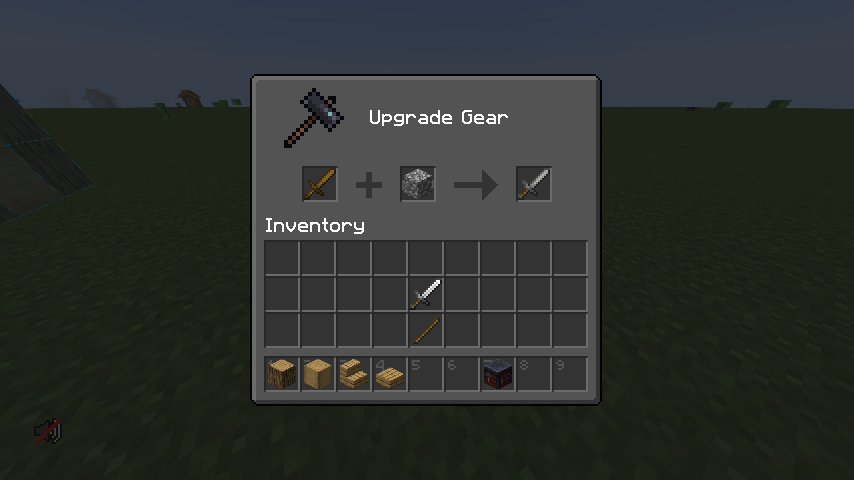
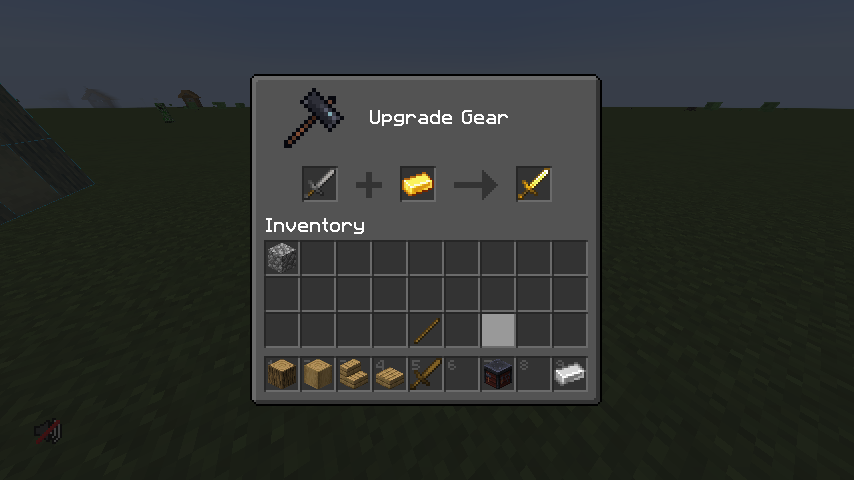

介绍
Upgrade-everything


Upgrade all tools/armour/weapon in the smithing table
What is the purpose of this datapack?
You can get a lot of tool drops from Minecraft mobs. and usually they come on iron or gold tools/weapons/armour; and that can be a pain becuase it renders then useless usually. But this pack here allows you to put any tool/weapon/armour piece in the smithing table and upgrade it to the next level
Features
- Inserting a Wooden item into the smithing table and adding a block of cobblestone returns a stone item
- Inserting a stone/chainmail item into the smithing table and adding a gold ingot returns a gold item
- Inseting a gold item into the smithing table and adding an iron ingot returns and iron item
- Inserting an Iron item into the smithing table and adding a diamond return a diamond items
- NETHERITE RECIPE IS UNAFFECTED
The Developers
| Author | Role | Links |
|:———|:——-|:——–|
| NoComment1105 | Pack Lead | Contributions |
| doglol99 | Pack Assistant Lead | Contributions |
Versioning
This pack is 1.16.x at it’s oldest. I am NOT going to back port any of these changes to any other versions
I will try my hardest to updates this pack, in its latest release at the time, on the day of the next version release and will add further features as i get a chance to evaluate the difficulty of the new items
Compiling / Using this pack
If you choose to download the .zip of this repository, to correctly use this pack you need to do a couple of things
- You need to separate upgrade_everything_vx.x from the rest of the .zip
- Compress upgrade_everything_vx.x into a .zip file itself
- Put into your data packs folder in your Minecraft save/server files and you’re ready to use
Contributing to this repo
If you want to contribute to this repo just follow the following steps
- Fork this repo
- Clone the repo to your local machine
- Optionally set up a symbolic link between your working directory and a minecraft folder
- Create the modifications you want
- Commit your changes
- Create a pull request
常见问题
Upgrade Everything 支持哪些 Minecraft 版本?
Upgrade Everything 支持 Minecraft Java 版 1.16–1.19.3,共 15 个版本。下载时注意选择和你游戏版本一致的文件。
Upgrade Everything 怎么安装?
新建世界时在「数据包」里把下载的 .zip 拖进去;已有的存档,把文件放进存档目录下的 datapacks 文件夹,进游戏输入 /reload 即可生效。服务器同样放在世界目录的 datapacks 里。
NoComment1105 的其他作品
查看全部 →
DeepslateCutting
在切石机中使用普通深板岩!

Quilt Kotlin Libraries (QKL)
Quilt 官方 Kotlin 前置库
YoFPS Shader (Chocapic13 Edit)
A shader that supports iGPU's and has a decent quality

YoFPS
YoFPS 是一款基于 Chocapic13 光影的修改版,注重画质与性能。
评论
登录后评论和评分