
Trusted Colors
Adds a sophisticated name-color switching system to the game, complete with live and rec tags as well as an RP tag.
介绍
Color Selection
Using the command:
/trigger colorWill bring up a menu to select a color and status for your in game name
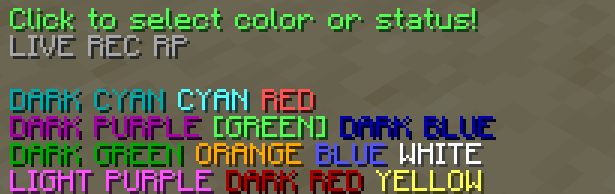
Clicking on the colors will select them and change the actual color of your name.
Status Selection
In the menu there are 3 buttons for different statuses. Clicking on these will make them show up next to your name in game:

Extra Features
An operator can use the command:
/tag add <playername> modThis will make their name in chat show up with an [OP] tag

The OP tag is compatible with all other tags and colors!
常见问题
Trusted Colors 支持哪些 Minecraft 版本?
Trusted Colors 支持 Minecraft Java 版 1.19–1.21,共 13 个版本。下载时注意选择和你游戏版本一致的文件。
Trusted Colors 怎么安装?
新建世界时在「数据包」里把下载的 .zip 拖进去;已有的存档,把文件放进存档目录下的 datapacks 文件夹,进游戏输入 /reload 即可生效。服务器同样放在世界目录的 datapacks 里。
naetilus 的其他作品
查看全部 →
Simple Voice Chat No Mic
Adds a way to message a whole group if you don't have a microphone. When you are in a group you can now use /msgvc

Trusted Pack
Trusted Pack is the resource pack created by and for the Trusted SMP by SGC. Most textures are vanilla, but there are some hidden references to Trusted.

Not Enough Pages
Paste text across pages in books!

90gQ Create: Season 2
A simple create modpack. It aims to be a modpack with extra features to the famous Create mod. This time we have added magic mods.
评论
登录后评论和评分