
截图

介绍
Want to know what’s in your storage at a glance?
This pack adds a block that displays the contents of the first slot of the storage container it is placed on.
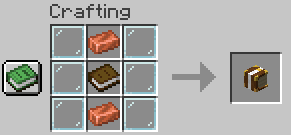
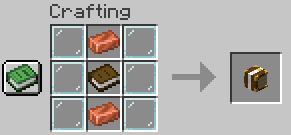
Crafting recipe for the Storage Display:
If you want to remove the Display, just left klick on it and it will pop off.
Storage displays can be placed on any container that has a chest inventory (not ender chests)
You can place it on: Chests, Trapped Chests, Shulkerboxes, Barrels.
They can be placed in any direction (east, west, north, south) and on top of containers.
常见问题
Storage Displays 支持哪些 Minecraft 版本?
Storage Displays 支持 Minecraft Java 版 1.21–1.21.5,共 6 个版本,可用的加载器:Fabric / Forge / NeoForge / Quilt。下载时注意选择和你游戏版本一致的文件。
Storage Displays 怎么安装?
新建世界时在「数据包」里把下载的 .zip 拖进去;已有的存档,把文件放进存档目录下的 datapacks 文件夹,进游戏输入 /reload 即可生效。服务器同样放在世界目录的 datapacks 里。
imalittlhigh 的其他作品
查看全部 →
Timber Physics
Makes tress fall when chopped

Horses can Float
Lets Horses swim when you ride them

Custom Trees from Saplings
Lets you grow custom trees from normal saplings

Custom Vanilla Trees from Saplings
Lets you grow sapling into a Custom Tree
评论
登录后评论和评分