
截图



介绍
Skyblock Infinite
The next generation of the classic Skyblock we all know and love!
Infinite Void:
No terrain will generate no matter how far you travel! No world border will stop you from exploring and finding new structures or biomes!
Note: This uses Custom Terrain Generation, which is not compatible with Minecraft Realms, Bedrock Edition, and some modded clients.
If you are looking for a compaitble server host, try out BisectHosting.
Structure Generation:
All important structures generate floating in the void! Witch Huts, Nether Fortresses, Strongholds, and many more all generate in the empty void.
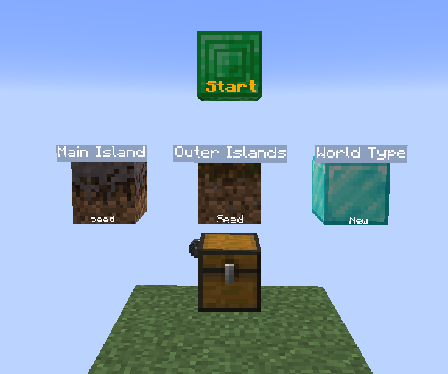
Config Menu:
Select how you want islands to generate. You can either pick Seed based islands or the Classic islands.
- Seed: Islands generate based on the biome you are in.
- Classic: The Skyblock island [grid/layout] you all know and love.
There will be more options added to this menu in the future, so keep an eye out.
How to Install
- Start creating a new world and click the More tab at the top left
- Click the “Data Packs” button
- Click the “Open Pack Folder” button
- Drag and drop the datapack into the folder
- Click on the Skyblock Infinite datapack in the “Available” list
- Finish creating your world!
Join the Community
Join the discord to get help with your Skyblock questions, or just come and hang out with other Skyblockers!
Island Design Contributers:
- Doovid: Jagged Peaks, Swamp, Badlands, Dark Forest
- PandaX: Mangrove, Lush Cave, Windswept Gravelly Hills, Desert, Savanna, Birch, Dripstone Cave
- Porg Collector: Deep Frozen Ocean
- Andergamez: Beach
- MrAmericanMike: Mushroom Fields
- WolfButterCup: Ice Spikes
- Anathra: Sulfur Caves
常见问题
Skyblock Infinite 支持哪些 Minecraft 版本?
Skyblock Infinite 支持 Minecraft Java 版 1.20–26.3,共 24 个版本,可用的加载器:Fabric / Forge / NeoForge / Quilt。下载时注意选择和你游戏版本一致的文件。
Skyblock Infinite 怎么安装?
新建世界时在「数据包」里把下载的 .zip 拖进去;已有的存档,把文件放进存档目录下的 datapacks 文件夹,进游戏输入 /reload 即可生效。服务器同样放在世界目录的 datapacks 里。


评论
登录后评论和评分