
SimpleTPA
A lightweight, vanilla-compatible datapack that adds player-to-player teleport requests (TPA) and a multi-home system to your Minecraft server. No mods, no client-side installation, just drop it in and reload.
截图

介绍
SimpleTPA
A lightweight, vanilla-compatible datapack that adds player-to-player teleport requests (TPA) and a multi-home system to your Minecraft server. No mods, no client-side installation, just drop it in and reload.
Built and tested on Minecraft 1.20.1. Works with modpacks like Better Minecraft (BMC4) since it only uses vanilla commands. Also great for single player — the multi-home system alone makes it worth installing on a solo world.
Features:
- Player teleport requests (TPA) – Send teleport requests to other players with a clickable in-chat menu. No name typing required.
- Multiple incoming requests – Each player has 5 request slots and can accept or deny each one individually with clickable buttons.
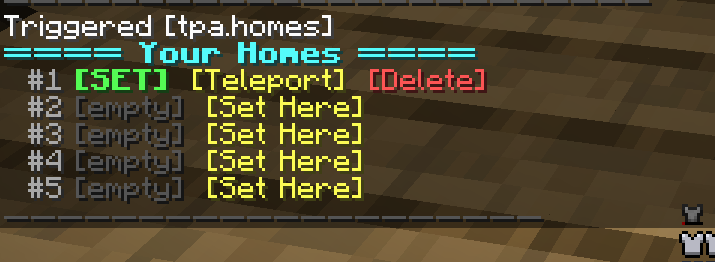
- Multi-home system – Each player gets 5 home slots. Set, teleport, and delete homes through a clean clickable menu.
- Cross-dimension teleport – Homes work in the Overworld, Nether, and End.
- Sensible defaults – 60s request timeout, 5s home cooldown, 3s send cooldown.
- No OP required for players – Uses vanilla /trigger so any player can use it.
Commands
All commands use Minecraft’s /trigger system, which works for non-OP players.
Player teleport
- /trigger tpa.menu – Open a clickable list of online players to request teleport to
- /trigger tpa.requests – View all incoming requests with accept/deny buttons
- /trigger tpa.cancel – Cancel your outgoing request
Homes
- /trigger tpa.home – Open the home teleport menu (click to teleport)
- /trigger tpa.homes – View and manage homes (set/teleport/delete)
- /trigger tpa.sethome set – Set a home in slot N
- /trigger tpa.delhome set – Delete home N
Other
- /trigger tpa.help – Show all commands
The easiest way to use the datapack is to type /trigger tpa.help and click the buttons.
Installation
- Stop your server.
- Download
SimpleTPA.zip. - Place it in your world’s
datapacksfolder (e.g.world/datapacks/). - Extract the zip — you should have
world/datapacks/SimpleTPA/pack.mcmeta. - Start the server. You’ll see
[SimpleTPA] Datapack loaded!in chat.
Run /datapack list to confirm [file/SimpleTPA] appears in the enabled list.
Known Constraints
- Vanilla dimensions only for homes – Overworld, Nether, and End. Modded dimensions (Aether, Twilight Forest, etc.) aren’t supported as home destinations.
- 5 home slots and 5 request slots per player – fixed limits.
- Up to 20 players can appear in the TPA menu list.
- Block precision for homes – you’ll land in the center of the block you set home in (no sub-block accuracy).
Why a datapack?
Datapacks are server-side only and don’t require players to install anything. You can add this to any vanilla 1.20.1 server, including modded servers running modpacks like BMC4, without breaking compatibility. Single player worlds support datapacks too — just drop it in your save’s datapacks folder the same way.
License
MIT — free to use, modify, and redistribute. Credit appreciated but not required.
常见问题
SimpleTPA 支持哪些 Minecraft 版本?
SimpleTPA 支持 Minecraft Java 版 1.20–1.21.4,共 7 个版本。下载时注意选择和你游戏版本一致的文件。
SimpleTPA 怎么安装?
新建世界时在「数据包」里把下载的 .zip 拖进去;已有的存档,把文件放进存档目录下的 datapacks 文件夹,进游戏输入 /reload 即可生效。服务器同样放在世界目录的 datapacks 里。
bosscjgioia 的其他作品
查看全部 →
Lost Enchantments
25 overpowered fantasy enchantments for NeoForge 1.21.1. Low-health rage, lifesteal, chain lightning, vein miner, cheat-death, and more. Treasure-only, found in loot, fishing, and rare trades.

Hidden Enchantments
Seven new enchantments hidden in ancient cities and rare librarian trades. Lifesteal, auto-smelting, homing arrows, replanting hoes, and more every enchantment hand-tuned with proper tooltips.
评论
登录后评论和评分