
Simple Shelf Alignment Toggle
Adds a simple survival friendly /trigger command to enable align-items-to-bottom on shelves.
截图
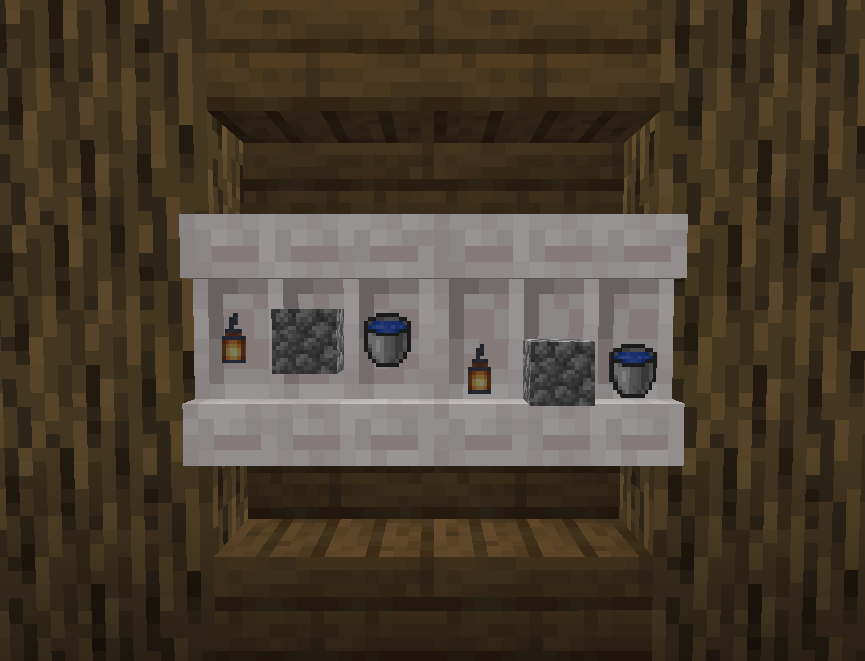

介绍
This lightweight datapack simply just adds a /trigger command for enabling the “align_items_to_bottom” property on a shelf block, which allows for more creative building possibilities 🙂
How to use:
To install: Just copy the datapack .zip file into your world’s datapacks folder.
Once in-game, just stand directly in front of a shelf at your feet, and type “/trigger toggle_shelf” You can find an example for this in the Gallery.
Breaking and replacing the shelf will set it back to it’s default state.
I originally made this datapack just for myself, but I figured others may like it as well 😀
If you’re not a fan of using commands for things like this, then you may want to check out this datapack someone else made which makes use of brushes instead: Fractures – Shelved
This datapack is inspired by the invisible item frames command in Vanilla Tweaks’ Armor Statues datapack. And I used some of their datapack’s .mcfunction files as reference for my own.
常见问题
Simple Shelf Alignment Toggle 支持哪些 Minecraft 版本?
Simple Shelf Alignment Toggle 支持 Minecraft Java 版 1.21.9–26.3,共 8 个版本。下载时注意选择和你游戏版本一致的文件。
Simple Shelf Alignment Toggle 怎么安装?
新建世界时在「数据包」里把下载的 .zip 拖进去;已有的存档,把文件放进存档目录下的 datapacks 文件夹,进游戏输入 /reload 即可生效。服务器同样放在世界目录的 datapacks 里。
EtechMC 的其他作品
查看全部 →
Pale Garden Panorama with Shaders
将主菜单全景图替换为使用 Complementary Reimagined 光影的苍白花园

Etech’s Better Maps
Changes the map inventory icons to make them more distinguishable.

Sqast
Changes Ghasts and Happy Ghasts to look like Squids!

Glow Sqast
Changes Ghasts and Happy Ghasts to look like Glow Squids!
评论
登录后评论和评分