
截图

介绍

ScreenEffects by Trplnr
A small flexible library for showing animated screen overlays to the user.
Demo
Usage
Making Screen Effects using the builder Deno file:
IMPORTANT:
Using this method requires the following to be installed in your system: Deno, ffmpeg. After getting those, restart your computer.
A screen effect is composed of multiple font frames that the datapack uses to show the animation.
A utility Deno JS file is provided with the resource pack inside the screen_effects folder to make this process easier.
1. Making the animation
NOTE:
– You can use any image editing software you like as long as it can export your animation into a spritesheet. Aseprite has this functionality.
– It is recommended to make a 256×256 .png file for the best results.
- Start by creating an animation.
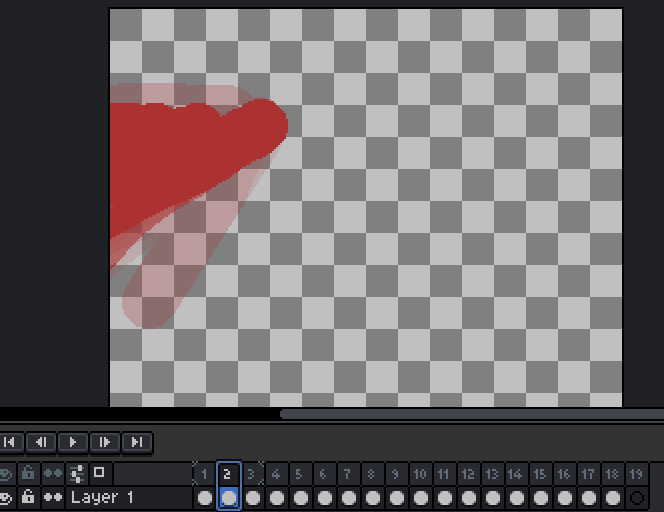
- Export your animation into a vertical spritesheet inside the
screen_effectsfolder.

- You can add more spritesheets inside the
screen_effectsfolder if you want more screen effects.
2. Building the animations
- To prepare for building the animations, go inside the
buildScreenEffects.jsfolder and adjust these configs.
// -------------CONFIGS---------------
// Replace with the namespace you use!
const NAMESPACE = "trplnr";

// If you want the font JSON files to be formatted, make this boolean true.
const prettyPrintFontFiles = false;

// If you want to see the ffmpeg logs, make this boolean true.
const showFFMPEGLogs = false;
// ------------------------------------ To make your amazing animations usable by the datapack, You can run a command in your terminal to convert your spritesheets into frames!
- Open your preferred terminal and make sure you are inside the
screen_effectsfolder. - After that, run this command
deno run --allow-all .\buildScreenEffects.js
- After running that, if everything is successful, it should look like this:
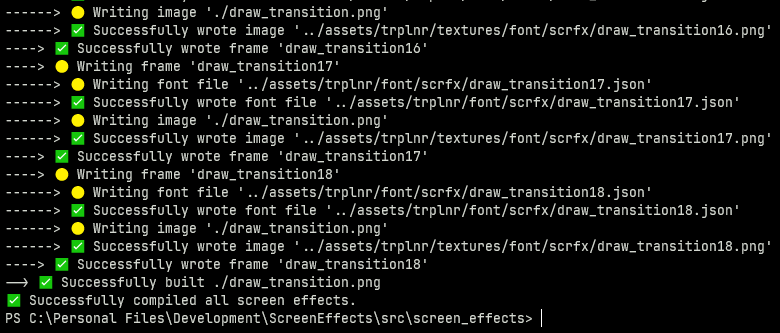
- Congrats! You’ve successfully turned your wonderful animations into frames! :tada:
- If you only want to to compile 1 spritesheet, simply run
deno run --allow-all .\buildScreenEffects.js filename.pngRegistering the Screen Effects
The datapack needs to have data to know what a screen effect is so you have to register it.
Here is an example on how you can register one.
ScreenEffect schema shown below this section.
# To add your own screen effects to the global registry,
# simply copy what is shown here.

data modify storage example:scrfx_data screen_effects set value { \
   "examples:toast": { \
        tps: 1, \
        frame_count: 31, \
        path: "example:scrfx/exampletoast" \
    }, \
   "examples:transition": { \
        tps: 1, \
        frame_count: 69, \
        path: "example:scrfx/exampletransition", \
        callbacks: { \
            "26": "say This frame covers the whole screen" \
        } \
    }, \
}

function scrfx:add_screen_effects {storage: "example:scrfx_data", path: "screen_effects"}
The ScreenEffect Schema
This is the definition of a ScreenEffect.
{
    /**
     * The name of the screen effect,
     * preferrably namespaced.
     */
    "ns:identifier": {
        /**
         * How fast each frame
         * shows up measured in ticks.
         *
         * Just like fps but well in ticks.
         *
         * Must be above zero.
         */
        tps: <int>,

        /**
         * How many frames are in the animation.
         */
        frame_count: <int>,

        /**
         * The font resource location
         * of the animation with the
         * number at the end removed.
         */
        path: <resource_location>,
        /**
         * Defines what commands run in a certain frame.
         *
         * Optional.
         */
        callback?: {
            "<frame_number>": "<command>",
            ...
        }
    }
}
Running the Screen Effects
- Declare the animation to be played inside the
scrfx:in idstorage. - Then execute as a player and run
scrfx:play!
Example:
data modify storage scrfx:in id set value "ns:identifier"
execute as Trplnr run function scrfx:play- You have successfully played a screen effect! 🎉
常见问题
ScreenEffects 支持哪些 Minecraft 版本?
ScreenEffects 支持 Minecraft Java 版 1.21.1–1.21.8,共 8 个版本。下载时注意选择和你游戏版本一致的文件。
ScreenEffects 怎么安装?
新建世界时在「数据包」里把下载的 .zip 拖进去;已有的存档,把文件放进存档目录下的 datapacks 文件夹,进游戏输入 /reload 即可生效。服务器同样放在世界目录的 datapacks 里。
Trplnr 的其他作品
查看全部 →
LeadRecipeBackport
Backports the new lead recipe from Minecraft 1.21.6

My Mouse is Broken
Lets you use your arrow keys to move your camera!

Sliding Titles
Makes your ordinary vanilla titles have a nice refreshing sliding animation that's configurable!

NBSMP modpack
all the essential mods needed to join NBSMP + some optionals
评论
登录后评论和评分