
Realistic Time
Realistic Time is a datapack that introduces a fully immersive 1:1 real-time system in Minecraft. It synchronizes your in-game day with real-world time, creating a deeply atmospheric and consistent world.
截图
介绍
🌦️ Features
🕐 1:1 Real-Time Synchronization
Your Minecraft world ticks forward in real-time—1 second IRL = 1 second in-game. No more accelerated sunrises or rushed nights.
🌍 Custom Yearly Calendar
28-day year divided into 4 seasons
Seasonal transitions bring new visuals and effects (WIP)
Dynamic moon phases
🌬️ Custom Weather Engine (WIP)
Realistic weather progression independent of Minecraft’s default system:
Wind mechanics (Planned)
Localized storms (Planned)
Temperature-based weather changes (Concept phase)
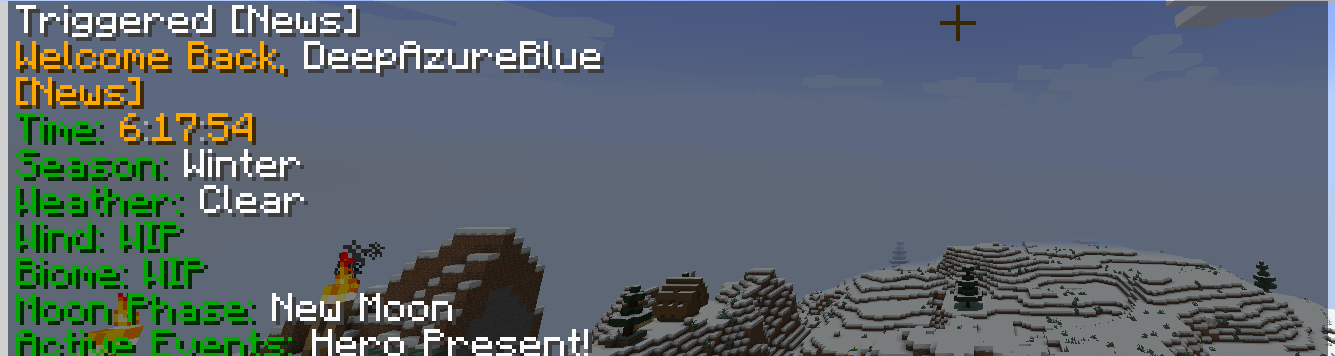
📻 Dynamic News and Alerts System
A trigger-based interface displays contextual updates such as:
Current time of day
Moon phase
Season
Biome (WIP)
Wind conditions (WIP)
Active world events or warnings (e.g., approaching storms)
🛠️ Setup Instructions
To set up Realistic Time in your world:
Install the datapack as usual in your world save folder.
Run the following command once:
/function realistic_time:calibrate
This will initialize the system and set the world time to 6:00 AM.
⚠️ Important:
Do not use /time set or other /time commands after setup. This will break synchronization.
常见问题
Realistic Time 支持哪些 Minecraft 版本?
Realistic Time 支持 Minecraft Java 版 1.21.5–1.21.6,共 2 个版本。下载时注意选择和你游戏版本一致的文件。
Realistic Time 怎么安装?
新建世界时在「数据包」里把下载的 .zip 拖进去;已有的存档,把文件放进存档目录下的 datapacks 文件夹,进游戏输入 /reload 即可生效。服务器同样放在世界目录的 datapacks 里。
DeepAzureBlue 的其他作品
查看全部 →
Azure’s Lifesteal
Defeat your enemies and steal their hearts to grow stronger — but beware: every death may tip the scales. Rise by blood, or fall into oblivion.
Realistc Time
Realistic Time is a datapack that introduces a fully immersive 1:1 real-time system in Minecraft. It synchronizes your in-game day with real-world time, creating a deeply atmospheric and consistent world.

Azures Deathswap
A minecraft Deathswap server side mod for unlimited players

Hide and Seek
A unique twist on Hide and Seek, where players gain, mysterious abilities to either hide or hunt.
评论
登录后评论和评分