
Reach Enchantment
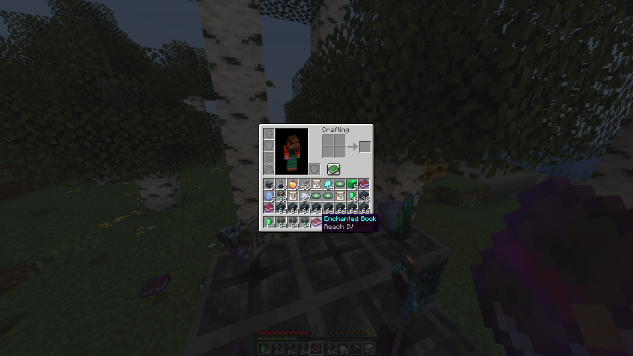
A vanilla datapack that adds a Reach enchantment, letting you hit mobs from further away.
截图
介绍
Reach Enchantment
A vanilla datapack that adds a Reach enchantment, letting you hit mobs from further away. No mods, no resource packs.
How to Use
Enchant any sword, axe, or mace with Reach Enchantment, you have to find the enchantment book.
| Level | Bonus reach | Total attack range |
|——-|————-|——————–|
| Reach I | +0.5 blocks | 3.5 blocks |
| Reach II | +1.0 blocks | 4.0 blocks |
| Reach III | +1.5 blocks | 4.5 blocks |
| Reach IV | +2.0 blocks | 5.0 blocks |
| Reach V | +2.5 blocks | 5.5 blocks |
Where to Get It
- Ominous Vault — the only source in the game
- Anvil — combine books to upgrade up to Reach V
Reach is a treasure enchantment, kept out of the enchanting table, villager trades, and random loot. Each ominous vault has a 7% chance to drop a Reach Enchantment book, so it always stays a special find. Books drop at Reach II–IV, so combine two on the anvil to push one to Reach V.
Additions
- Flat bonus per level: +0.5 blocks of attack reach, every level
- No conflicts: Reach doesn’t clash with Sharpness, Fire Aspect, or anything else
- Only in your main hand: works exactly like vanilla weapon enchantments
Compatibility
- Minecraft version atleast 1.21
- Works alongside most datapacks as it adds one enchantment.
Installation
- Drop
Datapack zip fileinto your world’sdatapacks/folder - Run
/reloador re-enter the world
Note
- This is not a hack it only works in singleplayer or in server if the datapack added from server side. Also you have to first enchant your weapon with reach enchantment.
常见问题
Reach Enchantment 支持哪些 Minecraft 版本?
Reach Enchantment 支持 Minecraft Java 版 1.21–26.3,共 17 个版本,可用的加载器:Fabric / Forge / NeoForge / Quilt。下载时注意选择和你游戏版本一致的文件。
Reach Enchantment 怎么安装?
新建世界时在「数据包」里把下载的 .zip 拖进去;已有的存档,把文件放进存档目录下的 datapacks 文件夹,进游戏输入 /reload 即可生效。服务器同样放在世界目录的 datapacks 里。



评论
登录后评论和评分