
截图
介绍
中文介绍正在准备中,下面暂时显示原文。
Placement Stick Datapack
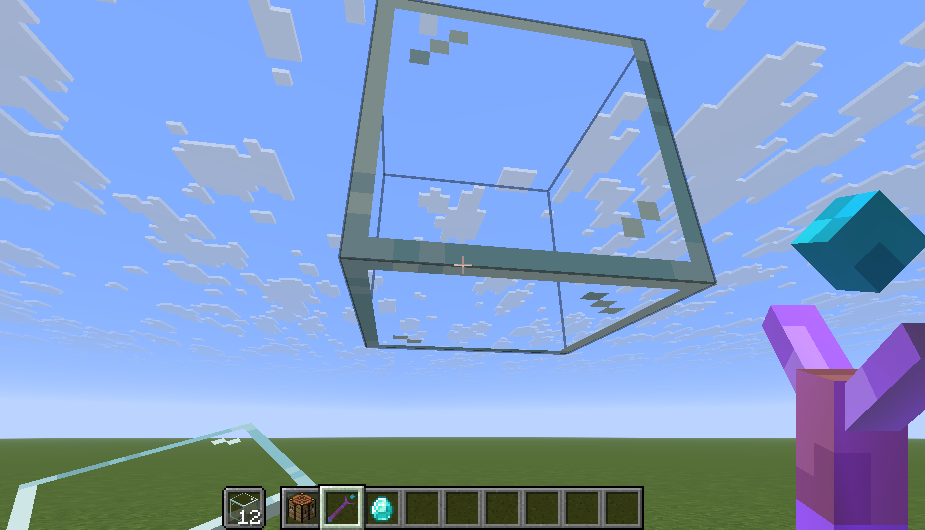
This datapack adds a special stick that allows players to place blocks in mid-air, even without support beneath them.
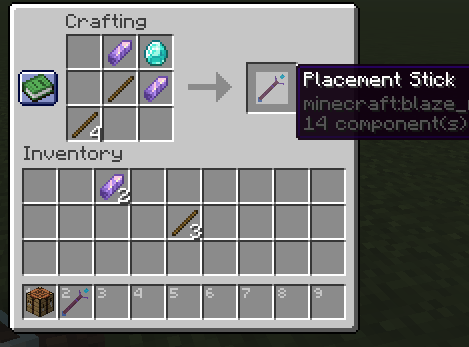
- Craftable via a custom recipe
- To activate its power, players must hold a glass block in their off-hand
- Works in both survival and creative modes
- Perfect for building sky bridge or floating structures
Installation Instructions
- Download the datapack ZIP file
- Open Minecraft and select the world you want to install it in
- Click “Edit” → “Open World Folder” → open the
datapacksfolder - Place the downloaded ZIP file inside the
datapacksfolder - Launch the world and type
/reload(if cheats are enabled) or pressF3 + Tto reload resources - Craft the Placement Stick using the custom recipe
Compatible with Minecraft 1.20+. No mods required.
常见问题
Placement Stick 支持哪些 Minecraft 版本?
Placement Stick 支持 Minecraft Java 版 1.21.9–1.21.11,共 3 个版本。下载时注意选择和你游戏版本一致的文件。
Placement Stick 怎么安装?
新建世界时在「数据包」里把下载的 .zip 拖进去;已有的存档,把文件放进存档目录下的 datapacks 文件夹,进游戏输入 /reload 即可生效。服务器同样放在世界目录的 datapacks 里。


评论
登录后评论和评分