
截图
介绍

Found bug / order datapack / other – Discord.
This datapack was intended to add “online” bank to simplify the use of server’s currency.
Usage explanation:
The player will need to craft a Bank Card and consume it to “register” a Bank Account, if the player already has an Account, he will not be able to consume it. After which the player will be able to use these commands:
- /trigger ob.balance – see your balance
- /trigger ob.replenish – replenish your account with 1 item in inventory
- /trigger ob.withdraw – withdraw 1 currency item from your account
- /trigger ob.replenish set – replenish your account with items in inventory
- /trigger ob.withdraw set – withdraw currency item from your account
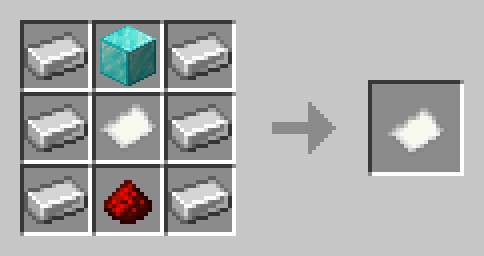
Bank Card craft:

This datapack has many settings, _you can choose any item as currency_.
There are the following settings:
cardAnywhere (default: true)
Allows players to use their Bank Account anywhere
makeAccountAnywhere (default: true)
Allows players to register Bank Account anywhere
balanceTab (default: false)
Shows the player’s balance in the tab
allowCredits (default: false)
Allows players to withdraw from their account even at 0
deathTaxPercent (default: 0)
Percentage of the account that is removed upon death
bankAreaDistance (default: 15)
Bank Area working distance (in blocks)
giveKillerPercent (default: false) WIP
Instead of removing the percentage from the account upon death, it transfers to the killer
All commands and how to configure:
How to set currency (default: diamond)
Take the item that will become the currency and write the following command:
/function online_bank:apply_currency
How to change settings
By writing the following command:
/function online_bank:settings
menu will open in the chat, hovering the cursor over gamerules will show their description and tips, clicking on them will change them. There is also a button to set default settings.
How to give yourself a set currency
/function online_bank:give_currency
How to install Bank Area
For gamerules cardAnywhere, makeAccountAnywhere and bankAreaDistance, you need Bank Area. By typing the command:
/function online_bank:give_bank_area
You will get a Bank Area spawn egg by placing it in a certain location (Example: build a bank and place it in the center), players will be able to use their Bank Account there within a set radius.
How to remove datapack
By writing the command:
/function online_bank:remove_datapack
Will be removed everything possible from the datapack created.
How to give currency to someone’s account
/scoreboard players set ob.playerBalance
常见问题
Online Bank 支持哪些 Minecraft 版本?
Online Bank 支持 Minecraft Java 版 1.21.5。下载时注意选择和你游戏版本一致的文件。
Online Bank 怎么安装?
新建世界时在「数据包」里把下载的 .zip 拖进去;已有的存档,把文件放进存档目录下的 datapacks 文件夹,进游戏输入 /reload 即可生效。服务器同样放在世界目录的 datapacks 里。
erkatom 的其他作品
查看全部 →
LifeSteal datapack
添加 LifeSteal SMP 同款生命值系统的数据包

LifeSteal PVP
Datapack for modified LifeSteal heart system

Luxante Coins
Datapack for roleplay servers that adds unobtainable coins and banker villager who can be summoned by command

Sigillum: Magic Circles
Datapack that adds magic to your wonderful world
评论
登录后评论和评分