
截图

介绍
Summary
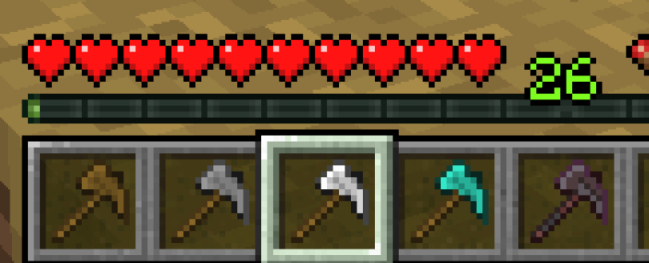
This datapack adds Paxels to Minecraft using the 1.20.5 update. Yeah, that’s about it.
Gameplay
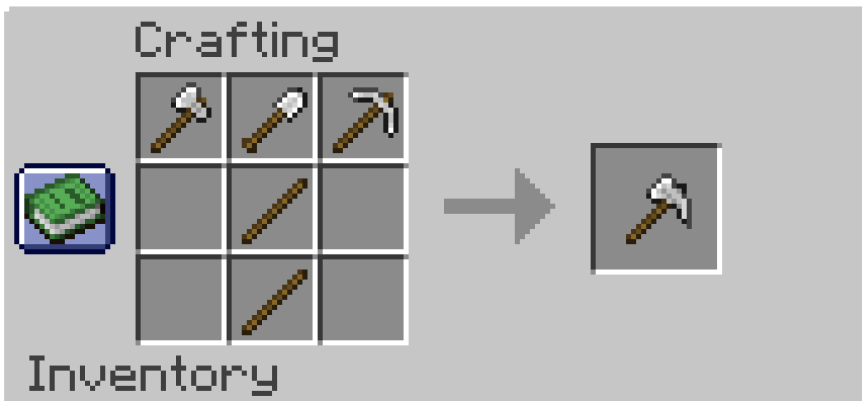
You can craft one with an Axe, Shovel, and Pickaxe of the tooltype you want.
There are 6 types of Paxels:
- Wooden Paxels
- Stone Paxels
- Iron Paxels
- Golden Paxels
- Diamond Paxels
- and Netherite Paxels.
An important note is that Paxels do not transfer over the enchantments of the tools used to craft them, and you craft the Netherite Paxel with 3 Netherite tools–NOT by upgrading a Diamond Paxel.
They can also only be used on trees to strip them, so you can’t path grass with them. I’m considering making a change for this in the future, but I’m debating it.
There are 2 advancements you can get from this pack. One for crafting any type of Paxel, and one for crafting a Netherite Paxel.
Config
This is a Config menu you can access with “/function mcpaxels:config“. That being said, there aren’t any settings you can edit. But you can access a list of commands using the book, and also uninstall the pack with it.
Commands
You can give yourself a paxel manually by giving yourself a Knowledge Book with a “[custom_data]“ component.
The component would have the data “{item_id:(paxel_name)}“.
This would look like: “/give regfunkid knowledge_book[custom_data={item_id:wooden_paxel}] 3“ to give regfunkid 3 Wooden Paxels.
常见问题
MC Paxels 支持哪些 Minecraft 版本?
MC Paxels 支持 Minecraft Java 版 1.20.5–1.20.6,共 2 个版本,可用的加载器:Fabric / Quilt。下载时注意选择和你游戏版本一致的文件。
MC Paxels 怎么安装?
新建世界时在「数据包」里把下载的 .zip 拖进去;已有的存档,把文件放进存档目录下的 datapacks 文件夹,进游戏输入 /reload 即可生效。服务器同样放在世界目录的 datapacks 里。
regfunkid 的其他作品
查看全部 →
Reg’s More Foods
Adds 200+ new "vanilla-esque" foods to Minecraft, using a Datapack!

Reg’s More Foods
Adds 200+ new foods to Minecraft, using a Datapack!

Reg’s Loot Bundles
Adds new Loot Bags to Minecraft in the form of Bundles. Comes with 4 main tiers, and some extras.

Dinobrik’s Rum Recipes
Adds an in-game recipe book for viewing recipes from Dinobrik's Rum Datapack.
评论
登录后评论和评分