
Better Item Frames
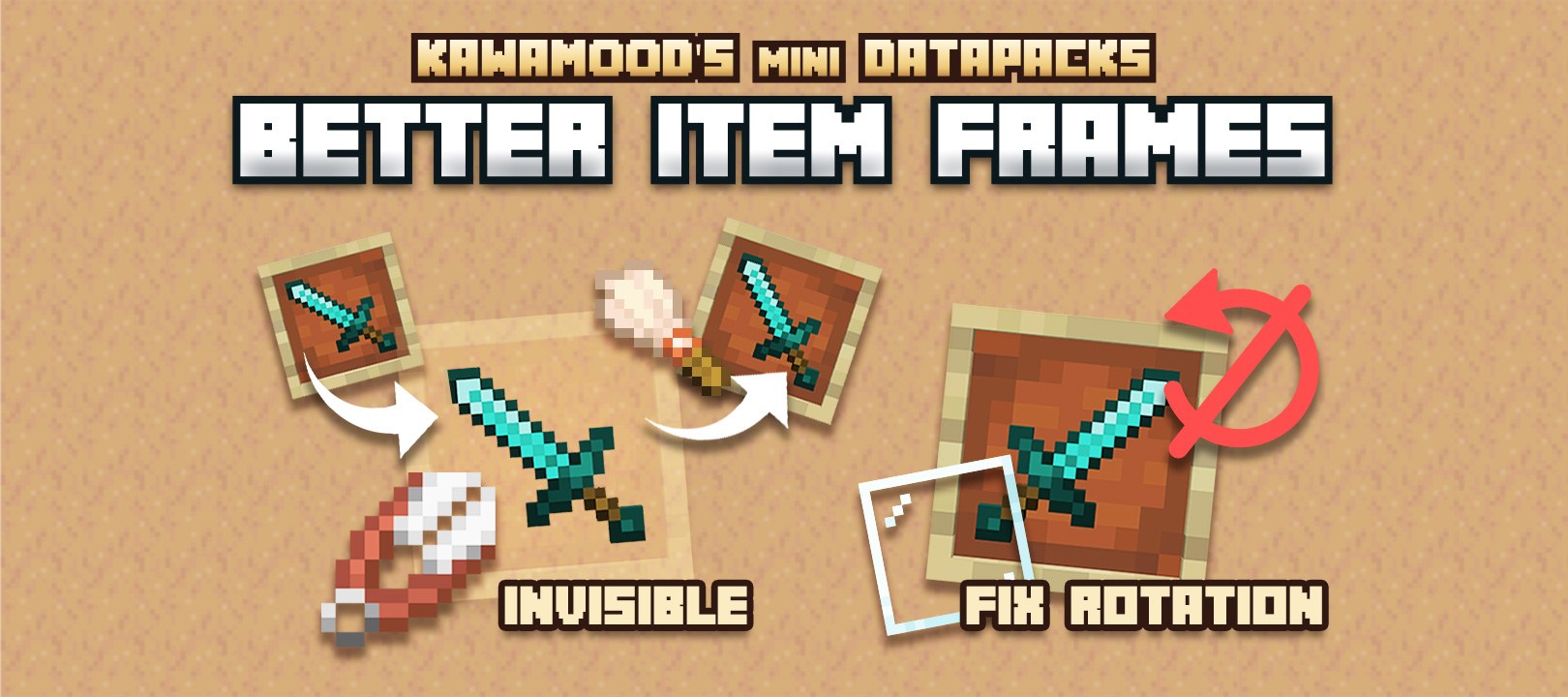
Easily turn your item frames invisible or visible in Survival! You can also lock your item frames rotation to avoid miss-click issues.
截图

介绍
Better Item Frames
Invisible & fixed item frames in Survival!
Easily turn your (glow or regular) item frames invisible or visible in Survival!
You can also lock your item frames rotation to avoid miss-click issues.
This presentation concerns the latest version of the data pack
For older ones, you can check them on Github:
🪄 How to use?
Make Invisible item frames
In order to make your (glow or regular) item frames invisible, you need to right-click an item frame while sneaking and having Shears in the main hand.
The background will then be cut from the item frame, making it invisible. This action will consume the Shears durability, the process will take into account the Unbreaking enchantment (even levels greater than 3).
Make them visible back
There are two ways to make their background reappear: you can either completely remove the item frame and place it back, or if you already set up several of them and you want to save time, you can also right-click these item frames while sneaking and having a Brush in the main hand.
The background will then be glued back to the item frame, making it visible. This action will consume the Brush durability, the process will take into account the Unbreaking enchantment (even levels greater than 3).
Lock item rotation
In order to lock item frame rotation, you can right-click an item frame while sneaking and having Glass Panes in the main hand.
It will consume a Glass Pane, as if it was fixed on the item frame. The item itself can be changed, but it won’t be able to be rotated anymore. In order to unlock the rotation, you will need to break the item frame, and place it back.
⚙️Settings
Always turn item frames visible when empty
If enabled, item frames will automatically turn visible back if a player removes its item. You can enable, disable or get the current state of the setting using these following commands respectively:
/function pk_be_it:settings/visible_when_empty/true
/function pk_be_it:settings/visible_when_empty/false
/function pk_be_it:settings/visible_when_empty/get
🧹 Uninstall
Better Item Frames comes with an uninstallation process. Running it will:
- Remove all scores and storage specific to the Better Item Frames data pack
- If there is no more KawaMood data packs installed, also remove all common scores and storages
It won’t turn visible or unfix the rotation of already modified item frames, though you would just need to break and place them back manually before or after the uninstallation.
The command to start the uninstalling process is the following one:
/function pk_be_it:cmd/uninstall🪠 Report an issue
If you encountered an issue with this data pack, preferably join the Discord server, and open a post in the dedicated #data-pack-issues channel to describe your problem. Please, don’t forget to provide all necessary informations including:
- The Minecraft version you’re using.
- The version of the concerned data pack you’re using.
- If you’re using any modified version like Forge, Paper or Spigot.
- If you do, the plugins or mods you’re using that may alter the functioning of data packs.
- The list of other data packs you’re using, if you have others.
- A clear description of your issue, and a way to reproduce it.
- If necessary, a video or a screenshot of the issue in game.
📌 Other links
Thank you for using Better Item Frames! It makes me happy to know people are enjoying it.
If you want to support its development and the development of other data packs, you can support me on my other social networks:
- Youtube
- Planet Minecraft
- Or if you’re in a generous mood, I accept donation on paypal or buy me a kawa (slang term for “coffee”)!
常见问题
Better Item Frames 支持哪些 Minecraft 版本?
Better Item Frames 支持 Minecraft Java 版 1.20.5–26.3,共 19 个版本。下载时注意选择和你游戏版本一致的文件。
Better Item Frames 怎么安装?
新建世界时在「数据包」里把下载的 .zip 拖进去;已有的存档,把文件放进存档目录下的 datapacks 文件夹,进游戏输入 /reload 即可生效。服务器同样放在世界目录的 datapacks 里。
KawaMood 的其他作品
查看全部 →
KawaMood’s Waystones
Craft and place waystones to quickly travel between all your points of interest.

Racks
Your tools and weapons will no longer envy the armor stands. From now on, they will also have their own exhibition space!

No Creeper Grief
Creepers will still damage entities around when they blast, but won't break blocks anymore.

Attract Villagers
Attract villagers with emeralds to relocated them more easily. No need for rail tracks or boat anymore!
评论
登录后评论和评分