
Item Display
Want to display your items to decorate your world? That's what this pack does.
截图

介绍
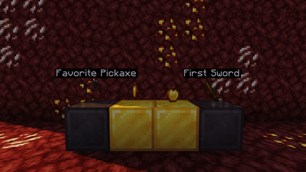
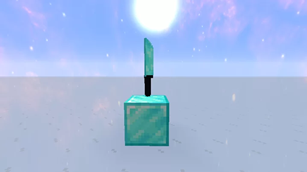
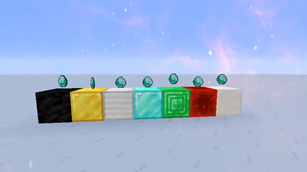
This data pack adds item display cases that you can display dropped items that will never despawn and can never be picked up. Use this pack to display your cool items!
Features:
- Make it glow in the dark like a glow item frame.
- Use a name tag to rename the item.
- Encase the item in glass to keep it safe from fire, lava, etc.
- More customizability coming soon!
How To Use
- Place down a valid display block.
- Drop the item that you want to be displayed.
- Then drop the item frame with the display item. (make sure your display item is dropped first)
- To remove break the block and you will receive your item.
How To Customize:
- To change valid display blocks go to:
pack/data/item_display/tags/blocks/display_blocks.json
- Inside that file, you can change what blocks are valid.
- Once you have changed it type ‘/reload’ to reset the datapack
Valid Blocks:
- gold_block
- iron_block
- diamond_block
- emerald_block
- redstone_block
- quartz_block
- coal_block
- chiseled_stone_bricks
FAQ
Can I add this to my mod pack?
Sure, as long as you give proper credit and follow the license.
Are you going to downgrade to older versions (ie; 1.15, 1.12, 1.8)?
I will if there is enough demand for a certain version and I have time to.
常见问题
Item Display 支持哪些 Minecraft 版本?
Item Display 支持 Minecraft Java 版 1.13–1.20.1,共 14 个版本。下载时注意选择和你游戏版本一致的文件。
Item Display 怎么安装?
新建世界时在「数据包」里把下载的 .zip 拖进去;已有的存档,把文件放进存档目录下的 datapacks 文件夹,进游戏输入 /reload 即可生效。服务器同样放在世界目录的 datapacks 里。
legopitstop 的其他作品
查看全部 →
Armor Stand Poses
Bedrock armor stand poses for Java Edition

Armor Stand Poses
Bedrock armor stand poses for Java Edition

Lot’s More Food
Adds new foods, crops, trees and more to your world!

Basalt Blocks
Three basalt blocks not enough to decorate? What if their was more basalt blocks, slabs or stairs? Well here you go!!
评论
登录后评论和评分