HexLands Sizes
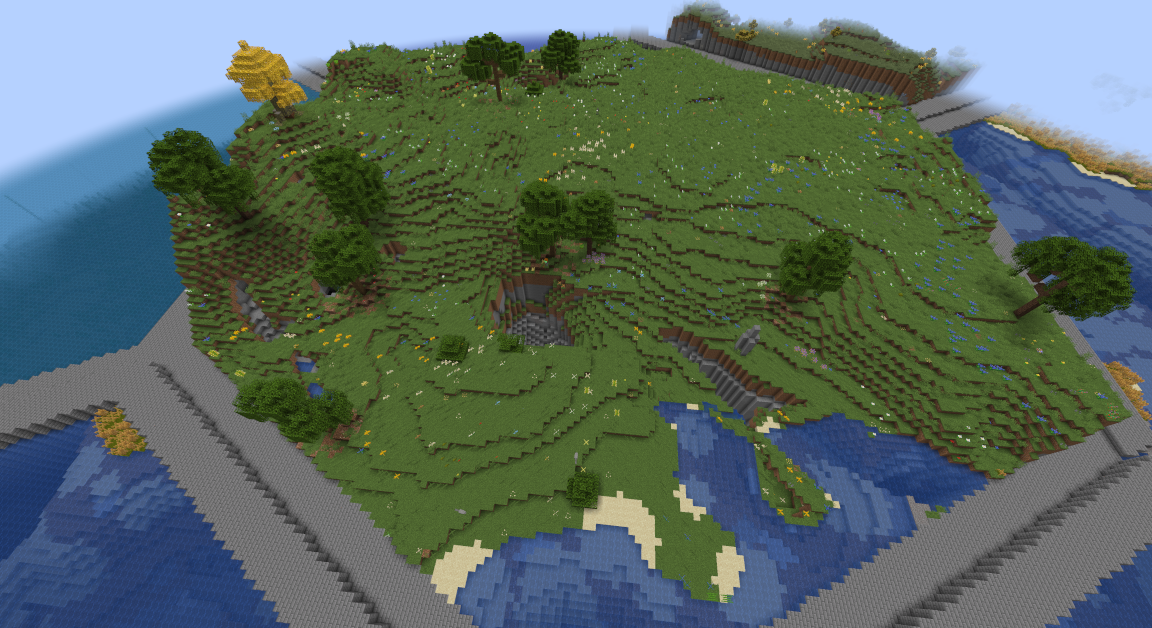
Additional world preset options for HexLands at different sizes. Also serves as a datapack example for configuring HexLands.
截图
介绍
HexLands Sizes
A datapack for HexLands: https://modrinth.com/mod/hexlands
Provides world presets very similar to the original, but at different hex sizes.
Please also download and install the matching resource pack so that the worldgen presets have their names:
- https://modrinth.com/project/hexlands-sizes-lang
Sizes
I picked sizes that seemed fun.
- Size 20: Quite small, big enough to build a single house or other small structure with some area around it
- HexLands (40): The HexLands default size, the right size to show off HexLands
- Size 100: Quite big, a single hex is big enough for a sprawling base, and horses fit on the borders
- Size 300: About as big as you can get while still noticing the hexes, with moderate sized borders
The biome scale is the same used in the HexLands default presets, 32, which make the biomes fairly random.
How Does It Work?
Here’s the critical bit of configuration:
    "hex_settings": {
        "biome_scale": 32,
        "hex_size": 100,
        "hex_border_threshold": 0.92,
        "bottom_border": {
            "min_height": 62,
            "max_height": 66,
            "state": {
                "Name": "minecraft:stone_bricks",
                "Properties": {}
            }
        }
    }
This follows, very precisely, the instructions in the description for HexLands: https://modrinth.com/mod/hexlands
Half the reason I’ve made this datapack is so that there’s an example online for configuring those settings, since I think HexLands is a fun mod.
Nether and End
This pack currently only has “Overworld Only” options.
It can be used as a working example to model for making Nether and End configs.
Without a lot of biome mods, putting hexes in those dimensions is less effective at making a new experience.
If you want a single-player or server with tweaked settings,
unzip this datapack into a ‘hexlands_sizes’ folder in your datapacks folder, then activate it.
- https://minecraft.wiki/w/Data_pack
I would also encourage people to play with the other settings.
In particular, try a hex_size of 10, which is very silly.
Version Support
The datapack version number is for 1.20.1, but it should work for most/all versions of HexLands which expose options to datapacks.
Currently that’s 1.19.x – 1.20.x, and possibly later versions.
You might get a warning or error on versions other than 1.20.1.
If you really need to fix that, see the format number table here:
https://minecraft.wiki/w/Pack_format#List_of_data_pack_formats
Translation Dependency
Without the matching resource pack HexLands Sizes Lang, the world presets will simply be “generated.hexlands_sizes….”.
Translations have to go in resource packs, not datapacks, so I had to ship them separately.
- https://modrinth.com/project/hexlands-sizes-lang
Usage and Licensing
This is just a set of configs for using a different mod.
I’ve intentionally marked this and the translation resource pack as CC0, e.g. Public.
Freely download, distribute, copy, edit, repost this, etc., even without permission or credit.
It’s intended as a guide as much as a tool.
常见问题
HexLands Sizes 支持哪些 Minecraft 版本?
HexLands Sizes 支持 Minecraft Java 版 1.19–1.20.6,共 12 个版本。下载时注意选择和你游戏版本一致的文件。
HexLands Sizes 怎么安装?
新建世界时在「数据包」里把下载的 .zip 拖进去;已有的存档,把文件放进存档目录下的 datapacks 文件夹,进游戏输入 /reload 即可生效。服务器同样放在世界目录的 datapacks 里。
son0fether 的其他作品
查看全部 →
Botania and Terraria
Terraria-Loving Magic in a Beautiful World

Travel and Create
Travel and Create

The Slow Magics
Explore some magic mods that take a while, with appropriate conveniences and fun worldgen

Witch of Many Colors
A Fabric Modpack based around Bewitchment, Spectrum, and the RPG Series, with Immersive Portals and Gravity for fun.
评论
登录后评论和评分