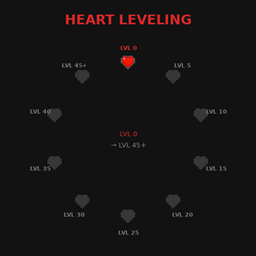
Heart Leveling
Reduces starting health to 1 heart. Gain hearts by leveling up, reaching max 10 hearts at level 45
介绍
Heart Leveling — Java Edition
Inspired by the Mite Heart System
Level up your XP, level up your max HP. This datapack adds a progression system where your maximum hearts scale based on your experience level the more you grind, the tankier you get.
How it works:
You start with just 1 heart. Every 5 XP levels, your max health increases by 1 heart reaching the vanilla maximum of 10 hearts at level 45.
Progression:
Level 0 – 4 = 1 heart
Level 5 – 9 = 2 hearts
Level 10 – 14 = 3 hearts
Level 15 – 19 = 4 hearts
Level 20 – 24 = 5 hearts
Level 25 – 29 = 6 hearts
Level 30 – 34 = 7 hearts
Level 35 – 39 = 8 hearts
Level 40 – 44 = 9 hearts
Level 45+ = 10 hearts (max)
A note on MITE accuracy:
The original MITE mod starts players at 3 hearts and adds 1 heart every 5 levels. This datapack follows the same scaling but starts harder at 1 heart. Unlike the Bedrock edition of this pack which required a player.json + script workaround, the Java version uses the /attribute command directly on minecraft:max_health, making it clean, precise, and mod-friendly.
⚠️ Compatibility:
This datapack sets minecraft:max_health base value every tick. It will conflict with any mod or datapack that also directly modifies the player’s base health – such as other health progression systems. Mods that add health via attribute modifiers (e.g. armor bonuses, RPG stat mods) are generally safe and will stack correctly on top.
Requirements: Minecraft Java Edition 1.21.9+, no mods required. Drop the .zip into your world’s datapacks folder and play.
This datapack is designed to be modular — feel free to include it in your own modpack or datapack project. No permission needed, just credit the original creator.
Licensed under CC BY 4.0. Free to use, modify, and redistribute with credit.
常见问题
Heart Leveling 支持哪些 Minecraft 版本?
Heart Leveling 支持 Minecraft Java 版 1.21.9–1.21.11,共 3 个版本。下载时注意选择和你游戏版本一致的文件。
Heart Leveling 怎么安装?
新建世界时在「数据包」里把下载的 .zip 拖进去;已有的存档,把文件放进存档目录下的 datapacks 文件夹,进游戏输入 /reload 即可生效。服务器同样放在世界目录的 datapacks 里。
AlpDSaymore 的其他作品
查看全部 →
Random Chunk
will Turned into 1 Random Block
Alp’s Better sulfur cube
Add two more simple mechanic to sulfur cube

Command Block Displayer
Datapack that display the contents of any command block in real time
评论
登录后评论和评分