
Grudge
Die to a mob and it comes back stronger, with your name on it. Take revenge to claim a trophy.
截图

介绍

You died. It noticed. It’s waiting.
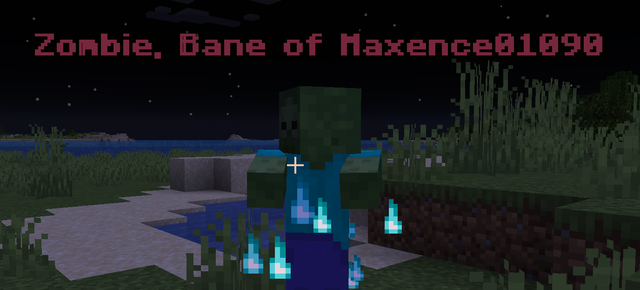
Any mob that kills a player becomes a named, stronger rival that never despawns. Kill it to settle the score and claim a trophy. Pure vanilla datapack, no mods needed.
The grudge
When a mob kills you, it:
- Takes your name:
Zombie, Bane of {player name}, visible from a distance - Gets stronger: +50% max health (fully healed), +20% speed, +20% attack damage
- Burns with soul fire: a permanent particle aura, easy to spot in a crowd
- Never despawns: it stays where it is until you come back
In multiplayer, every player gets their own rival. The mob remembers who it killed and goes after that player first.
Announcements
Everyone on the server sees it start, and see it end.


The trophy
Land the killing blow and the mob drops a unique head, named after the victim.

- Real mob skins: custom textures for Blaze, Spider, Cave Spider, Enderman, Witch, Wolf, Pillager, Vindicator, Evoker and Ravager, vanilla skulls for Zombie, Skeleton, Wither Skeleton and Piglin
Compatibility
| | |
|—|—|
| Minecraft Java | 1.20.5 to 26.3 |
| Mods required | None |
| Singleplayer | Yes |
| Multiplayer | Yes, one rival per player |
| Existing worlds | Yes |
| Performance | No noticeable impact |
Excluded mobs
These break too easily or mess with game mechanics, so they never hold a grudge:
Creeper, Ghast, Ender Dragon, Wither, Warden, Slime, Magma Cube, Phantom, Vex, Shulker, Breeze, Guardian, Elder Guardian, Iron Golem.
Installation
- Download
Grudge.zip - Drop it in your world’s
datapacks/folder - Launch your world
- Try not to die. Or do, the mob will be waiting.
Feedback
Found a bug or have an idea? Add me on Discord: maxence01090
常见问题
Grudge 支持哪些 Minecraft 版本?
Grudge 支持 Minecraft Java 版 1.20.5–1.21.11,共 14 个版本。下载时注意选择和你游戏版本一致的文件。
Grudge 怎么安装?
新建世界时在「数据包」里把下载的 .zip 拖进去;已有的存档,把文件放进存档目录下的 datapacks 文件夹,进游戏输入 /reload 即可生效。服务器同样放在世界目录的 datapacks 里。
评论
登录后评论和评分