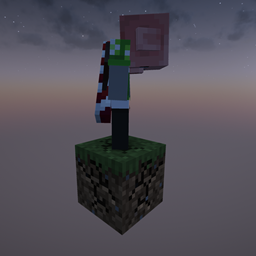
Grass One Block
Spin-off of the classic one block game. Start on a respawning block. Datapack of my world download.
介绍
ULTIMATE ONE BLOCK
Ultimate One Block adds a new spin to the classic one-block game mode. It offers a new experience to players with its increased difficulty. The block generates grass, even more grass, and some more. You get the idea. This one block only generates grass!
How-To’s
Installation
Download the ZIP file. Then launch Minecraft in the 1.21.4 version. (No mods are needed!) Now click “Singleplayer” and “Create New World.” Click the “More” button at the top and then click “Data packs.” Now finally just drag and drop the ZIP file into Minecraft OR click open pack folder and copy and paste the ZIP file. (Make sure you select the data pack from the available list.)
I am a new developer so multiplayer may cause issues with the player going to the proper area. If this happens enable commands (press esc and open to lan or using servers console) tp the player to the one block.
Required Mods
- None!
- If you want you can easily add mods and this data pack does run on fabric (I don’t know about forge.)
常见问题
Grass One Block 支持哪些 Minecraft 版本?
Grass One Block 支持 Minecraft Java 版 1.21.4。下载时注意选择和你游戏版本一致的文件。
Grass One Block 怎么安装?
新建世界时在「数据包」里把下载的 .zip 拖进去;已有的存档,把文件放进存档目录下的 datapacks 文件夹,进游戏输入 /reload 即可生效。服务器同样放在世界目录的 datapacks 里。
评论
登录后评论和评分