
截图


介绍
 Auto Crafting by Gamemode 4
Try out Gamemode 4’s take on auto-crafting!
Features
- Crafts any vanilla item.
- Set the recipe shape, give it ingredients one at a time, and power the piston to craft the item
- Build a cool steampunk multiblock structure
Creation
Craft the auto-crafter in a Custom Crafter
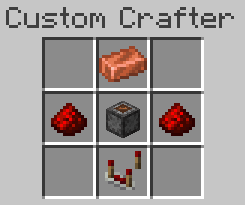
Build the Multiblock Structure
Usage
- Set the shape of your recipe inside the Auto Crafter, using any items
- Fill the top barrel with the ingredients of your recipe, in order
- Power the Piston to craft the item
- Retrieve the result from the bottom barrel
More Info
 Read the Wiki
Credits
About Gamemode 4
Gamemode 4 is a series of command-powered creations that are designed to change and enhance the survival experience. All of our modules are designed to work together flawlessly, and are balanced for usage in a survival setting. Pick and choose your favorites from our website, or wherever you get datapacks.
常见问题
Auto Crafting 支持哪些 Minecraft 版本?
Auto Crafting 支持 Minecraft Java 版 1.20–1.21.4,共 12 个版本。下载时注意选择和你游戏版本一致的文件。
Auto Crafting 怎么安装?
新建世界时在「数据包」里把下载的 .zip 拖进去;已有的存档,把文件放进存档目录下的 datapacks 文件夹,进游戏输入 /reload 即可生效。服务器同样放在世界目录的 datapacks 里。
Gamemode 4 的其他作品
查看全部 →
Shapeless Portals
Rectangles are boring, so use this Datapack and make your Nether Portals any shape your heart desires!

Connected Carpets
Unique carpet designs using vanilla connected textures. A small modular pack to equip with or without other resource packs to brighten the look of your interiors!

Better Armor Stands
Let your Armor Stands strike all the poses you want! Simply use a Book and Quill to edit Armor Stands.

Double Doors
Open two doors with a single click ✅ Doors automatically close behind you ✅ Make extra tall doors using trapdoors ✅
评论
登录后评论和评分