
Glazed: A Honey Expansion
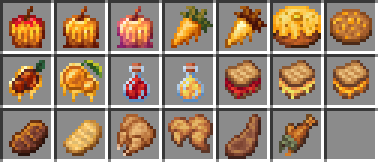
Adds 20 new food items, giving honey the sweet uses it deserves.
截图
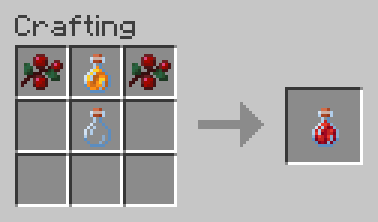
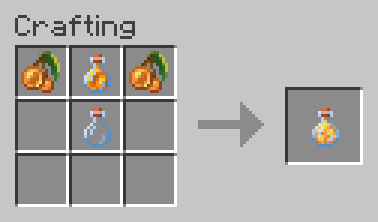
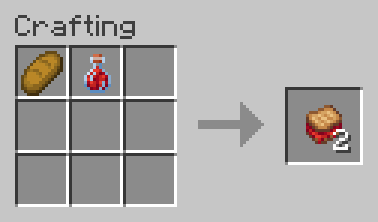
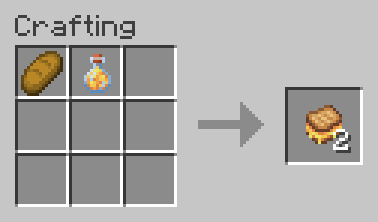
介绍

RESOURCE PACK REQUIRED TO CORRECTLY VIEW ITEMS IN-GAME

Glazed: A Honey Expansion is a Data Pack that revolves around honey and the food system of the game, adding new food and slightly better versions of existing food made using honey.
The main goal of Glazed is to incentivize players to use honey more often, by rewarding them with stronger food options that are balanced around pre-existing rules of the Vanilla food system. While doing so, Glazed gives some new uses to other food items to also incentivize their use (e.g Sweet Berries and Glow Berries).
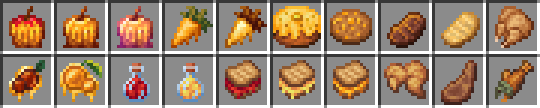
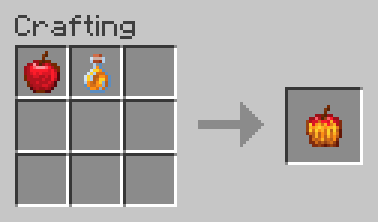
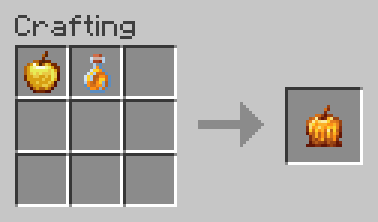
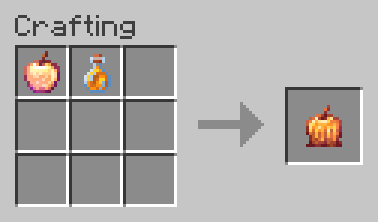
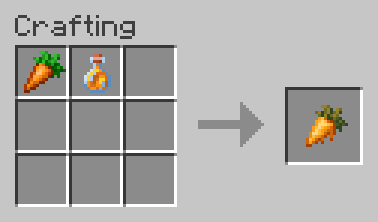
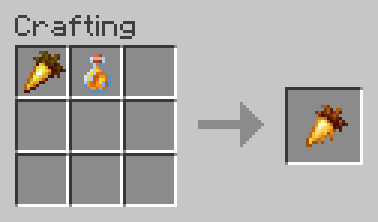
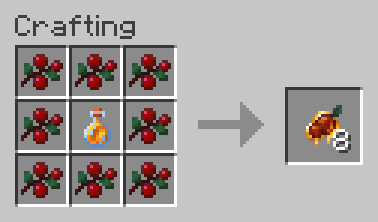
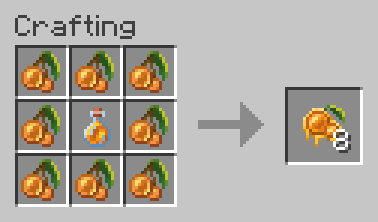
For Crafting recipes, take a look at the Images tab.
For a deep look at every food, including hunger values and additional effects, visit the Wiki tab or view Glazed’s Modrinth Page.
Installation
To properly install Glazed, both the Data Pack and the Resource Pack must be installed.
To manually install the Data Pack, simply drop the corresponding .zip file in the ‘datapack’ folder inside your world folder.
To manually install the required Resource Pack, drop the corresponding .zip file in the ‘resourcepacks’ folder inside your main MC directory.
Glazed extremely lightweight and is compatible with Multiplayer, as long as the Resource Pack is correctly loaded.
Currently supported versions: 1.21.2+
Support
If you like my Data Packs, Resource Packs or textures, consider donating, it would really mean a lot to me. If you are interested in commissioning any content, contact me on any available platform, I’ll try to reach out to you as fast as I can.
Suggestions for future Minecraft content are also well received. Thank you for taking a look at my content. 🙂
常见问题
Glazed: A Honey Expansion 支持哪些 Minecraft 版本?
Glazed: A Honey Expansion 支持 Minecraft Java 版 1.21.2–1.21.7,共 6 个版本。下载时注意选择和你游戏版本一致的文件。
Glazed: A Honey Expansion 怎么安装?
新建世界时在「数据包」里把下载的 .zip 拖进去;已有的存档,把文件放进存档目录下的 datapacks 文件夹,进游戏输入 /reload 即可生效。服务器同样放在世界目录的 datapacks 里。
Napino 的其他作品
查看全部 →
Fancy End | End Aesthetic Overhaul
重新着色末地物品和方块,带来更清新、更紫的视觉体验!

Fancy Gear | Reshaded Equipment
Tools, weapons and armor overhaul, while mantaining the vanilla aesthetic! (Now with copper and spear compatibility!)

Antarchy
Adding 45+ mobs, 8+ bosses, 3 fleshed out dimensions, and more

Ascendant Arcana
A complete enchantment overhaul with more than 50 new enchantments and enhanced progression.
评论
登录后评论和评分