
Custom Objects
it adds some weapons,enchantments and armors!(I plan to add more things in future!)
截图

介绍
🌏Language
English
Guide
- Here’s guides of this datapack!
Weapons
Dagger
- Has low damage,low attack range and high attack speed
- You can block 50% damage with it
How to Craft
Craft

Upgrade

Hammer
- Has very high damage and low attack speed(just like mace)
- And it can disable shield for 10s(emm… I think it’s too powerful…)
- You can use it as a pickaxe!
How to Craft
Craft

Upgrade

Battle Axe
- It has high damage and low durability,
it can also block damage
- You can’t use it as an axe
How to Craft
Craft

Upgrade

Long Sword
- It has a little strong than swords’ damage,little slow than swords’ attack speed and long attack range
- Similar to spear
How to Craft
Craft

Upgrade

Hatchet
- It has attack cooldown like sword, and it has shorter attack range
- But lose 4 DURABILITIES per attack
How to Craft
Craft

Upgrade

Heavy Spear
- It’s just like a mace
- But it also has spear’s features
How to Craft
Craft

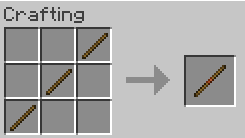
Pole
- It can make you run faster and jump higher
How to Craft
Craft
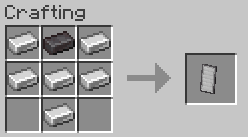
Harder Shield
- Can’t be disabled
- Durability is very high
How to Craft
Craft
Armors
Studded armors
- Was deleted in old versions
- Make you run faster
How to Craft
Helmet

Chestplate

Leggings

Boots

Copper Chainmail Armor
- Make you have more knockback resistance
- Emm…
- Yeah,that’s all
How to Craft
(They are NOT waxed copper chain)
Helmet

Chestplate

Leggings

Boots

Foods
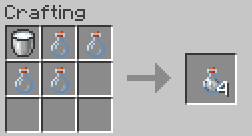
Milk Bottle
- Clear effects(nothing else…)
How to Craft
Craft
(It’s shapeless)
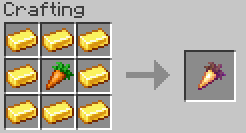
Enchanted Golden Carrot
- It’s very powerful
- It can give you instant health 2 and resistance,haste for 2.5 min
How to Craft
Craft
Toy
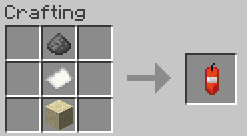
Match Craker
- Can explode
- Nothing else…
How to Craft
Craft
(it’s shapeless)
Enchantments
Quick Attack
- Make you attack more quickly
- Support spears mace axes and swords
Knockback Protection
- Make you have more knockback resistance
- Different from other protect enchantments,it’s compatible with ANY protect enchantments
- Support armors
Reach
- It makes you reach farther blocks
- Incompatible with unbreaking
- Support tools
Speed
- It makes you run faster
- Incompatible with depth strider
- Support boots
Threats
- Can make mobs slow and can’t attack you for a second
- Incompatible with smite , bane of arthropods and sharpness
- Support spears mace axes and swords
Wither Aspect
- Can make mobs get wither
- Incompatible with fire aspect
- Support spears mace axes and swords
Health Boost
- Can give you more health
- Support armors
Other&Tips
Install Tips
- Step 1
Open”Resource Packs”

- Step 2
Put it in your resource pack list and enable it

- Step 3
Create a new world and open”Data Packs”

- Step 4
Put it in your data pack list and enable it

- Step 5
Enjoy it 🙂
- It support English !
- It’s just a test version…
- That’s all!(will add other things in future~)
I can’t say English well so you may not know what am I saying……(I’m just a middle school student…)
简体中文
指南
- 这里是数据包指南(我要翻译这个吗)
武器
匕首
- 攻击伤害低,攻击距离短,但是攻击速度很快
- 右键可以格挡,格挡50%的伤害
如何制作
制作
升级
锤子
- 伤害非常!非常高!但是攻击速度慢(平衡下不然太强力了)
用它破盾的话,被破的盾在10秒内无法使用(我也不知道我平衡了个啥)
- 你可以把它当镐子用
如何制作
制作
升级
战斧
- 伤害也很高但是耐久特别低(只有同材质工具武器的10%),
- 它可以格挡70%的伤害
- 你不能把它当斧子用
如何制作
制作
升级
长剑
- 伤害相比同材质的剑略高,攻击速度略慢,攻击距离远
- 就像长矛一样(我想不明白我做这个干啥)
如何制作
制作
升级
手斧
- 它的攻击冷却和剑一样,攻击距离同样很短
- 但是每次攻击减少4点耐久
如何制作
制作
升级
重矛
- 它本质上就是重锤
- 但是你可以把它当矛用(?!无限连击!?)
如何制作
制作
长棍
- 它可以让你跑得更快,跳得更高
(老实说,我做这个只是为了测试自定义模型awa,但它也不是不好用qwq)
如何制作
制作
硬化盾牌
- 不会被破(被斧子或者锤子禁用)
- 耐久很高(一盾更比三盾强!)
如何制作
制作
盔甲
皮革链盔甲
- 很久之前被删了
- 可以让你跑得更快(不然没人用啊)
如何制作
头盔
胸甲
护腿
靴子
铜锁链甲
- 让你有更多的击退抗性
- 呃。。。
- 对,就这么多
如何制作
(它们不是涂蜡的铜锁链!)
头盔
胸甲
护腿
靴子
食物
奶瓶
- 清除效果(没了)
如何制作
制作
(它是无序配方)
附魔金胡萝卜
- 非常强力
- 它可以给你2级的瞬间治疗,2分半的急迫以及抗性提升
如何制作
制作
小玩具
擦炮(投掷TNT)
- 会爆炸
- 嗯对,爆炸
如何制作
制作
(它是无序配方)
魔咒
快速攻击
- 让你的攻击速度加快
- 可以附魔在武器上
击退保护
- 让你有更高的击退抗性
- 可以附魔在盔甲上,但是它兼容其他的保护魔咒
延伸
- 让你可以够到更远的方块
- 与耐久冲突
- 可以附魔在工具上
敏捷
- 让你跑的更快
- 与深海探索者冲突
- 可以附魔在靴子上
恐吓
- 让被攻击到的生物在短时间内获得缓慢和虚弱效果
- 与锋利,节肢杀手,亡灵杀手冲突
- 可以附魔在武器上
凋零附加
- 可以让被攻击到的生物在短时间内获得凋零效果
- 与火焰附加冲突
- 可以附魔在武器上
生命提升
- 给你更多的生命值
- 可以附魔在盔甲上
其他
不会安装数据包的看这里
- 第一步
打开“资源包”

- 第二步
把你下载到的数据包包长按左键拖动到资源包目录里并启用(这个数据包既是数据包,也是资源包,不用担心冲突)

- 第三步
点击“创建新的世界”,在顶部选项中的最后一个“更多”中找到“数据包”

- 第四步
把你下载到的数据包包长按左键拖动到数据包目录里并启用

- 第五步
好了这就是全部了,玩去吧awa
- 支持中文()
- 目前还在测试,有bug很正常(我这里没有汇报bug的地方,如果你遇到了那我也没办法awa)
- 没了(后面还会加入新的东西~)
Description update in 2026.10.27
简介于2026.10.27更新
没错我还是懒得去Github qwq
常见问题
Custom Objects 支持哪些 Minecraft 版本?
Custom Objects 支持 Minecraft Java 版 1.21.11–26.3,共 6 个版本。下载时注意选择和你游戏版本一致的文件。
Custom Objects 怎么安装?
新建世界时在「数据包」里把下载的 .zip 拖进去;已有的存档,把文件放进存档目录下的 datapacks 文件夹,进游戏输入 /reload 即可生效。服务器同样放在世界目录的 datapacks 里。


评论
登录后评论和评分