CreeperBeeper
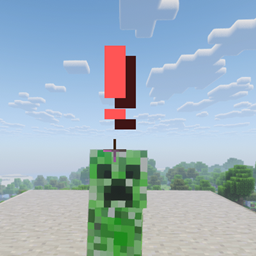
Displays a color-changing warning icon and plays a proximity sound when creepers get close!
介绍
CreeperBeeper is a lightweight Minecraft Data Pack designed to give you a quick visual and audible warning whenever a Creeper gets too close to you.
Whether you’re mining deep underground, building at night, or sorting through your chests, CreeperBeeper keeps you safe before it’s too late!
✨ Features
-
Proximity Warning System: Displays a minimalist exclamation mark (
!) right at your crosshair that changes color depending on how close a Creeper is:-
🟢 Green
!(6–10 blocks away): Early warning + soft sound pulse. -
🟡 Yellow
!(3–6 blocks away): Approaching threat + medium sound pulse. -
🔴 Red
!(0–3 blocks away): Immediate danger + high-pitched sound alert!
-
-
Non-Intrusive Display: A clean, minimal indicator that stays out of your way and disappears instantly once the threat is gone or defeated.
-
Proximity Audio Alerts: Dynamic note block sounds speed up and change pitch as the Creeper gets closer.
-
Zero Lag: Highly optimized function code that runs seamlessly in singleplayer and multiplayer.
🚀 Installation Guide
-
Download the
CreeperBeeper.zipfile. -
Place the
.zipfile into your world’sdatapacksfolder:-
.minecraft/saves/<your_world>/datapacks/
-
-
Enter your world and run
/reloadin the chat!
常见问题
CreeperBeeper 支持哪些 Minecraft 版本?
CreeperBeeper 支持 Minecraft Java 版 1.21–26.2,共 16 个版本。下载时注意选择和你游戏版本一致的文件。
CreeperBeeper 怎么安装?
新建世界时在「数据包」里把下载的 .zip 拖进去;已有的存档,把文件放进存档目录下的 datapacks 文件夹,进游戏输入 /reload 即可生效。服务器同样放在世界目录的 datapacks 里。
评论
登录后评论和评分