
介绍
Creeper Paranoia Datapack
Introduction
This datapack plays a ignited creeper sound to a random player at a random time
Installation
Place the .zip in your world’s datapacks
Usage
- After the installation, you don’t need to configure anything
This is how it works:
- A timer is set to a random value between 10 minutes and 1 hour in real time (by default)
- When the timer reaches to 0, a creeper sound is played at a random player in the world
- The timer resets again to a random value
Configuration
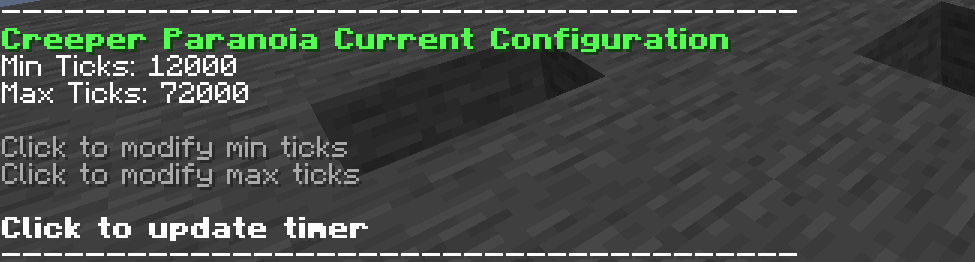
To modify the range of the timer run the command /function creeper_paranoia:_sudo/print_config. This will print in chat the current configuration, theres two pressable texts to modify the range:
- Min ticks: This is the minimum value of the range (set to 12000 ticks by default)
- Max ticks: This is the maximum value of the range (set to 72000 ticks by default)
After setting min_ticks and/or max_ticks, click the “Click to update timer” text.
Note that all values are set in minecraft ticks (20 ticks = 1 second), to convert seconds to ticks use this tool from the wiki
Running The command /function creeper_paranoia:_sudo/_reset resets the timer to it’s default values
Uninstallation
Just run the command /function creeper_paranoia:_sudo/_uninstall
Compatibility
This datapack works in +1.21.6
常见问题
Creeper Paranoia 支持哪些 Minecraft 版本?
Creeper Paranoia 支持 Minecraft Java 版 1.21.6–1.21.10,共 5 个版本。下载时注意选择和你游戏版本一致的文件。
Creeper Paranoia 怎么安装?
新建世界时在「数据包」里把下载的 .zip 拖进去;已有的存档,把文件放进存档目录下的 datapacks 文件夹,进游戏输入 /reload 即可生效。服务器同样放在世界目录的 datapacks 里。


评论
登录后评论和评分