
截图
介绍
🌱 关于
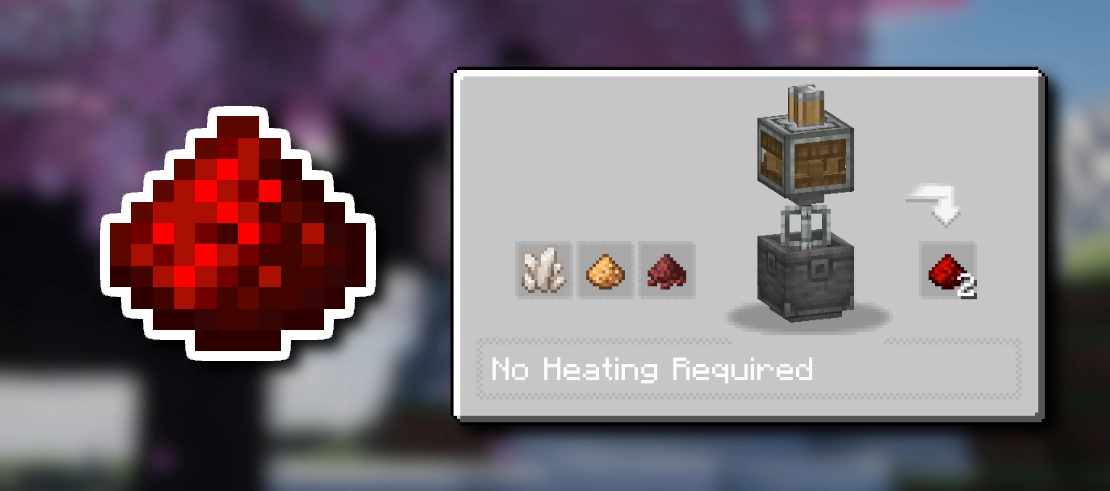
Create: Redstone Recipe 是 Create 模组的附属内容,提供模组和数据包两种版本。它新增了一种红石配方,让玩家能够可再生地获取红石
粉。适用于 Create 支持的所有版本,提供模组和数据包两种版本。
📋 配方
混合石英、萤石粉和 Cinderflour” loading=”lazy”>
提示:使用 JEI物品管理器(JEI)在游戏中查看配方
🧩 安装指南
如何安装模组(.jar)
- 下载模组:获取 .jar 文件。
- 放入文件:将下载的 .jar 文件拖入 mods 文件夹。
如何安装数据包(.zip)
- 下载:获取数据包版本的 .zip 文件。
- 打开你的地图文件夹:
- 安装:打开 datapacks 文件夹,并将下载的 .zip 文件拖入其中。
📦 更多 Create 配方
https://cdn.modrinth.com/data/CYSgjm6s/28fafc2c731387f3de9c9783fad3857329ef0ee5_96.webp”
alt=”Create: Redstone Recipe” width=”96″>
https://cdn.modrinth.com/data/W8VGEPty/17a7b516430009f7ef00fe7e1e816493cc58d1a1_96.webp”
alt=”Create: Glowstone Recipe” width=”96″>
https://cdn.modrinth.com/data/AO6B352P/91ec7e1a5aafb40d71919d645d3f4f0485939f56_96.webp”
alt=”Create: Netherrack Recipe” width=”96″>
https://cdn.modrinth.com/data/I9D5Ok4p/4ea2393022c4e9f26a1d5947250427912a8b3c3c_96.webp”
alt=”Create: Veridium Recipe” width=”96″>
<img src="https://cdn.modrinth.com/data/t1fcPMyu/0feaa2ce89ae753e3ba97c484f6af62a631045f6_96.webp"
alt=”Create: Crimsite Recipe” width=”96″>
<img src="https://cdn.modrinth.com/data/r6SlWTQ5/26c20f1dcb028f08652eac401360e415ec5e3cda_96.webp"
alt=”Create: Ochrum Recipe” width=”96″>
<img src="https://cdn.modrinth.com/data/8M92nhFm/b549f05b9947deda9024dbea1c00e93474db957b_96.webp"
alt=”Create: Asurine Recipe” width=”96″>
<img src="https://cdn.modrinth.com/data/rDH5tdx9/7f442aa28272770d5ec8966bf297ab53efe8ef7f_96.webp"
alt=”Create: Coal Recipe” width=”96″>
<img src="https://cdn.modrinth.com/data/jxcqrCWz/36db170274d9efe2837b7a796236bc1552f0f255_96.webp"
alt=”Create: Diamond Production” width=”96″>
https://cdn.modrinth.com/data/HzL1HSIW/b8a05c10de5f681e7a38201e7d84722450e1aef8.gif” alt=”Create: Copper Oxidizing”
width=”96″>
<img src="https://cdn.modrinth.com/data/WFncgzS4/e9a0fefa462028353ff948040055481868f8d1d7_96.webp"
alt=”Create: Lapis Lazuli Recipe” width=”96″>
👀 和朋友一起玩
想要运行一台稳定流畅的模组服务器?来看看 Godlike Host 吧!目前,通过他们搭建服务器是支持我们的最佳方式。
别只听我们说——在这里阅读社区评价:最佳 Minecraft 服务器托管。
👉 点击下方图片或使用此链接:Godlike Host,首月立享 5 折优惠!

常见问题
Create: Redstone Recipe 支持哪些 Minecraft 版本?
Create: Redstone Recipe 支持 Minecraft Java 版 1.20.1–1.21.1,共 2 个版本,可用的加载器:Fabric / Forge / NeoForge。下载时注意选择和你游戏版本一致的文件。
Create: Redstone Recipe 怎么安装?
新建世界时在「数据包」里把下载的 .zip 拖进去;已有的存档,把文件放进存档目录下的 datapacks 文件夹,进游戏输入 /reload 即可生效。服务器同样放在世界目录的 datapacks 里。
itzdragoncze 的其他作品
查看全部 →
Spore&Underground Bunker Spawner Compat
将地下掩体刷怪笼生成的生物替换为进化孢子。

Guns&Fun
军事主题整合包——真实枪械、载具、防弹衣、飞机、战斗!

Voxyris
即插即用的 Voxy 与 Iris 光影。流畅无卡顿体验。预装光影。修复水面缝隙。渲染距离最高可达 2048。

Shaders – Working
即装即用,支持光影、手柄,免费多人联机,性能出色!
评论
登录后评论和评分