
Craftable Sponge by Potato_XIII
作者:Potato_XIII
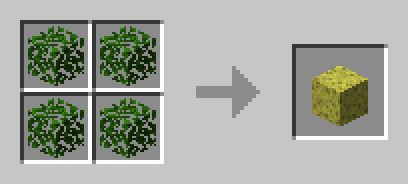
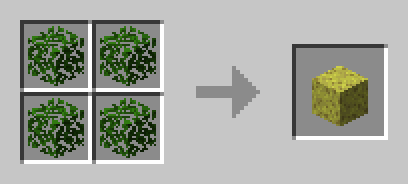
This datapack makes it possible to craft a sponge with 4 leaves.
截图
介绍
中文介绍正在准备中,下面暂时显示原文。
Craftable Sponge
What this datapack does:
This datapack allows players to obtain the sponge crafting recipe by simply picking up any kind of leaves.
It’s a lightweight quality-of-life addition — perfect for modpacks or servers where a lot of sponges are needed.
Recipe:
Installation:
For an Existing World:
- Download the
.zipfile — no need to extract it - Drop it into your world’s datapacks folder:
saves/<your_world>/datapacks - Launch Minecraft and load the world
- Confirm it’s active by running
/datapack list
For a New World:
- Download the
.zipfile — no need to extract it - In the world creation menu, go to the “More” tab → “Data Packs“
- Click “Open Pack Folder” and drop the
.zipinto it - Click the arrow on the “craftable_sponge” icon
- Click Done and create the world
- Run
/datapack listto confirm it’s enabled
Version Compatibility:
Tested on Minecraft 1.20.1
Licensed under Creative Commons BY-NC-SA 4.0 -> (No commercial use. Please give credit. Share alike.)
常见问题
Craftable Sponge by Potato_XIII 支持哪些 Minecraft 版本?
Craftable Sponge by Potato_XIII 支持 Minecraft Java 版 1.20.1。下载时注意选择和你游戏版本一致的文件。
Craftable Sponge by Potato_XIII 怎么安装?
新建世界时在「数据包」里把下载的 .zip 拖进去;已有的存档,把文件放进存档目录下的 datapacks 文件夹,进游戏输入 /reload 即可生效。服务器同样放在世界目录的 datapacks 里。

评论
登录后评论和评分