
截图
介绍
中文介绍正在准备中,下面暂时显示原文。
Craft Light Blocks
This project adds a crafting recipe which allows you to craft light blocks, supporting the latest 1.21 versions!
Crafting Recipe
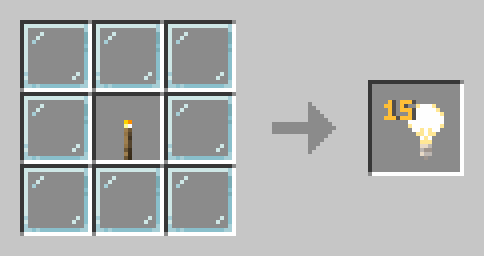
Surround a torch with 8 glass panes in a crafting table.
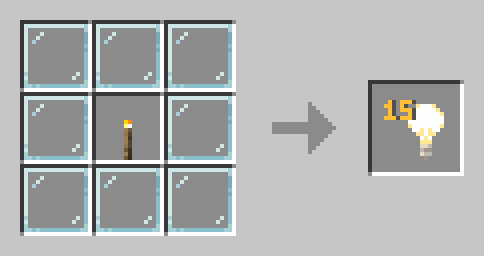
The recipe will show up in your recipe book after you craft it for the first time.
Features
- No configuration needed, just drop it in and play
- Recipe automatically appears in your recipe book after crafting once
- Lightweight and performance-friendly
Installation
Datapack
Works on both singleplayer worlds and servers.
- Download the datapack .zip file
- Place it in your world’s
/datapacksfolder
- Singleplayer:
.minecraft/saves/[WorldName]/datapacks - Server:
[ServerFolder]/[WorldName]/datapacks
- Run
/reloadingame or restart your server - Check with
/datapack listto verify.
Roadmap
- Add support for older versions (1.20.x, 1.19.x, etc.)
- Standalone mod version for Forge/Fabric
- Config file for customizing the recipe!
- Customizing the Light Block brightness via recipe
Enjoying this project? Support us by leaving a ❤️ and share it with your friends!
常见问题
Craft Light Blocks 支持哪些 Minecraft 版本?
Craft Light Blocks 支持 Minecraft Java 版 1.21–1.21.11,共 12 个版本,可用的加载器:Bukkit / Paper / Purpur / Spigot。下载时注意选择和你游戏版本一致的文件。
Craft Light Blocks 怎么安装?
新建世界时在「数据包」里把下载的 .zip 拖进去;已有的存档,把文件放进存档目录下的 datapacks 文件夹,进游戏输入 /reload 即可生效。服务器同样放在世界目录的 datapacks 里。

评论
登录后评论和评分