
Command Block Console
CBC is a datapack that adds a menu with useful commands that appears when you press SHIFT + RMB with a command block in your hand.
截图
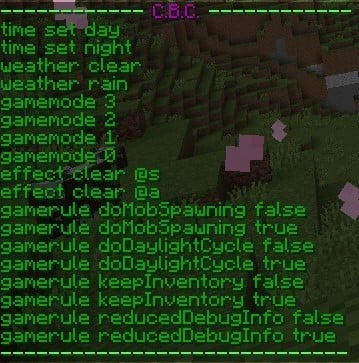
介绍
中文介绍正在准备中,下面暂时显示原文。
Command Block Console, abbreviated as CBC, is a data package designed to make using commands easier and faster by adding a menu to chat that appears when you hold left shift and right-click with a command block in your hand.
In versions prior to 1.3, you do not need to hold down the shift key.
The menu contains commands such as:
- time set day,
- time set night,
- weather clear,
- weather rain,
- gamemode 3,
- gamemode 2,
- gamemode 1,
- gamemode 0,
- effect clear @s,
- effect clear @a,
- gamerule doMobSpawning false,
- gamerule doMobSpawning true,
- gamerule doDaylightCycle false,
- gamerule doDaylightCycle true,
- gamerule keepInventory false,
- gamerule keepInventory true,
- gamerule reducedDebugInfo false,
- gamerule reducedDebugInfo true.
常见问题
Command Block Console 支持哪些 Minecraft 版本?
Command Block Console 支持 Minecraft Java 版 1.20.1。下载时注意选择和你游戏版本一致的文件。
Command Block Console 怎么安装?
新建世界时在「数据包」里把下载的 .zip 拖进去;已有的存档,把文件放进存档目录下的 datapacks 文件夹,进游戏输入 /reload 即可生效。服务器同样放在世界目录的 datapacks 里。
评论
登录后评论和评分