
Colouring Brush
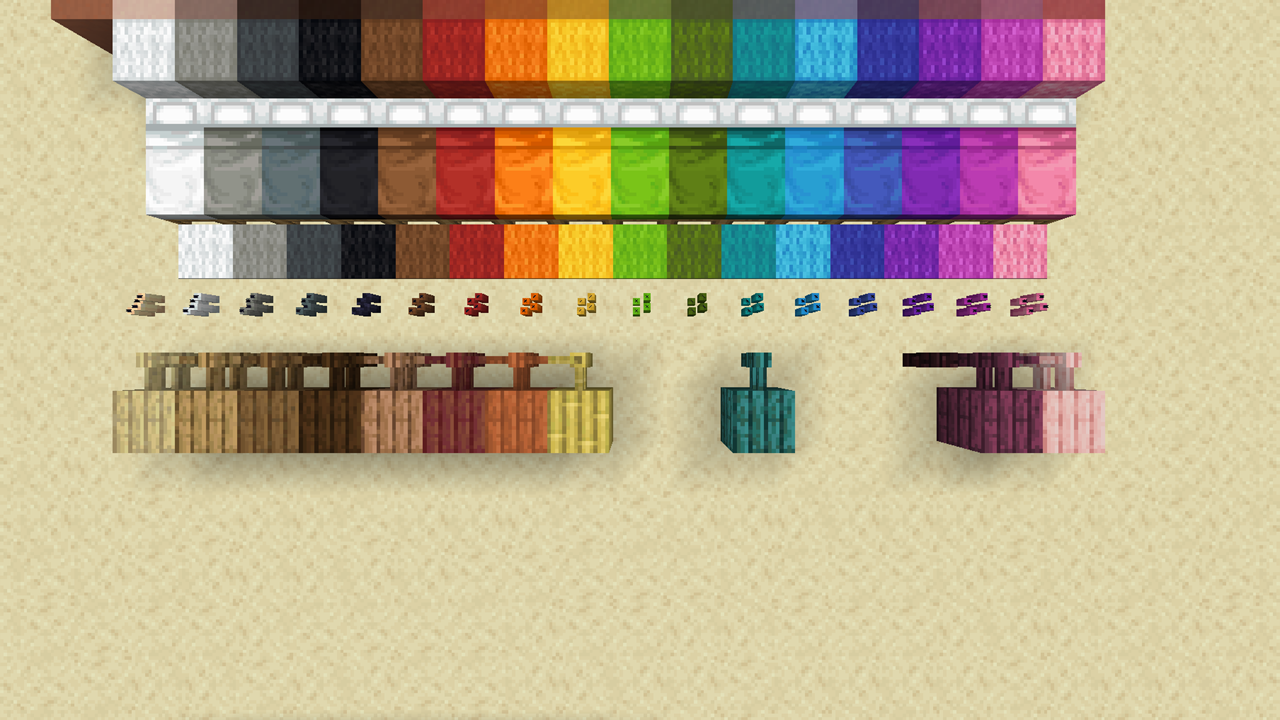
With brush and dyes, you can give, change, remove the colour of various coloured blocks: glass, wool, shulker box, terracotta, even planks. you name it!
截图



介绍
Colouring Brush
With brush and dyes, you can give, change, remove the colour of various coloured blocks: glass, wool, shulker box, terracotta, even planks. you name it!
Dev Status
- 🟦 Active: Actively developing. Working properly.
- Version: v1.0
Compatibility
- 1.20.x
- Multiplayer friendly
Features
Colouring decoloured blocks
Hold a brush and dyes in both hands and use the brush on glasses, terracotta, and more. You can colour following blocks.
- Candles, candle cakes
- Glasses, glass panes
- Shulker boxes
- Terracotta
Recolouring coloured blocks
Same mechanism as above. You can recolour following blocks.
- Banners, wall banners
- Candles, candle cakes
- Concretes, concrete powders
- Glasses, glass panes
- Shulker boxes
- Terracotta, glazed terracotta
- Wools, beds, and carpets
Recolouring wooden blocks
Same mechanism as above. But cannot recolour in lime, green, light blue, blue, and purple. (Mojang plz add these woods) Using purple dye, you can recolour wooden fences into nether brick fences depending on the settings.
- Planks
- Stairs
- Slabs
- Fences
- Fence gates
- Doors (*optional: off)
- Trap doors (*optional: off)
- Pressure plates
- Buttons
- Signs, wall signs, hanging signs, and wall hanging signs
Colouring sand into red sand
Hold orange dyes in mainhand, a brush in offhand and use the brush on sand-related blocks. You can also dye chiselled sandstone depending on the settings.
- Sand
- Sandstones
- Sandstone stairs
- Sandstone slabs
- Sandstone walls
- Smooth sandstones
- Smooth sandstone stairs
- Smooth sandstone slabs
- Cut sandstones
- Cut sandstone slabs
- Chiselled sandstone (*optional: off)
Colouring cobblestones and stonebricks into mossy variants
Hold green dyes in mainhand, a brush in offhand and use the brush on related blocks.
- Cobblestone
- Cobblestone stairs
- Cobblestone slabs
- Cobblestone walls
- Stone bricks
- Stone brick stairs
- Stone brick slabs
- Stone brick walls
Decolouring blocks
Hold a brush in mainhand, water bottle or water bucket in offhand, and use the brush on following blocks. Be careful as you cannot use brush in offhand in this case.
- Candles, candle cakes
- Cobblestone-related blocks
- Glasses, glass panes
- Sand-related blocks
- Shulker boxes
- Stone-brick-related blocks
- Terracotta
Balancing Options
Use commands or click the menu on chat to toggle the options for the following features for balance purposes. In parentheses are default options. (Use /function guris:colouring/settings to evoke the menu)
- Consume dye (on)
- Consume water bottle (on)
- Consume water bucket (off)
- Damage brush (on)
- Green jungle planks (off)
- Maintain banner pattern (on)
- Chiselled sandstone (off)
- Nether brick fences (off)
- Wooden doors (off)
- Wooden trapdoors (off)
Planned Features (Soon™)
- Other stone blocks, stairs, slabs, etc (concerning balances and plausibility)
- Automatic mainhand-offhand swapper when using water bottle and bucket
References
- PuckiSilver’s Multitool data pack for targeted block ray tracing
- Moggla’s Timber data pack for settings menu design, item damaging
常见问题
Colouring Brush 支持哪些 Minecraft 版本?
Colouring Brush 支持 Minecraft Java 版 1.20–1.20.1,共 2 个版本。下载时注意选择和你游戏版本一致的文件。
Colouring Brush 怎么安装?
新建世界时在「数据包」里把下载的 .zip 拖进去;已有的存档,把文件放进存档目录下的 datapacks 文件夹,进游戏输入 /reload 即可生效。服务器同样放在世界目录的 datapacks 里。
lsk21kr 的其他作品
查看全部 →
BotaniClone
Bone meal any plants and replicate them! You can bone meal small flowers, potted flowers, cactus, chorus flower, sugar cane, vine, even dead bush, and more.

Kitty Litter
Cats and ocelots excrete on sand converting the sand into suspicious sand.

Enderman Hates Prismarine
Enderman takes damage when on prismarine-related blocks.
评论
登录后评论和评分