
截图

介绍
中文介绍正在准备中,下面暂时显示原文。
Emmie’s Color Changer
Color Changer is a simple datapack that allows users to change their username color



Usage
- To access the color changer menu, type /trigger color
- To access Accessibility mode, type /trigger color set -1
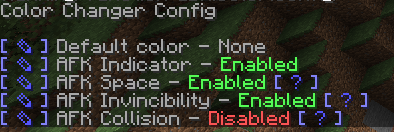
- To edit the config, type /function dbx.color:config
Config Options
- Default Color: Setting a default color makes that the color that users will receive by default
- AFK Indicator: When a user goes AFK, an AFK indicator will be displayed in their username prefix
- AFK Space: Should there be a space between the AFK Indicator and the player’s username?
- AFK Invincibility: When the user goes AFK, the user will become invincible
- AFK Collision: When the user goes AFK, they can be pushed by other players or entities
- AFK Notification: When the user goes AFK, notify them that they are now AFK in chat
Notices
Color Changer should not be used on any server that utilizes teams!
Removal
Before removing the datapack, run /function dbx.color:uninstall before deleting the file from your server. This will remove everyone’s colors, be careful!
Authors
- Emmie – Datapack Developer – Emmie
- VanillaTweaks – AFK Module – VanillaTweaks
- Perfect System DX – Brush Icon – PSDX
常见问题
Color Changer 支持哪些 Minecraft 版本?
Color Changer 支持 Minecraft Java 版 1.15.2–1.21.4,共 29 个版本。下载时注意选择和你游戏版本一致的文件。
Color Changer 怎么安装?
新建世界时在「数据包」里把下载的 .zip 拖进去;已有的存档,把文件放进存档目录下的 datapacks 文件夹,进游戏输入 /reload 即可生效。服务器同样放在世界目录的 datapacks 里。
Emmie 的其他作品
查看全部 →
Re-Console
by Lasting Legacy
延续 Legacy Console Edition 体验,并加入现代 Java 版内容和便捷性优化!(Legacy4J 官方项目)
72万
23 天前
Modrinth · CurseForge

Evil Console-idated
by EVIL Cook
A fork of Console-Idated focusing on EVIL qualities
665
1 年前
Modrinth

Glowier Berries
by Emmie
Gives players the glowing affect when they eat a glow berry
434
2 年前
Modrinth

No Wasted Time
by Emmie
Datapack that stops time on a multiplayer server when nobody is online
219
2 年前
Modrinth
评论
登录后评论和评分