
Chromaglow
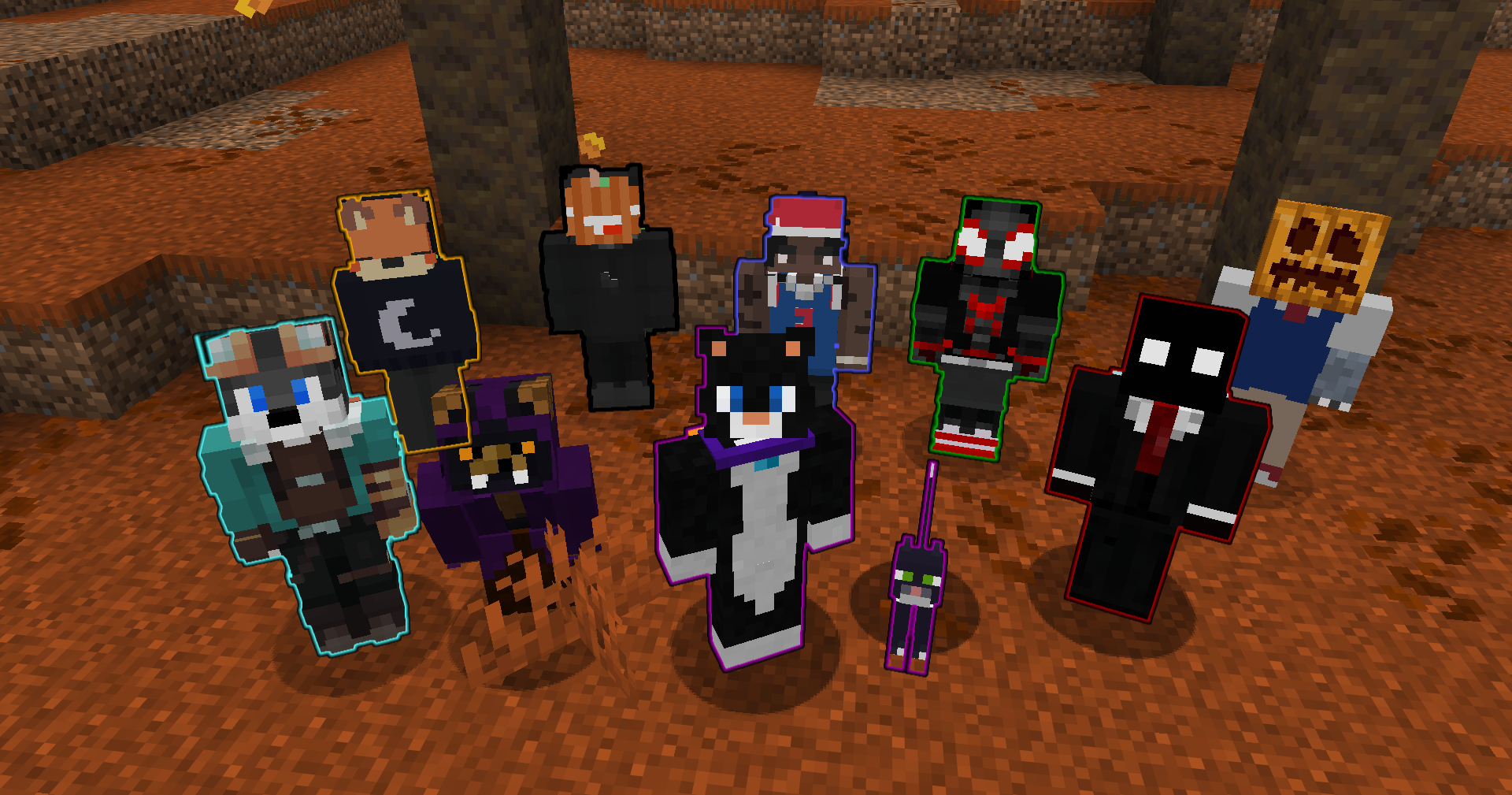
Automatically grants every player and pet a glowing effect, allowing them to customize their outline color and auto-hide it using contextual settings.
截图
介绍
Chromaglow
What it does
Chromaglow automatically gives players and their owned pets a glowing outline and lets players customize how it behaves. Player outlines can use Chromaglow team colors, while pets can either follow their owner’s color or use their collar color.
Glowing can also be hidden automatically in different situations, with personal settings available through /trigger chromaglow and global controls available to server admins.
Personal Menu
Run /trigger chromaglow to open your personal menu.
- Colors: Choose from Chromaglow’s color teams to change your glowing outline color.
- Player Settings: Choose whether you glow and when your Glowing is hidden.
- Pet Settings: Choose whether your pets glow, when their Glowing is automatically hidden, and where their color comes from.
Personal choices follow the server’s global defaults unless overridden, and server admins can force individual settings when needed.
Player Glowing
Players can configure whether Chromaglow applies Glowing and whether it should be hidden in specific situations:
- Crouching: Hide Glowing while sneaking.
- Invisibility: Hide Glowing while under the Invisibility effect.
- Disguises: Hide Glowing while wearing an item from
#chromaglow:disguisesin an armor slot.
These settings can be changed personally unless they are forced by the server configuration.
Pet Glowing
Chromaglow can also automatically apply Glowing to owned pets.
Players can configure:
- Glow Pets: Enable or disable Glowing for their pets.
- Auto Hide: Choose whether pet Glowing is hidden while Sitting, while Standing, or Never automatically hidden.
- Pet Color: Use either the Owner’s Chromaglow team color or the pet’s Collar color when available.
By default, pets glow using their owner’s color and automatically hide their Glowing while sitting.
Customization
Use /function chromaglow:_config to configure global server settings.
Server admins can:
- Control whether players and pets glow by default.
- Force individual player and pet settings.
- Configure contextual player hiding rules.
- Configure pet auto-hide behavior and color source.
- Require the
chromaglow.glowingtag separately for players and pets. - Choose which personal menu categories players can access.
Each setting can be reset individually, while groups and the entire configuration can also be restored to their defaults.
Uninstallation
Use /function chromaglow:uninstall to remove Chromaglow’s persistent data before removing the datapack.
What’s Next
In a future update I plan to expand glowing granting to other entities by interacting with an item.
常见问题
Chromaglow 支持哪些 Minecraft 版本?
Chromaglow 支持 Minecraft Java 版 1.21–26.3,共 17 个版本,可用的加载器:Fabric / Forge / NeoForge / Quilt。下载时注意选择和你游戏版本一致的文件。
Chromaglow 怎么安装?
新建世界时在「数据包」里把下载的 .zip 拖进去;已有的存档,把文件放进存档目录下的 datapacks 文件夹,进游戏输入 /reload 即可生效。服务器同样放在世界目录的 datapacks 里。
Smidul 的其他作品
查看全部 →
SUS
Modpack full of electricity-based mods

Vitalboard
Displays live player health below names, in the list and sidebar.

Hatchable
Automatically hatches eggs into their chicken variants or any configured item/entity before they despawn.

Overbrew
Expands brewing with missing potions, new duration and strength tiers, particle-free variants, and custom fuels.
评论
登录后评论和评分