
Chest Minecart GUI
This data pack simplifies and accelerates the GUI configuration for transport minecarts; you only need to configure the storage settings and execute the generation function to quickly set up a GUI.
介绍
Introduction
This datapack makes configuring the Chest Minecart GUI simpler and more convenient. You only need to configure the storage and execute the generation function to quickly create a GUI.
Features
The following feature is supported:
- Click an item to execute a command / switch menus
Storage Structure
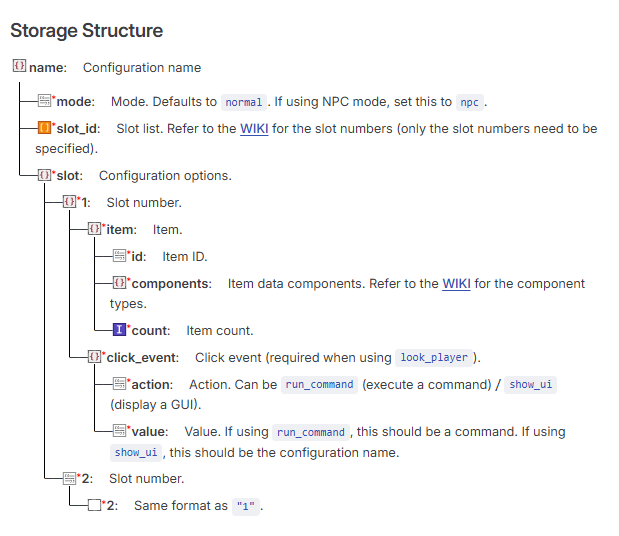
Example Storage
Default configuration
~~~mcfunction
data merge storage windwaves_sea:chest_gui {\
config:{\
“test”:{\
“mode”:”npc”,\
“slot_id”:[“1”],\
“slot”:{\
“1”:{\
“item”:{\
“id”: “minecraft:diamond”,\
“components”:{},\
“count”: 1 \
},\
“click_event”:{\
“action”:”show_ui”, \
“value”:”test1″ \
}\
}\
}\
}\
}\
}
~~~
Command Reference
Generate a Chest Minecart GUI
~~~mcfunction
function chest_gui:command/summon {name:”name”,x:1,y:1,z:1}
~~~
Generates a Chest Minecart GUI. The configuration must be written to storage first. name is the configuration name defined above (and used throughout the following commands). x, y, and z are coordinate values.
Remove a Chest Minecart GUI
~~~mcfunction
function chest_gui:command/remove {name:”name”}
~~~
Delete a Configuration (Also Removes the Chest Minecart GUI)
~~~mcfunction
function chest_gui:command/delete_setting {name:”name”}
~~~
Download
QQ Group: 117464315
Github: https://github.com/WindWavesSea/Chest-Minecart-GUI/
Modrinth: https://modrinth.com/datapack/chest-minecart-gui/
Credits
Thanks to NOX OBSCURA for providing the minecart opening detection concept.
常见问题
Chest Minecart GUI 支持哪些 Minecraft 版本?
Chest Minecart GUI 支持 Minecraft Java 版 1.21–26.2,共 16 个版本。下载时注意选择和你游戏版本一致的文件。
Chest Minecart GUI 怎么安装?
新建世界时在「数据包」里把下载的 .zip 拖进去;已有的存档,把文件放进存档目录下的 datapacks 文件夹,进游戏输入 /reload 即可生效。服务器同样放在世界目录的 datapacks 里。
WindWaves_Sea 的其他作品
查看全部 →
Vanilla Video Player
Video Player driven by DataPack and Resource Pack

Simple NPC
This data pack simplifies the process of configuring vanilla-style NPCs; you simply need to define the storage and execute the spawn function to set up your own NPC.
评论
登录后评论和评分