
截图


介绍
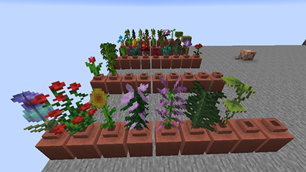
This datapack lets you place any flower in the Decorated Pots added in 1.20 to give pots more color and functionality!
Features:
- Place any flower (including double tall flowers) inside the decorated pot.
- Some flowers have a unique look.
- It does NOT require a resource pack making installation easier.
How to use:
First, you must place an item frame on the top of the Decorated Pot. Then place a regular flower pot inside the item frame. If done correctly the item frame should disappear. While holding a flower you can now Right Click on the top of the Decorated Pot to place the flower in it. To remove the flower Right Click on the top of the Decorated pot with an empty hand.
FAQ
Can I add this to my mod pack?
Sure, as long as you give proper credit and follow the license.
Are you going to downgrade to older versions (ie; 1.15, 1.12, 1.8)?
I will if there is enough demand for a certain version and I have time to.
常见问题
Botanic Pots 支持哪些 Minecraft 版本?
Botanic Pots 支持 Minecraft Java 版 1.20–1.21,共 3 个版本。下载时注意选择和你游戏版本一致的文件。
Botanic Pots 怎么安装?
新建世界时在「数据包」里把下载的 .zip 拖进去;已有的存档,把文件放进存档目录下的 datapacks 文件夹,进游戏输入 /reload 即可生效。服务器同样放在世界目录的 datapacks 里。
legopitstop 的其他作品
查看全部 →
Armor Stand Poses
Bedrock armor stand poses for Java Edition

Armor Stand Poses
Bedrock armor stand poses for Java Edition

Lot’s More Food
Adds new foods, crops, trees and more to your world!

Vanilla Tweaks Dark UI for Mods
Do you play modded? Do you use VanillaTweaks Dark UI? This pack adds support for mods!
评论
登录后评论和评分