
介绍
Overview
This datapack adds a single new item – the Biome Scanner. This item can be used like a compass to locate biomes.
Crafting
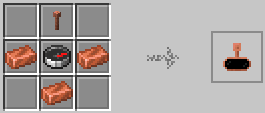
The Biome Scanner is crafted with a compass, three copper ingots, and a lightning rod:
Usage
To use the Biome Scanner, hold the ‘use’ button (i.e. right click) with the biome scanner in one hand and an item related to the biome in the other. See below for the full table of items and biomes.
After a short time (longer if the nearest instance of a biome is far away), the screen will light up with arrows pointing towards the targeted biome.

You can use the following command to register a new item/biome pair with the following command, to allow more or custom biomes to be found with the biome scanner:
data merge storage biome_scan:dict {"minecraft:item_id":{dimension:"minecraft:dim_id",biome:"minecraft:biome_id",message:"Finding Biomes"}}item_idis the id of a _single_ item.dim_idis the dimension the biome is found in.biome_idis the biome or biome tag to search for.- The message field is displayed when the player starts scanning, and added as item lore when scanning is complete
Default Biome List
The following table includes every biome grouping and the item(s) used to locate the nearest biome in that grouping:
|Biome Group |Biomes |Items |
|—|—|—|
|Badlands|badlands, wooded_badlands, eroded_badlands|Any Terracotta|
|Bamboo Jungle|bamboo_jungle|Bamboo|
|Basalt Deltas|basalt_deltas|Basalt|
|Birch Forests|birch_forest, old_growth_birch_forest|Birch Sapling|
|Cherry Forests|cherry_grove|Cherry Sapling|
|Warm Ocean|warm_ocean|Any Live Coral|
|Crimson Forests|crimson_forest|Crimson Fungus|
|Dark Oak Forests|dark_forest|Dark Oak Sapling|
|Deep Dark|deep_dark|Deepslate, Cobbled Deepslate|
|Dripstone Caves|dripstone_caves|Dripstone, Pointed Dripstone|
|Flower Forest|flower_forest|Any Flower Forest Flower|
|Frozen Biomes|frozen_ocean,deep_frozen_ocean,frozen_peaks,frozen_river|Ice|
|Gravel Hills|windswept_gravelly_hills|Gravel|
|Ice Spikes|ice_spikes|Blue Ice|
|Jungles|jungle,sparse_jungle|Jungle Sapling|
|Lush Caves|lush_caves|Small Dripleaf, Big Dripleaf|
|Mangrove Swamp|mangrove_swamp|Mangrove Propagule|
|Mountains|jagged_peaks,stony_peaks|Stone, Cobblestone|
|Mushroom Islands|mushroom_fields|Brown Mushroom, Red Mushroom|
|Oak Forests|forest,windswept_forest|Oak Sapling|
|Oceans|ocean,lukewarm_ocean,cold_ocean,deep_ocean,deep_lukewarm_ocean,deep_cold_ocean|Water Bucket|
|Pale Oak Forest|pale_garden|Pale Oak Sapling|
|Plains Biomes|meadow,plains,windswept_hills|Grass Block|
|Sandy Biomes|beach,desert|Sand|
|Savannas|savanna,savanna_plateau,windswept_savanna|Acacia Sapling|
|Snowy Biomes|snowy_beach,snowy_plains,snowy_slopes|Snow Block|
|Spruce Forests|grove,old_growth_pine_taiga,old_growth_spruce_taiga,taiga|Spruce Sapling|
|Sunflower Fields|sunflower_plains|Sunflower|
|Swamps|swamp|Lily Pad|
|Warped Forest|warped_forest|Warped Fungus|
常见问题
Biome Scanner 支持哪些 Minecraft 版本?
Biome Scanner 支持 Minecraft Java 版 1.21.8。下载时注意选择和你游戏版本一致的文件。
Biome Scanner 怎么安装?
新建世界时在「数据包」里把下载的 .zip 拖进去;已有的存档,把文件放进存档目录下的 datapacks 文件夹,进游戏输入 /reload 即可生效。服务器同样放在世界目录的 datapacks 里。
dqwertyc.dev 的其他作品
查看全部 →
Glamour Table
An in-game texture editor for tools and canvases.

Enchanted Elytra
Unique Elytra enchantments to provide more mobility options!

Vanilla Entity Shader Effects
This resource pack allows for the creation of animated entity textures, with effect such as glowing, flowing fluids, end-portal stars, and others! Also includes a demo pack that applies the end portal shader to endermen and dragon wings!

Ore Scanner
A consumable ore scanner that highlights nearby ores through walls.
评论
登录后评论和评分