
截图

介绍
BetterChatting Data Pack
Enhance your Minecraft chat experience with the BetterChatting data pack! This pack adds interactive and visually appealing chat messages with hover effects, clickable actions, and custom formatting for various chat types.
IMPORTANT
CLICK EVENT CANNOT WORK AS USUAL IN 1.20.X
Features
- Interactive Chat Messages: Hover over messages to see tooltips and click to perform actions.
- Custom Formatting: Unique prefixes and styles for different chat types.
- Clipboard Integration: Copy predefined text with a single click.
- Command Suggestions: Quickly suggest commands by clicking on chat messages.
- Narration Support: Improved accessibility with narration keys for screen readers.
Installation
- Download the latest version of the data pack from the releases section.
- Place the downloaded file into your Minecraft world’s
datapacksfolder:
<world_folder>/datapacks/- Reload the world or run the following command in-game:
/reloadSupported Chat Types
The data pack modifies the following chat types with enhanced features:
| Chat Type | Prefix | Features |
|——————————|————–|————————————————————————–|
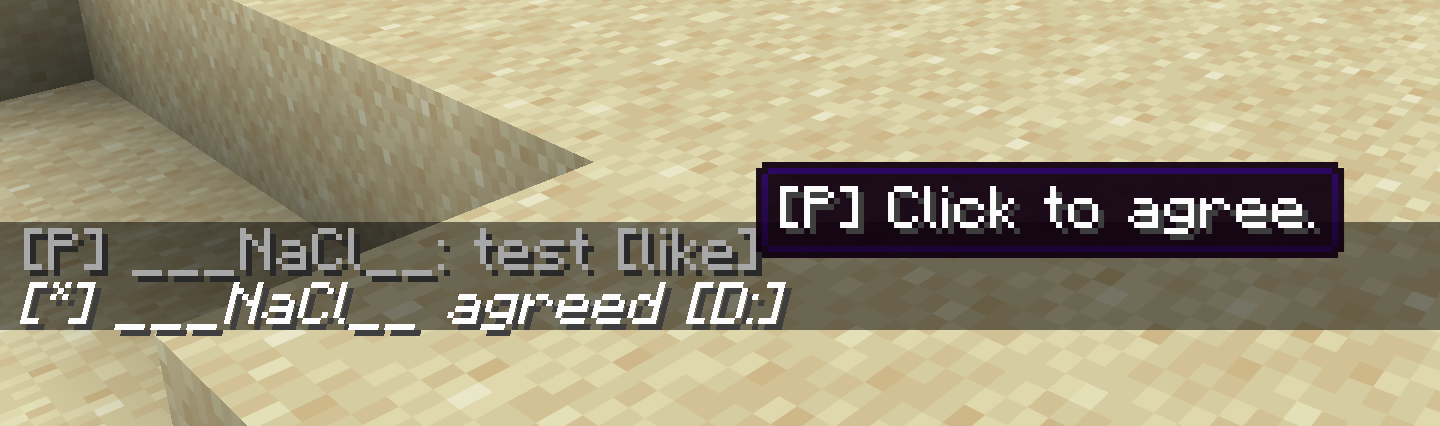
|chat.json| [P] | Gray text with hover tooltip suggesting /me agreed. |
|emote_command.json| [*] | Italic white text with hover tooltip suggesting /me D:. |
|msg_command_incoming.json| [Player -> you]| Red text with hover tooltip to copy “Talk to you later”. |
|msg_command_outgoing.json| [you -> Player]| Red text with hover tooltip to copy “Talk to you later”. |
|say_command.json| [OP] | Bold white text with hover tooltip suggesting /me OK. |
|team_msg_command_incoming.json| [TeamName] | Bold blue text with hover tooltip suggesting /teammsg agreed. |
|team_msg_command_outcoming.json| [-> TeamName] | Bold blue text with hover tooltip suggesting /teammsg agreed. |
Usage Examples
Public Chat
- Message:
[P] Steve: Hello! [like] - Hover Tooltip:
[P] Click to agree. - Action: Suggests
/me agreedwhen clicked.
Emote Command
- Message:
[*] Steve waves [D:] - Hover Tooltip:
[*] Click to send 'D:'. - Action: Suggests
/me D:when clicked.
Private Message
- Message:
[Steve -> you] Hi there! [ttyl] - Hover Tooltip:
[C] Click to copy 'Talk to you later'. - Action: Copies “Talk to you later” to clipboard when clicked.
Requirements
- Minecraft Version: Java Edition 1.20 or later.
- Pack Format: Compatible with pack formats 15–94.
- World Permissions: Must have operator permissions to install and reload datapacks.
Configuration
To customize the behavior of the chat messages:
- Edit the JSON files in the
data/minecraft/chat_type/directory. - Modify the
translation_key,style, orclick_eventfields as needed. - Run
/reloadto apply changes.
License
This project is licensed under the MIT License.
Contact
For questions, suggestions, or issues, feel free to reach out:
Enjoy chatting in style with BetterChatting!
常见问题
Better Chatting 支持哪些 Minecraft 版本?
Better Chatting 支持 Minecraft Java 版 1.20–26.2,共 23 个版本。下载时注意选择和你游戏版本一致的文件。
Better Chatting 怎么安装?
新建世界时在「数据包」里把下载的 .zip 拖进去;已有的存档,把文件放进存档目录下的 datapacks 文件夹,进游戏输入 /reload 即可生效。服务器同样放在世界目录的 datapacks 里。
FeSo4a 的其他作品
查看全部 →
Custom Keep Inventory
This project adds the rules that deop players can freely adjust the death penalty.

Scoreboard ID
This project generate a 9-digit id for each player.

Infinity Night Vision
This project let player give/clear effect of night vision.

Teleport Player
This project add a way to tp other players for the no-op
评论
登录后评论和评分