截图
介绍
Gate Keep
Allows server admins to control access to dimensions. With GateKeep, you can completely restrict dimensions or set up time-based restrictions that automatically unlock at specific dates and times.
Features
- Dimension Restriction: Completely block access to any dimension
- Time-Based Restrictions: Schedule dimensions to unlock at specific dates and times
- Customizable Messages: Configure the messages players receive when attempting to access restricted dimensions
- Automated Announcements: Server-wide announcements when time-restricted dimensions become available
Configuration
GateKeep uses a JSON configuration file located at config/gatekeep.json. The config file is created automatically when the mod is first loaded (in-case of a crash or mis-behavior re-check the config and deleting it and generating a fresh one)
Configuration Options
{
  "disabledDimensions": [
    "minecraft:the_end"
  ],
  "announce": true,
  "restrictedDimensionMessage": "&c%dimension% dimension is restricted",
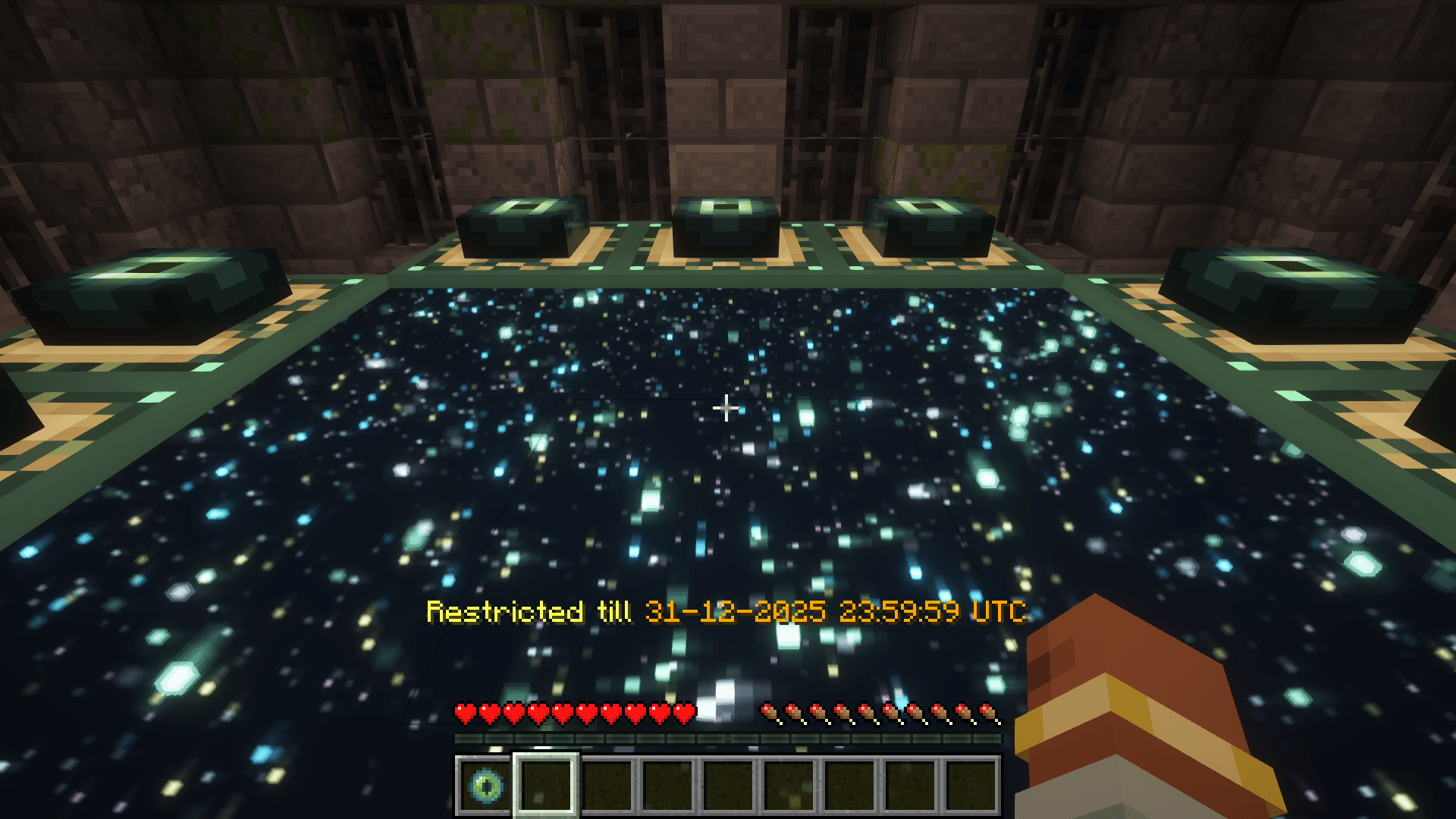
  "timedDimensionRestrictedMessage": "&eRestricted till &6%time%",
  "unrestrictedAnnouncementMessage": "&a%dimension% dimension is now open!",
  "timeRestrictions": {
    "minecraft:the_end": {
      "enabled": true,
      "timeZone": "UTC",
      "unlockDateTime": "2024-12-31T23:59:59"
    }
  }
}
Configuration Explanation
- disabledDimensions: List of dimensions that are completely disabled
- announce: Whether to announce when time-restricted dimensions unlock
- restrictedDimensionMessage: Message displayed when a player tries to access a disabled dimension
- timedDimensionRestrictedMessage: Message displayed when a player tries to access a time-restricted dimension
- unrestrictedAnnouncementMessage: Message announced when a time-restricted dimension becomes available
- timeRestrictions: List of dimensions with time-based restrictions
- enabled: Whether the time restriction is active
- timeZone: Time zone for the unlock time (uses standard time zone IDs)
- unlockDateTime: Date and time when the dimension will unlock (ISO format)
Message Formatting
Messages support Minecraft color codes using the & character:
&0to&9,&ato&f: Colors&k: Obfuscated&l: Bold&m: Strikethrough&n: Underline&o: Italic&r: Reset
In the configuration messages, you can use the following variables:
%dimension%: Will be replaced with the formatted dimension name%time%: Will be replaced with the formatted unlock time (for time-restricted dimensions)
Examples
Basic Setup: Disable The End
{
  "disabledDimensions": ["minecraft:the_end"],
  "announce": true,
  "timeRestrictions": {}
}
Time-Restricted Nether
{
  "disabledDimensions": [],
  "announce": true,
  "timeRestrictions": {
    "minecraft:the_nether": {
      "enabled": true,
      "timeZone": "America/New_York",
      "unlockDateTime": "2024-06-01T12:00:00"
    }
  }
}
Multiple Restrictions
{
  "disabledDimensions": ["minecraft:the_end"],
  "announce": true,
  "timeRestrictions": {
    "minecraft:the_nether": {
      "enabled": true,
      "timeZone": "UTC",
      "unlockDateTime": "2024-05-15T18:00:00"
    },
    "twilightforest:twilight_forest": {
      "enabled": true,
      "timeZone": "UTC",
      "unlockDateTime": "2024-07-22T15:06:20"
    }
  }
}
How It Works
- When a player or entity attempts to change dimensions including through commands or other means that use minecrafts internal code to travel through dimensions, the mod checks if the destination dimension is restricted
- If the dimension is in the
disabledDimensionslist, access is denied - If the dimension has a time restriction that hasn’t passed its unlock time, access is denied
- Players with permission level 4 (operators) can bypass all restrictions when in creative mode
- The mod regularly checks if time-restricted dimensions have reached their unlock time, these checks run on a background thread to minimize performance impact
- When a time-restricted dimension becomes available, an announcement is sent to all online players (if enabled)
Compatibility
GateKeep should be compatible with most modded dimensions and forms of dimensional travel.
常见问题
Gate Keep 支持哪些 Minecraft 版本?
Gate Keep 支持 Minecraft Java 版 1.21.1–1.21.10,共 10 个版本,可用的加载器:Fabric / NeoForge / Quilt。下载时注意选择和你游戏版本一致的文件。
Gate Keep 怎么安装?
先用 PCL2 或 HMCL 启动器安装对应版本的 Fabric / NeoForge / Quilt,再把下载的 .jar 文件放进游戏目录的 mods 文件夹,重新启动游戏即可。开启了版本隔离的,mods 文件夹在 versions/版本名 下面。运行环境:仅服务端。
frikinjay 的其他作品
查看全部 →
Let Me Despawn
通过调整生物消失规则提升性能,告别那些烦人的意外永久存在生物。
Almanac Lib
一个独立于加载器的前置库,包含模组间复用的共享代码,并修复了空 NBT 问题。
Almanac
Almanac 是我的模组使用的一个前置库,主要提供跨加载器通用的共享代码,供多个模组复用,以避免代码重复。
More Villagers: Re-employed
新增多种村民职业和工作站,是原版 More Villagers 模组的移植版。
评论
登录后评论和评分