
截图

介绍
Galactic Language
Translate all of Minecraft into the Standard Galactic Alphabet
📖 What is this?
You know those symbols on the enchanting table? This pack replaces every single line of text in the game with exactly that – the Standard Galactic Alphabet. Menus, tooltips, item names, advancements, death messages, all of it. All 7 886 translation keys.
Galactic shows up as a proper language in Options → Language under Galactic (Galaxy), not some hacky overlay.
✨ Features
- 🔤 Full translation — 7 886 strings, nothing left in English
- 🌌 Appears as a real selectable language in the language menu
- ⚡ Tiny file size (~150 KB), no performance hit
- 🔧 Works on all modern versions
🎮 How to install
- Download the
.zip - Drop it into
.minecraft/resourcepacks/(don’t unzip it) - Go to Options → Resource Packs and enable GalacticLanguage
- Then Options → Language → pick Galactic (Galaxy)
- ᒷリ⋮𝙹||!
🖼️ Screenshots
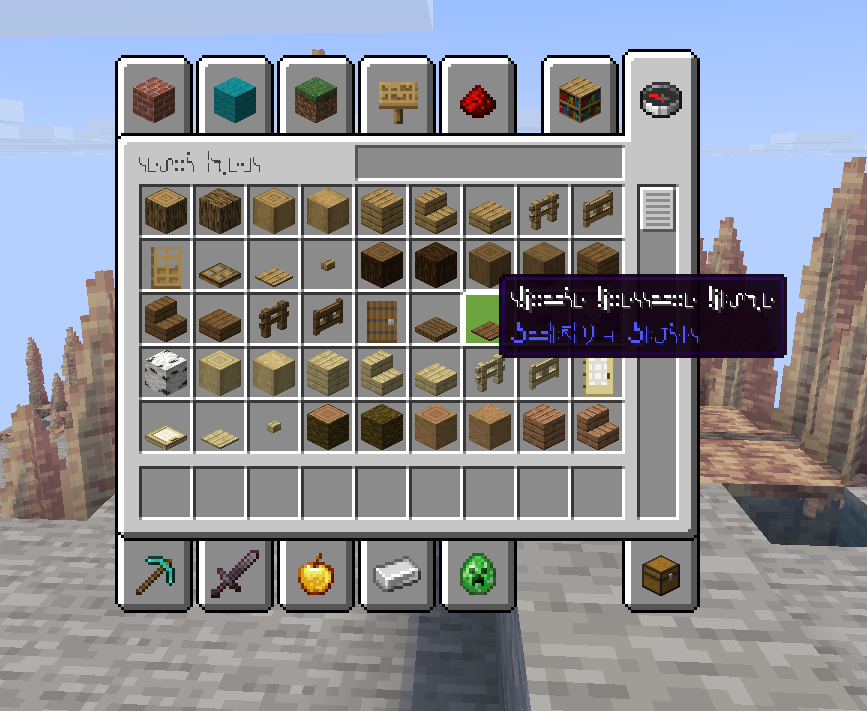
🔢 Compatibility
| Minecraft | Status |
|———–|——–|
| 26.x | ✅ Tested |
| 1.21.x | ✅ Works |
| 1.20.x | ✅ Works |
| 1.16+ | ✅ Works |
Fabric, Forge, NeoForge, vanilla — all good.
❓ FAQ
Language not showing up?
The pack needs to be enabled in Resource Packs first, then go to Language. Order matters.
Some text is still English?
Mods add their own translation keys which this pack doesn’t cover. Vanilla only.
ℸ̣ᒷ ᔑリᓵ╎ᒷリℸ̣ ꖎᔑリ⊣⚍ᔑ⊣ᒷ 𝙹⎓ ℸ̣ᒷ ᓭℸ̣ᔑ∷ᓭ
常见问题
Galactic Language 支持哪些 Minecraft 版本?
Galactic Language 支持 Minecraft Java 版 1.16–26.2,共 39 个版本。下载时注意选择和你游戏版本一致的文件。
Galactic Language 怎么安装?
把下载的 .zip 文件(不用解压)放进游戏目录的 resourcepacks 文件夹,进游戏后在「选项 → 资源包」里把它移到右边启用。
raskajanie 的其他作品
查看全部 →
Borsch instead of lava
Famous Ukrainian borsch instead of lava,flowing lava and lava bucket!

Ping Items
Lets you mark items in containers!

Newgen Ping Hud
TAB ping and onscreen ping display. fully togglable and customizable.

Visualified
Ultimate Performance & Immersion
评论
登录后评论和评分