
DJO – DECIDE
Replaces Minecraft music discs with the album DECIDE by DJO, including custom titles and high-quality audio.
截图

介绍
Title: DJO – DECIDE (Music Disc Replacement)
Description
This resource pack replaces the default Minecraft music discs with tracks from the album DECIDE by DJO.
If you’re a fan of Joe Keery’s music, this pack is for you! It changes the audio, the names of the discs in your inventory, and the “Now Playing” messages to match the album’s vibe.
Features
Custom Music: Replaces several vanilla discs with high-quality .ogg tracks.
Updated Names: All modified discs show the correct song title and artist (DJO).
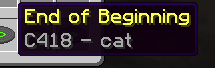
Immersive: The “Now Playing” pop-up correctly displays the new song info.
Tracklist (Current)
Cat → End of Beginning
13 → Fool
Blocks → On and On
5 → Runner
Far → Bloom (More tracks coming soon!)
How to use
Download the .zip file.
Place it in your resourcepacks folder.
Activate it in-game (Options > Resource Packs).
Note: If the pack appears red (incompatible), you can still click “Yes” to activate it; it will work perfectly on version 1.21.10!
Disclaimer: All music belongs to DJO. This is a fan-made project.
常见问题
DJO – DECIDE 支持哪些 Minecraft 版本?
DJO – DECIDE 支持 Minecraft Java 版 1.21–1.21.11,共 12 个版本。下载时注意选择和你游戏版本一致的文件。
DJO – DECIDE 怎么安装?
把下载的 .zip 文件(不用解压)放进游戏目录的 resourcepacks 文件夹,进游戏后在「选项 → 资源包」里把它移到右边启用。
评论
登录后评论和评分