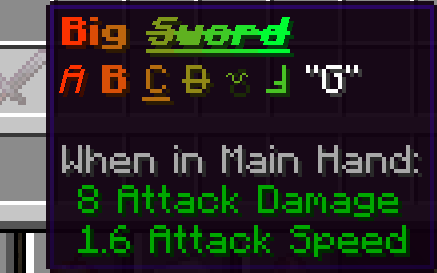
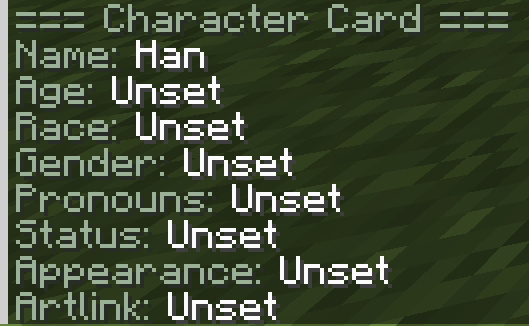
Roleplay Mod (A), or as I call it, Aniko’s roleplay mod, is a mod that was made to make a better Minecraft roleplay experience more accessible to everyone! For the few thousand who downloaded this mod before, you may have noticed it is different now, and that’s because it is!
Originally, this mod was made for one Minecraft server in mind, not for all Minecraft servers, but now I have made many changes to make it easier to use on any server. The mod now contains compatibility with LuckPerms, its own internal config, and a custom settings config to change how certain commands function. It has also been feature-trimmed extensively to make sure the features here are for the intended purpose of improving _roleplay_, not just other aspects of a Minecraft server.
The old Aniko’s RPClient mod has also been merged into this one. The rework of this mod is releasing on 1.21.1 Fabric; in the coming weeks, I’ll port it to other versions along with more updates. If you find any bugs you can message me on discord @asioko
Somewhat accurate command list below;
[Chat]
/chatmode – change your chat mode
/chatcolor – set your chat color
/chatcolor gradient – set a gradient chat color
/chatcolor reset – reset your chat color
/chattoggle – toggle whether you can see a chat channel
/chattoggle list – view which chat channels you currently have enabled
/chattoggle all – toggle all chat channels
/format – toggle chat formatting
/format reset – clear your active formatting
/font – set your font variant
/togglepunc – toggle automatic punctuation
/clearappend – clear appended text
[Character]
/characters – open the character management GUI
/character create – create and switch to a character
/character switch – switch active character
/character delete – delete one of your characters
/character list – list saved characters
/character namemask – temporarily mask your character name
/character namemask clear – clear your active name mask
/character set Name – set your character name
/character set Age – set your character age
/character set Race – set your character race
/character set Gender – set your character gender
/character set Pronouns – set your character pronouns
/character set Residence – set a residence
/character set Pronunciation – set your character’s pronunciation
/character set Height – set your character height
/character set Appearance – type appearance text in chat after the prompt; supports appending and manual formatting
/character set Artlink – set a clickable art link
/character scale – scale your character if you have Pehkui installed
/character view – view a character card
/character viewchat – view a character card in chat
/characteruser
/character lastseen – finds last time a character was used
/character compare , – compares 2 characters
/character search – search specific things about characters
/character color – sets your own character color, only viewable for yourself
/character color – sets other people’s character colors, only viewable for yourself
/status – set your active character status for hover cards
/status clear – clear your active character status
/playtime – gives playtime for your current character
/playtimeall – gives playtime across all your characters
[Relations]
/relation set – type the relation in chat after the prompt
/relation change – type the new relation in chat after the prompt
/relation remove – remove your relation to a character
/relation view – view a character’s relations
/relation color – type one or two hex colors after the prompt to color that relation
/note set – type a private note in chat; supports appending with —
/note view – view your private notes
/note remove – remove all private notes for that character
/note list – list characters you have notes for
[Writing]
/mail – open your mail GUI
/mail – send the held letter, document, or journal to another character’s mailbox
/mail search – search your mail
/journal create
– receive a writable journal book</p>
<p>/journal save – save the held written journal into your journal storage</p>
<p>/journal entry – add an entry to the held journal</p>
<p>/journal seal – seal the held journal</p>
<p>/journal inspect – inspect the held journal</p>
<p>/journal preview – preview the held journal</p>
<p>/journal copy – copy the held journal</p>
<p>/journals – open the journals GUI</p>
<p>/journals search – search your saved journals</p>
<h2>[Misc]</h2>
<p>/prompt cancel – allows you to cancel certain prompts</p>
<p>/prompt preview – allows you to preview certain prompts</p>
<p>/roleplayhelp – open Roleplay Mod help</p>
<p>/rphelp – open Roleplay Mod help</p>
<p>/IC – sets your tag to IC (In Character) in Nameplate & Tab</p>
<p>/CIC – sets your tag to CIC (Can be In Character) in Nameplate & Tab</p>
<p>/PIC – sets your tag to PIC (Private In-Character) in Nameplate & Tab</p>
<p>/afk – sets your tag to AFK (Away from keyboard) in Nameplate & Tab</p>
<p>/ooc – sets your tag to OOC (Out of Character) in Nameplate & Tab</p>
<p>/hidenames – hides nametags</p>
<p>/hidetags – hides tags</p>
<p>/walk – makes your movement slower</p>
<p>/walking – makes your movement slower & makes you walk automatically</p>
<p>Manual Formatting (symbols go on both sides of a text) * italics ** bold __ underline ~~ strikethrough || obfuscate ^^ upsidedown ” Dialogue</p>
<p>Ending a message with — appends it to your next message.</p>
<h2>[Item]</h2>
<p>/change item lore – type item lore in chat after the prompt; supports appending with — and manual formatting</p>
<p>/change item loreclear – clear the held item’s custom lore</p>
<p>/change item name – change the held item’s name</p>
<p>/change item color – set held item name color or gradient</p>
<p>/change item lorecolor – set held item lore color or gradient</p>
<p>/signitem – sign the held item with your active character name</p>
<h2>[Dice]</h2>
<p>/roll – roll publicly, like /roll d20, /roll 2d6, or /roll d20+5</p>
<p>/roll advantage – roll twice and keep the higher result</p>
<p>/roll disadvantage – roll twice and keep the lower result</p>
<p>/roll hidden – show the roll only to yourself and operators</p>
<p>/roll private – show the roll only to yourself</p>
<p>/coinflip – flip a coin</p>
<h2>[GUI]</h2>
<p>/characters – open the character management GUI</p>
<p>/journals – open the journals GUI</p>
<p>/mail – open your mail GUI</p>
<p>/roleplayhelp – open Roleplay Mod help</p>
<p>[Operator]</p>
<p>/chatstaff – enter staff chat</p>
<p>/chatevent – enter event chat mode</p>
<p>/chatevent – send one event message</p>
<p>/colortoggle – toggle color and gradient support for global and local chat</p>
<p>/staffrequest – send a request to online staff</p>
<p>/rpconfig settings – view the settings for the mod you can change in game</p>
<p>/mobsave – saves mobs</p>
<p>/character set nametagcolor – changes nametag colors</p>
<p>/character set opheight – allows operators to change height values much greater than normal players (1″0-15″0 vs 4’5″ & 7″5)</p>
<h2>Other Features</h2>
<p>Chatmode display – Shows chat-mode display below chatbox</p>
<p>Typing Indicators – see when nearby players are typing;</p>
<p>Nameplates – displays character names and IC/CIC/PIC/OOC/AFK tags above players</p>
<p>Tab Names – displays character names and tags in the player list</p>
<h2>Optional Mod Support</h2>
<p>No mods are required here, but optionally add more functionality to the mod.</p>
<p>Works with [Pehkui] makes /character set height actually scale your character, makes /character scale function</p>
<p>Works with [Luckperms] allowing you to customize what commands people can use more easily</p>
</div>
</section>
<section class="panel faq">
<h2>常见问题</h2>
<h3>Roleplay Mod (A) 支持哪些 Minecraft 版本?</h3>
<p>Roleplay Mod (A) 支持 Minecraft Java 版 1.21.1,可用的加载器:Fabric / NeoForge。下载时注意选择和你游戏版本一致的文件。</p>
<h3>Roleplay Mod (A) 怎么安装?</h3>
<p>先用 PCL2 或 HMCL 启动器安装对应版本的 Fabric / NeoForge,再把下载的 .jar 文件放进游戏目录的 mods 文件夹,重新启动游戏即可。开启了版本隔离的,mods 文件夹在 versions/版本名 下面。运行环境:客户端和服务端都要装。</p>
</section>
<section class="panel comments" id="comments">
<h2>评论 <small class="muted"></small>
</h2>
<p><a class="btn" href="https://qqmc.com/login/?redirect=https%3A%2F%2Fqqmc.com%2Fmod%2Fanikos-roleplay-mod%2F%23comments">登录后评论和评分</a></p>
</section>
<section class="more-works">
<div class="section-head">
<h2>Asioko 的其他作品</h2>
<a href="https://qqmc.com/creator/asioko/">查看全部 →</a>
</div>
<div class="pack-grid">
<a class="pack-card" href="https://qqmc.com/mod/avatar-editor-a/">
<img class="pack-icon" src="https://cdn.modrinth.com/data/uSqkBKpd/5eb9a9b980b943608eac9ae23893e02124def65f_96.webp" alt="" width="64" height="64" loading="lazy" referrerpolicy="no-referrer"> <div class="pack-card-body">
<h3>Avatar Editor (A)</h3>
<div class="by">by Asioko</div>
<p class="summary">Aniko's Avatar Editor is a mod that allows you to upload, change into, make, or edit skins live in-game with its built-in wardrobe/skin editor!</p>
<div class="pack-meta">
<span class="chip chip-type">模组</span> <span class="chip chip-loader chip-fabric">Fabric</span><span class="chip chip-loader chip-forge">Forge</span><span class="chip chip-loader chip-neoforge">NeoForge</span> <span class="chip">26.2 +4</span> </div>
<div class="pack-stats">
<span title="下载量"><svg viewBox="0 0 24 24" fill="none" stroke="currentColor" stroke-width="2" stroke-linecap="round" stroke-linejoin="round" aria-hidden="true"><path d="M12 4v11m0 0-4-4m4 4 4-4M5 19h14"/></svg>768</span>
<span title="最近更新"><svg viewBox="0 0 24 24" fill="none" stroke="currentColor" stroke-width="2" stroke-linecap="round" stroke-linejoin="round" aria-hidden="true"><circle cx="12" cy="12" r="8"/><path d="M12 8v4l3 2"/></svg>25 天前</span>
<span>Modrinth</span>
</div>
</div>
</a>
</div>
</section>
</div>
<aside class="pack-aside">
<div class="panel server-card is-plain">
<a class="btn btn-block btn-primary btn-lg" href="https://qqmc.com/go/94406/dl/0/" target="_blank" rel="noopener nofollow"><svg viewBox="0 0 24 24" fill="none" stroke="currentColor" stroke-width="2" stroke-linecap="round" stroke-linejoin="round" aria-hidden="true"><path d="M14 5h5v5M19 5l-8 8M17 14v5H5V7h5"/></svg>前往 Modrinth 下载</a>
</div>
<div class="panel team-panel" id="team">
<h2>作者与团队</h2>
<ul class="team-list">
<li><a href="https://qqmc.com/creator/asioko/">
<img class="avatar" src="https://cdn.modrinth.com/data/skCIVNYV/3e6743aea8687e3c773573db4e3e44e566ea4b35_96.webp" alt="" width="32" height="32" loading="lazy" referrerpolicy="no-referrer"> <span>Asioko<small>所有者</small></span>
</a></li>
</ul>
</div>
<div class="panel">
<h2>信息</h2>
<ul class="info-list">
<li><span>下载量</span><span>1,762</span></li>
<li><span>最近更新</span><span>10 天前</span></li>
<li><span>首次发布</span><span>2026-05-30</span></li>
<li><span>游戏版本</span><span>
<a class="chip" href="https://qqmc.com/mods/?ver=1-21-1">1.21.1</a>
</span></li>
<li><span>加载器</span><span><span class="chip chip-loader chip-fabric">Fabric</span><span class="chip chip-loader chip-neoforge">NeoForge</span></span></li>
<li><span>运行环境</span><span>客户端和服务端都要装</span></li>
<li><span>许可协议</span><span>LicenseRef-All-Rights-Reserved</span></li>
<li><span>数据来源</span><span>
<a class="chip chip-source" href="https://modrinth.com/mod/anikos-roleplay-mod" target="_blank" rel="noopener nofollow">Modrinth</a>
</span></li>
</ul>
</div>
<details class="panel report-box" id="report" >
<summary>举报这个资源</summary>
<p class="note"><a href="https://qqmc.com/login/?redirect=https%3A%2F%2Fqqmc.com%2Fmod%2Fanikos-roleplay-mod%2F%23report">登录</a>后可以举报。版权方投诉请看<a href="https://qqmc.com/copyright/">侵权投诉</a>。</p>
</details>
</aside>
</div>
</div>
</main>
<footer class="site-footer">
<div class="container">
<div class="about">
<div class="brand"><svg viewBox="0 0 32 32" width="24" height="24" aria-hidden="true"><path d="M16 2 30 9 16 16 2 9z" fill="#6bbb40"/><path d="M16 2 23 5.5 16 9 9 5.5z" fill="#7cc94f" opacity=".6"/><path d="M2 9 16 16v14L2 23z" fill="#8b5a3c"/><path d="M16 16 30 9v14l-14 7z" fill="#6b4329"/><path d="M2 9 16 16v4L2 13z" fill="#4c9a2a"/><path d="M16 16 30 9v4l-14 7z" fill="#3c7d20"/><path d="M5 14.5 7 15.5v2.5L5 17zM11 17.5 13 18.5v2l-2-1zM20 18l2-1v2.5l-2 1zM26 15l2-1v2l-2 1z" fill="#4c9a2a"/><path d="M6 20l2 1v2l-2-1zM10 24l2 1v2l-2-1zM21 24l2-1v2l-2 1zM25 20l2-1v2l-2 1z" fill="#000" opacity=".12"/></svg><span>青青方块</span></div>
<p>中文 Minecraft 资源社区,收录整合包、模组、资源包、光影、数据包和地图,数据来自 Modrinth 与 CurseForge。</p>
</div>
<div>
<h3>浏览</h3>
<ul>
<li><a href="https://qqmc.com/modpacks/">整合包</a></li>
<li><a href="https://qqmc.com/mods/">模组</a></li>
<li><a href="https://qqmc.com/resourcepacks/">资源包</a></li>
<li><a href="https://qqmc.com/shaders/">光影</a></li>
<li><a href="https://qqmc.com/datapacks/">数据包</a></li>
<li><a href="https://qqmc.com/maps/">地图</a></li>
<li><a href="https://qqmc.com/software/">软件</a></li>
<li><a href="https://qqmc.com/translate/">AI 翻译</a></li>
<li><a href="https://portal.akiracloud.net/">一键开服</a></li>
</ul>
</div>
<div>
<h3>关于</h3>
<ul><li><a href="https://qqmc.com/copyright/">侵权投诉</a></li><li><a href="https://modrinth.com" target="_blank" rel="noopener">Modrinth</a></li><li><a href="https://www.curseforge.com/minecraft" target="_blank" rel="noopener">CurseForge</a></li></ul> </div>
<div class="footer-bottom">
<span>© 2026 青青方块 · 非 Minecraft 官方产品,与 Mojang、Microsoft 无关</span>
<span>
</span>
</div>
</div>
</footer>
<button type="button" class="to-top" aria-label="返回顶部" title="返回顶部" hidden><svg viewBox="0 0 24 24" fill="none" stroke="currentColor" stroke-width="2" stroke-linecap="round" stroke-linejoin="round" aria-hidden="true"><path d="m6 15 6-6 6 6"/></svg></button>
<dialog class="lightbox" id="lightbox"><img alt=""></dialog>
<script type="speculationrules">
{"prefetch":[{"source":"document","where":{"and":[{"href_matches":"/*"},{"not":{"href_matches":["/wp-*.php","/wp-admin/*","/wp-content/uploads/*","/wp-content/*","/wp-content/plugins/*","/wp-content/themes/craftline/*","/*\\?(.+)"]}},{"not":{"selector_matches":"a[rel~=\"nofollow\"]"}},{"not":{"selector_matches":".no-prefetch, .no-prefetch a"}}]},"eagerness":"conservative"}]}
</script>
<script data-wp-strategy="defer" defer id="craftline-js" src="https://qqmc.com/wp-content/themes/craftline/assets/site.js?ver=1793884218"></script>
<script async data-wp-strategy="async" fetchpriority="low" id="comment-reply-js" src="https://qqmc.com/wp-includes/js/comment-reply.min.js?ver=7.1.4"></script>
</body>
</html>
<!--
Performance optimized by Redis Object Cache. Learn more: https://wprediscache.com
使用 PhpRedis (v5.3.7) 从 Redis 检索了 966 个对象(109 KB)。
-->