
Scoreboard Health Indicators
Displays scoreboard-based health values as clean, visible health bars above players and entities, even when internal health is hidden.
截图


介绍
Scoreboard Health Indicators
📋 Overview:
🎮 Multiplayer
- This mod works in both single-player and multiplayer.
- Important: Confirm that you are allowed to use this mod on the multiplayer server you are playing on, as it may be considered cheating.
❓ What It Does
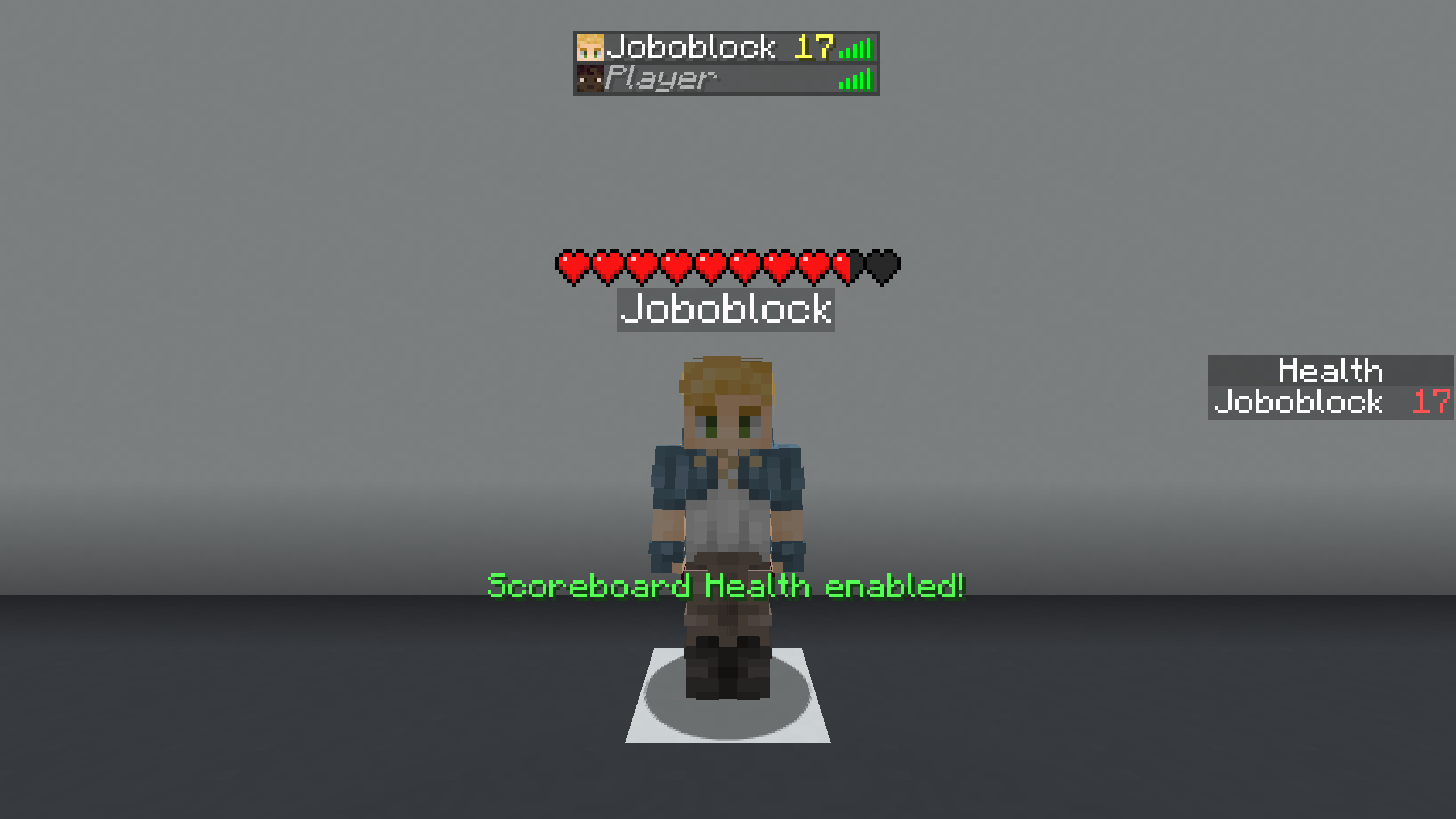
This mod displays the scoreboard-based health of players and entities as a health bar above them.
It works even if the server hides the internal health value or the entity is invisible.
❓ Why does it exist?
Many servers hide real health values and instead display custom values using the scoreboard (for example below player names or in the player list).
These values can be harder to read, look cluttered, and disappear when players are too far away or invisible.
This mod solves that by converting the scoreboard value into a clean and consistent health bar.
🚀 Getting Started
- Bind the “Toggle Scoreboard Health” key from the “Scoreboard Health Indicators” category to a key of your choice.
- Press the key. _(You should see the message: “Scoreboard Health enabled!”)_
- Enjoy the mod.
🔍 How It Works
Instead of using the health value sent by the server, the mod reads the scoreboard value used to represent health (such as below-name, sidebar, or player list).
This value is then passed to the health indicator mod, which handles rendering the health bar.
⚙️ Technical:
❌ Does it not work like you want it to?
_The mod must be toggled._
No enable text appears when you press the key:
Did you set the correct keybind? (The mod is unbound by default.)
Enable text appears, but no health is rendered:
Did you select the correct scoreboard type (Below Name, Sidebar, Player List)?
You can cycle through them using the “Cycle Scoreboard Type” key from the “Scoreboard Health Indicators” category.
(Remember: a scoreboard value must exist for the mod to work.)
The health bar disappears for invisible players:
Did you enable “Invisibility Rendering”?
The game crashes:
Do you have all dependencies installed? (Fabric API, Health Indicators)
Did you download the correct mod version for your game version?
Something else:
Open an issue or request a version here:
https://github.com/Joboblock/Bridge-Guard/issues
_(If your game crashes, please confirm that this mod is the cause.)_
📝 Example
Scenario: Internal health is hidden, and the health value is shown in the player list.
- Bind “Toggle Scoreboard Health” to a key and press it.
- Bind “Cycle Scoreboard Type Up” and cycle until you see “Scoreboard type: List”.
The player list value will now be displayed as a health bar.
常见问题
Scoreboard Health Indicators 支持哪些 Minecraft 版本?
Scoreboard Health Indicators 支持 Minecraft Java 版 1.21.9–1.21.11,共 3 个版本,可用的加载器:Fabric。下载时注意选择和你游戏版本一致的文件。
Scoreboard Health Indicators 怎么安装?
先用 PCL2 或 HMCL 启动器安装对应版本的 Fabric,再把下载的 .jar 文件放进游戏目录的 mods 文件夹,重新启动游戏即可。开启了版本隔离的,mods 文件夹在 versions/版本名 下面。运行环境:仅客户端。
Joboblock 的其他作品
查看全部 →
Bridge Guard
助你快速搭桥:如果你过早放置方块或忘了放方块,它会防止你掉落。

Trajectory Guard
助你精准命中:模拟弹射物的轨迹,并沿途画出轨迹线。
Trajectory Guard
助你命中目标: 模拟弹射物的轨迹,并沿着轨迹绘制一条线。

Fireball Guard
This mod provides a trajectory previev when projectiles like fireballs and arrows are flying your way.
评论
登录后评论和评分