
Just Tiers
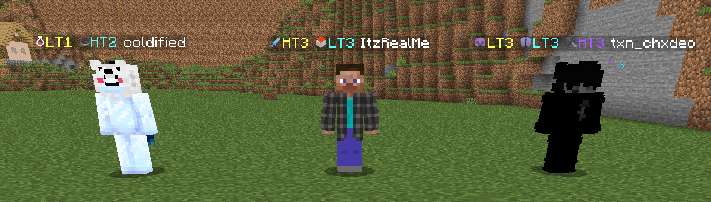
Show PvP tiers from PvPTiers, PvPHQ, SubTiers and NovaTiers in Minecraft nametags. Toggle each site individually, customize badges, and look up players. Client-side Fabric mod.
截图

介绍
Just-Tiers
A client-side Fabric mod that puts PvP tiers from PvPTiers, PvPHQ, SubTiers and NovaTiers in player
nametags. Currently in beta. Builds are available for Minecraft 1.21.10, 1.21.11, 26.1, 26.1.1, 26.1.2, 26.2 and 26.3.
Use the JAR for your exact game version, Fabric Loader 0.19 or newer, and Fabric API and
YetAnotherConfigLib built for that game version. Minecraft 1.21.10 and 1.21.11 require Java 21 and
YACL 3.8.2 or newer; 26.x requires Java 25 and YACL 3.9.4 or newer, or 3.9.7 for 26.3.
Minecraft 26.3 also requires Fabric Loader 0.19.5 or newer. ModMenu is optional.
Example nametags from an earlier release, before PvPHQ and individual site toggles.
New in 1.2.1
One invalid value in the config file now falls back on its own instead of resetting every
setting, and a file that is not valid JSON is backed up before defaults load. Every network
request has a deadline, so a stalled server can no longer hold a request slot. Nametag
badges are rebuilt only when settings or answers change. An empty NovaTiers refresh no
longer turns every NovaTiers player unranked, and /justtiers lookup retries a site whose
nametag request failed. Keyboard focus survives window resizes, and the narrator announces
the selected gamemode tile.
Full release notes.
What you can do
- Show one site’s selected gamemode, falling back to the player’s best placement on that site.
- Toggle each site independently, showing the best placement from every enabled site together.
- Prefer each enabled site’s selected gamemode instead, falling back to its best placement.
- Use yellow for PvPTiers and gray
#D2D2D2for PvPHQ in the default palette. - Display PvPHQ middle tiers such as MT3 between high and low divisions.
- Move badges before or after names, hide icons or brackets, and hide your own badge.
- Choose default, Color vision alternative, high-contrast or custom leaderboard colors.
- Include retired placements with their R prefix, or show active placements only.
- Look up a player by name with
/justtiers lookup <player>and inspect every known gamemode.
The lookup screen shows the skin and fills in each site as it answers. A dash means no placement
was reported, not that the player was never tested. Unavailable sites have a separate message. Cached placements remain visible while refreshing;
cell tooltips show their age and whether the latest refresh was unavailable.
You can change the name, retry, scroll results in smaller windows and navigate with the keyboard.
Recent lookups appear as buttons for a quick recheck and in tab completion. They are kept only
for the current game session and never saved.
Tab list and chat names are unchanged.
Install and configure
Put the matching Just-Tiers JAR, Fabric API and YACL in your instance’s mods folder.
Install ModMenu if you want a config button in the mod list. Nothing is required on the server.
Open configuration with /justtiers gui, ModMenu or the configurable Just-Tiers keybind,
which starts unbound. The live preview uses example tiers and makes no leaderboard request.
Gamemode pickers support clicks and keyboard activation. Save applies pending edits; Cancel
discards them. Screen save failures leave the previous settings intact and show an error.
A settings command that cannot save warns that its change applies only to the current session.
| Command | Action |
|—|—|
| /justtiers | Show settings and index status |
| /justtiers gui | Open configuration |
| /justtiers lookup <player> | Open a player lookup |
| /justtiers toggle | Toggle nametag tiers |
| /justtiers site <site> [true\|false] | Toggle or set pvptiers, pvphq, subtiers or novatiers |
| /justtiers gamemode [site] <slug> | Set a site’s gamemode; the site is optional with one site enabled |
| /justtiers preferselected | Toggle preferring every enabled site’s selected gamemode |
| /justtiers retired | Toggle retired tiers in nametags |
| /justtiers badge <before\|after> | Move the badge |
| /justtiers icons or /justtiers brackets | Toggle those badge decorations |
| /justtiers ownbadge | Toggle hiding your own badge |
| /justtiers palette <palette> | default, colorblind, high_contrast, custom |
| /justtiers refresh | Recheck cached placements and refresh NovaTiers |
| /justtiers debug | Print and copy a diagnostic report |
The Data category sets cache and NovaTiers refresh intervals between 5 and 1440 minutes.
Defaults are 60 and 30 minutes respectively. Palette colors also apply to the download indicator;
icon artwork retains its original colors. Alternative palettes may help distinguish sites,
but visibility depends on your vision and the background.
Network use
There is no mod analytics endpoint. PvPTiers, PvPHQ and SubTiers receive the account UUID being
looked up. NovaTiers supplies a bulk list, with no per-player identifier in that request.
Mojang receives a typed name if the tab list cannot resolve it to an account UUID. Displaying
the skin can also contact Mojang profile/session services and Minecraft’s skin texture hosts
through Minecraft. These services receive connection metadata, including your IP address.
Automatic nametag lookups stop when nametag tiers are disabled. Each site toggle also
stops nametag lookups for that site. Explicit lookup screens and
NovaTiers’ startup, scheduled and requested downloads remain available. Hiding the download
indicator does not stop downloads. Manual refresh and failure retries can make requests before
a cached answer’s usual expiry; the cache interval is not a strict request-rate guarantee.
Another installed mod that uses the
tier-query API makes automatic
lookups too, so the same switches apply: it gets no answer and causes no request for a
site while that site, or nametag tiers, are turned off. Like nametags, it never sends a UUID
that is not an online-mode account, such as an offline-mode player or a server NPC.
Failed or malformed responses are not shown as unranked players. A player or Mojang request
fails after 20 seconds without an answer, a NovaTiers download after two minutes. Retries back
off, and repeated site failures temporarily pause new requests. Failed NovaTiers refreshes retain usable cached
data without resetting its original age. Old answers stay visible for up to six additional
hours beyond the configured cache interval, then become unavailable. Valid unranked replacements
remove old badges. NovaTiers records with an identifiable player but malformed or conflicting
placements are unavailable rather than unranked. Its first download shows bytes and a moving bar; later percentages are estimates based
on the last successful download’s size, which can change.
Each site allows four active player requests and 128 queued requests, with explicit lookups
ahead of nametag work. Queue pressure defers background requests. HTTP Retry-After cooldowns
apply to rate-limited requests and bulk downloads, capped at 24 hours; missing or invalid hints
on HTTP 429 use 60 seconds. Refresh preserves those cooldowns and last successful placements.
Per-site caches and retry records are capped at 4096 players each, with periodic idle cleanup.
Settings are saved in config/justtiers.json. Existing MCTiers settings migrate to
PvPTiers and old display modes become individual site toggles. Minecraft can cache skins on disk, errors go to
the client log, and /justtiers debug writes its report to the clipboard. The mod does not send
chat, inventory or the server address to the leaderboard APIs.
Reporting problems
Run /justtiers debug and include its copied report, reproduction steps and relevant logs or
screenshots in a GitHub issue. PAUSED means the
mod is waiting before probing a site that repeatedly failed. Diagnostics remain in English.
The README lists all 43 supported gamemodes,
configuration fields and contributor instructions. A gamemode a site adds later still shows
its placements, with a name taken from the site and no icon, but it cannot be selected for
nametags until a mod update adds it.
Credits and licensing
Just-Tiers is maintained by Idan Gilboa under the MIT license.
PvPTiers, PvPHQ and SubTiers icon textures come from TierTagger
by uku and netiyiy and retain MPL-2.0 licensing. NovaTiers icons and the reused PvPHQ Spear icon are original project artwork
under MIT. See NOTICE.
Code and documentation include AI-assisted work reviewed by the maintainer. The project’s
AI-content disclosure does not replace the third-party artwork attribution above.
Thanks to PvPTiers, PvPHQ, SubTiers and NovaTiers for their leaderboards and public APIs. Just-Tiers is
unofficial and is not affiliated with these services, Mojang or Microsoft.
常见问题
Just Tiers 支持哪些 Minecraft 版本?
Just Tiers 支持 Minecraft Java 版 1.21.10–26.3,共 7 个版本,可用的加载器:Fabric。下载时注意选择和你游戏版本一致的文件。
Just Tiers 怎么安装?
先用 PCL2 或 HMCL 启动器安装对应版本的 Fabric,再把下载的 .jar 文件放进游戏目录的 mods 文件夹,重新启动游戏即可。开启了版本隔离的,mods 文件夹在 versions/版本名 下面。运行环境:仅客户端。

评论
登录后评论和评分