
Neutral Tooltip
Changes the tooltip to a neutral grey that works fairly well with Minecraft's font colours
截图

介绍
Neutral Tooltip
Neutral Tooltip transforms the tooltip to use a neutral grey colour scheme that works well with Minecraft’s vanilla font colours. I wanted to make this resource pack because I didn’t like that every item had a purplish background and I felt like those colours didn’t always match well with the items they were displaying. In the end it comes down to personal preference, but I generally like the tooltip from this resource pack more than vanilla Minecraft’s.
Showcase
Here is an item with lore that contains every font colour available in vanilla Minecraft:
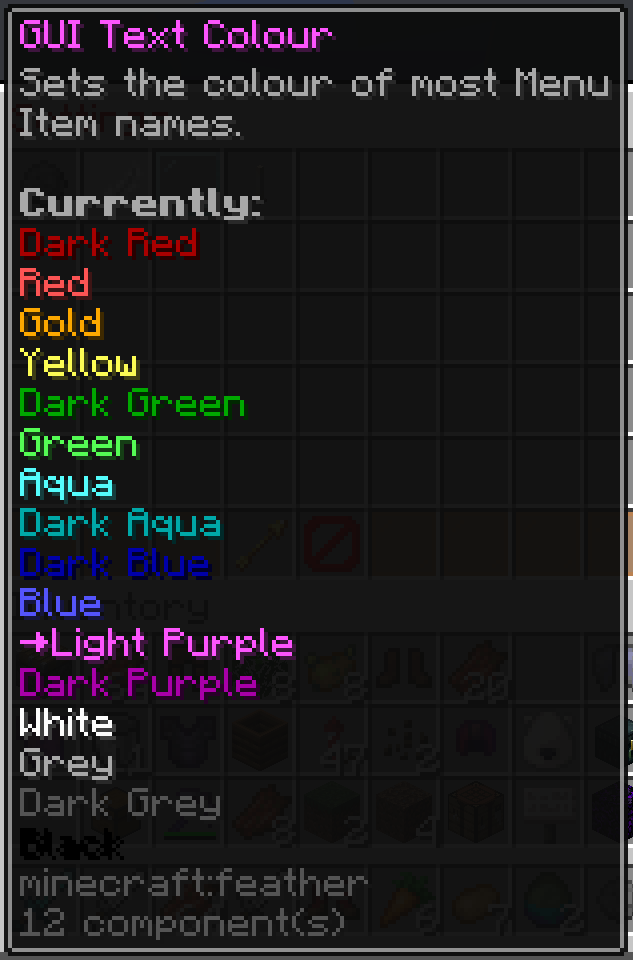
Dark Grey may be a little hard to read but if I make the tooltip any lighter it starts to interfere with Grey as well. I’ve found this grey to be a good middle ground. Black also kind of sucks to read but no resource pack will be able to change that as the drop shadow absolutely ruins Black.
常见问题
Neutral Tooltip 支持哪些 Minecraft 版本?
Neutral Tooltip 支持 Minecraft Java 版 1.21.2–26.1.2,共 13 个版本。下载时注意选择和你游戏版本一致的文件。
Neutral Tooltip 怎么安装?
把下载的 .zip 文件(不用解压)放进游戏目录的 resourcepacks 文件夹,进游戏后在「选项 → 资源包」里把它移到右边启用。
Foyleth 的其他作品
查看全部 →
No Nether Particle
Renders all Nether (Biome) Particles invisible.

Prevent Enderman Block Pickup
Prevents Endermen from picking up (& placing) blocks and destroying your carefully crafted world!

SmooHUD Dark
A smooth and colour-consistent HUD rework, using a dark colour scheme

SmooGUI Dark
A smooth and colour-consistent GUI pack that changes everything except the HUD and menu backgrounds, using a dark colour scheme
评论
登录后评论和评分