
UnifiedOptions
Modrinth version of https://www.curseforge.com/minecraft/mc-mods/unifiedkeybinds-unifedoptions
截图

介绍

UnifiedKeybinds/UnifiedOptions
If you’re reading this, I bothered to publish it (and document it)
What does it do 🤔
Unifies options.txt and keybinds for all minecraft instances with the
mod installed into a single file that is used by all versions.
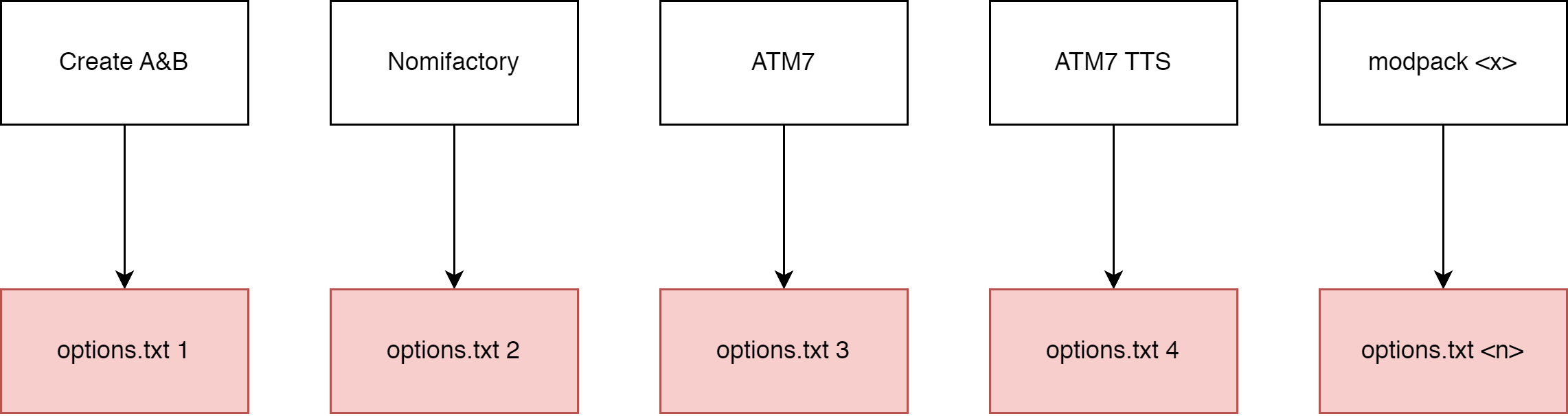
Put simply, in a diagram
Without the mod installed
With the mod installed
How to use it 🤔🤔
The mod should function out of the box.
When the mod is installed, it will move most options.txt options into
universal.txt which can be found in your home directory:
- Windows users:
%userprofile%/MinecraftOptions - Linux users (and I assume macos, never used it):
~/MinecraftOptions
Default options? YOSBR?? 🤨
The mod also has a feature kinda like YOSBR and default options, but
instead of copying configs from a folder within the modpack directory,
it copies from MinecraftOptions/<version>/extras. You could use this,
for example to automatically copy your journeymap config into all your
modpacks so that your map always looks the same, or disable immersive
engineering’s cluttery tag tooltips.
Configuring it 🤔🥱🙄
The mod should function out of the box, but you can configure what
options are synchronized, move where options are stored and completely
disable the mod.
The config file is found at MinecraftOptions/config.toml. It explains
what each option does.
**If you want to reset your config, just delete config.toml and the
mod will generate a new one.**
By default, the following options are not synchronized:
- tutorialStep
- This mod disables the tutorial.
- overrideWidth
- overrideHeight
- resourcePacks
- incompatibleResourcePacks
- renderDistance
- simulationDistance
- fullscreen
- fullscreenResolution
You can add or remove options (or keybinds) to/from the blacklist.
Blacklisted options will be stored in the vanilla options.txt.
You can change where universal.txt and extras are read from by
changing directory, under synchronization. **config.toml cannot be
moved**.
1.12
If you open a 1.12 options.txt, you will see your controls formatted with numbers, like this:
key_key.jump:57
key_key.sneak:42
key_key.sprint:16
key_key.drop:211
key_key.inventory:20
key_key.chat:28
key_key.playerlist:0
And if you open a 1.16 options.txt, you will see your controls formatted with named keys, like this:
key_key.jump:key.keyboard.space
key_key.sneak:key.keyboard.left.shift
key_key.sprint:key.keyboard.left.control
key_key.drop:key.keyboard.q
key_key.inventory:key.keyboard.e
key_key.chat:key.keyboard.t
key_key.playerlist:key.keyboard.tab
The 1.12 version of this mod converts any numerical values into the modern named keys automatically. Note that 1.16 and higher versions do not support this, so if you want to convert a 1.12 options.txt, load it with the 1.12 version of this mod.
Use in modpacks?
yes
Maven packages for use in a developer environment
Add this to your repositories
repositories {
    maven { url "https://codeberg.org/api/packages/PORTB/maven" }
}
And add this to your dependencies
dependencies {
    //example: portb:unifiedoptions:1.19.4-1.1
    runtimeOnly fg.deobf("portb:unifiedoptions:<MC VERSION>-<MOD VERSION>")
}
List of versions:
https://codeberg.org/PORTB/-/packages/maven/portb-unifiedoptions/versions
常见问题
UnifiedOptions 支持哪些 Minecraft 版本?
UnifiedOptions 支持 Minecraft Java 版 1.12.2–1.20.1,共 8 个版本,可用的加载器:Forge。下载时注意选择和你游戏版本一致的文件。
UnifiedOptions 怎么安装?
先用 PCL2 或 HMCL 启动器安装对应版本的 Forge,再把下载的 .jar 文件放进游戏目录的 mods 文件夹,重新启动游戏即可。开启了版本隔离的,mods 文件夹在 versions/版本名 下面。运行环境:仅客户端。


评论
登录后评论和评分