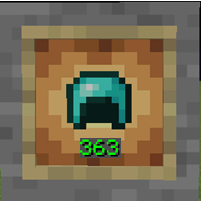
截图


介绍
Rival’s Durability
Rival’s Durability is a client-side Minecraft mod that lets you view nearby players’ armor durability and health directly above their heads.
You can also display your own armor durability on your HUD without opening your inventory.
Features
- See nearby players’ armor durability
- See nearby players’ health
- Show or hide durability numbers
- Show your own armor durability on your HUD
- Move your own durability HUD by dragging it
- Customize armor icon size, durability text size, and overlay height
- Open the settings menu with the K key
- Fully client-side
Settings
Press K in-game to open the Rival’s Durability settings menu.
From the menu, you can:
- Enable or disable the mod
- Show or hide durability text
- Show or hide player health
- Show or hide your own durability HUD
- Change icon and text sizes
- Move your own HUD position
Warning
This mod may not be allowed on some servers.
Because it can show information about other players, some servers may consider it unfair or against their rules. Use it at your own risk and always check the server rules before using it.
常见问题
Rival’s Durability 支持哪些 Minecraft 版本?
Rival’s Durability 支持 Minecraft Java 版 1.21.1–1.21.11,共 6 个版本,可用的加载器:Fabric。下载时注意选择和你游戏版本一致的文件。
Rival’s Durability 怎么安装?
先用 PCL2 或 HMCL 启动器安装对应版本的 Fabric,再把下载的 .jar 文件放进游戏目录的 mods 文件夹,重新启动游戏即可。开启了版本隔离的,mods 文件夹在 versions/版本名 下面。运行环境:仅客户端。
评论
登录后评论和评分