
截图


介绍
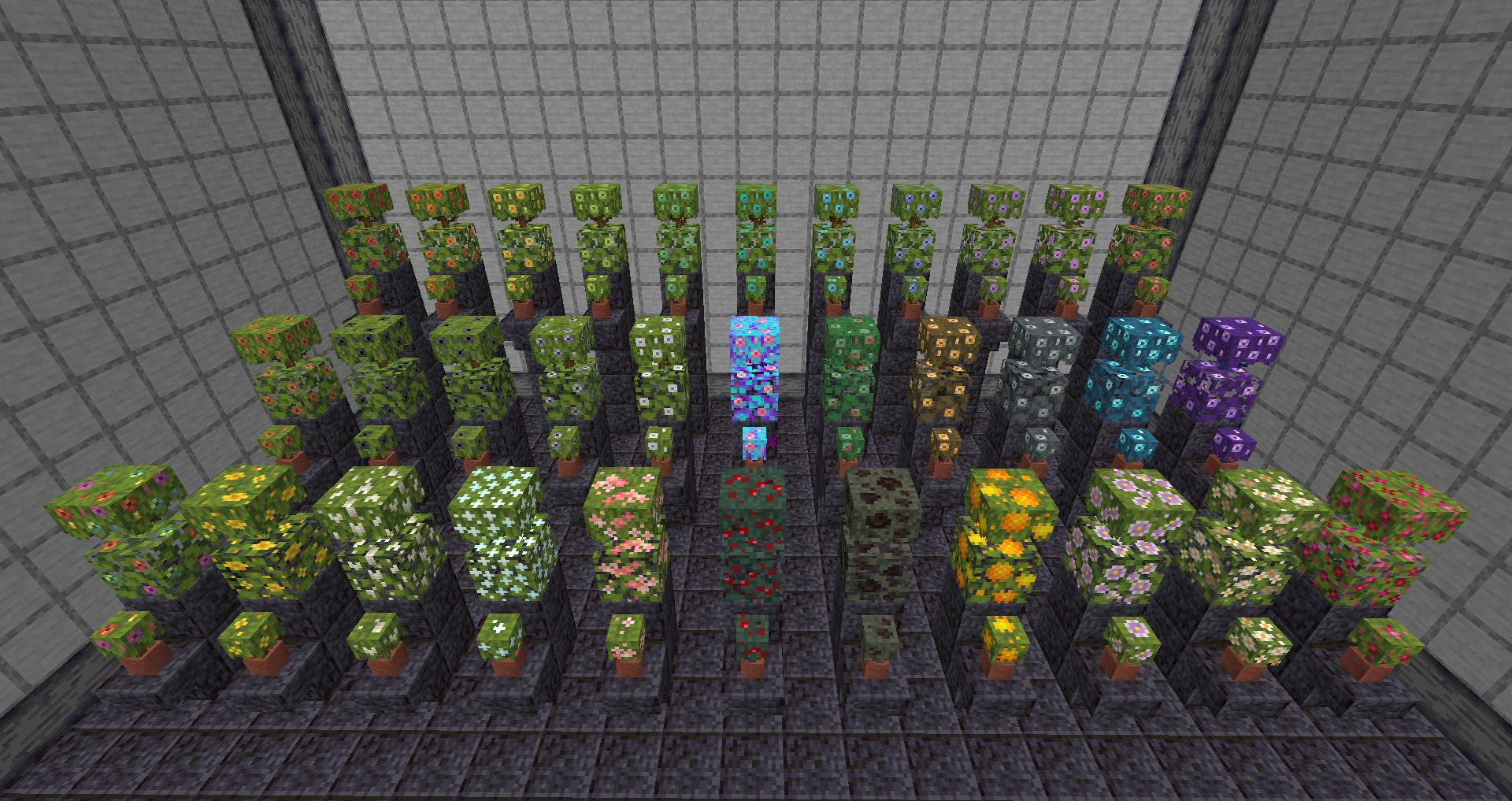
The S33R Iris Azalea Mod for Forge adds 33 new flowering azalea bushes and leaves to the game. Bushes or leaves can be right clicked with the following 26 items to change their appearance:
- All 16 dyes
- Sweet berries
- Dragon’s breath
- Prismarine shard
- Oxeye daisy
- Wither rose
- White tulip
- Redstone dust
- Dandelion
- Honey comb
- Popped chorus fruit
Dyed bushes can be washed off by right clicking with a water bottle and shears can be used to snip the other 10 bushes back to a flowering azalea bush (you won’t get the dye nor item back in this exchange).
The remaining 7 azalea bushes can be crafted. 4 diamonds, amethyst shards, gold, copper, or iron ingots can be placed around a flowering azalea bush to craft 1 bush. The rainbow iris azalea can be crafted using red, orange, yellow, lime, cyan, blue, purple, and magenta dye in any order around a flowering azalea bush. Lastly, my easter egg S33R themed bush can be crafted by placing four flowering azalea bushes around 1 nether star to make 4 bushes.
Placed iris bushes can be right clicked using an axe to obtain the corresponding leaves.
In addition to this mod I’ve made a texture pack to make the leaves and bushes match those in the Mizunos 16Craft texture pack, as well as two texture packs which use Optifine to achieve a Vanilla and Mizunos version without needing to use the mod. Those are available for download via the links above or on my PlanetMinecraft page.
Hope you enjoy using this mod, I’ve had some ideas on how to expand it with new woods and tree models. Maybe I could be convinced to do that if people want to support a goal on my Buy Me a Coffee page, let me know if that’s something ya’ll would be interested in ^-^
~ Seer

常见问题
S33R Iris Azalea 支持哪些 Minecraft 版本?
S33R Iris Azalea 支持 Minecraft Java 版 1.18.2–1.19.2,共 2 个版本,可用的加载器:Forge。下载时注意选择和你游戏版本一致的文件。
S33R Iris Azalea 怎么安装?
先用 PCL2 或 HMCL 启动器安装对应版本的 Forge,再把下载的 .jar 文件放进游戏目录的 mods 文件夹,重新启动游戏即可。开启了版本隔离的,mods 文件夹在 versions/版本名 下面。运行环境:客户端和服务端都要装。
S33R_OF_PYR3 的其他作品
查看全部 →
S33R More Food
This mod adds over 50 new recipes to cook based on the vanilla items already added to the game, like Sweet Berry Tea and Honey Steak Sandwiches.

S33R Butterfly Paintings
Adds 18 new butterfly and insect themed paintings to Minecraft Java.

S33R Iris Azalea
Adds 33 new flowering azalea bushes and leaves.

S33R Winter Leaves
A winter themed resource pack that recolors leaves and moss as well as plants and flowers to have a bluish tint, and makes chests and flower pots more seasonal.
评论
登录后评论和评分