
PlayerNoticeBoard
A mod adding a notice board that allow players to create quests for others.
截图



介绍
PlayerNoticeBoard
A mod adding a notice board that lets players create quests for others.
You can create two types of quests:
Harvest quests — ask for a quantity of any item, up to a full inventory (2304, i.e. 36 stacks of 64).
Hunting quests — ask to kill a specific player.
For each quest you can place up to two stacks of rewards. When someone completes the quest they receive the rewards, and you receive the requested items.
Press J at any time to check your ongoing contracts, even far from a notice board.
How a contract lives
- You create it at a notice board. The reward items are taken from your inventory.
- It shows up on the board as Available. Anyone can accept it except its creator — and, for a hunt, except the target. You can accept as many contracts as you want.
- The acceptor either completes it or abandons it. Abandoning puts the contract back on the board (with a fresh timer) for someone else.
- The creator can delete a contract as long as nobody has accepted it. Once accepted, it must be abandoned by its acceptor before it can be deleted.
Rules
- You cannot accept your own contract.
If you are the target of a hunt, you cannot accept it.
- A harvest contract is completed from My Contracts once you carry the requested amount; the items are then taken from your inventory.
- A hunt contract cannot be closed manually: it completes only when the target dies and the kill is credited to the acceptor. Deaths the attacker provoked count too (e.g. “X burned to a crisp while fighting Y”); a death with no attacker does not count.
- Only the acceptor can complete or abandon. Only the creator can delete.
- If a contract expires, its rewards are returned to the creator.
- Every event (created, accepted, completed, abandoned, deleted) notifies the players involved in the chat, with a short sound.
The Create tab lets you write a contract:
- Harvest — pick the objective item, then the quantity (1 to 2304) and a time limit.
- Hunt — pick the target player (you cannot target yourself) and a time limit.
- Rewards — drag up to two stacks from your inventory into the two slots.
- A live preview on the right shows exactly what other players will read.
- The Seal stamp creates the contract.
The time limit is entered in seconds (e.g. 600 = 10 minutes).
Three tabs at the top of the board:
- Contract Board — every available and in-progress contract. Click one to accept it.
- Create — the creation menu described above; your inventory is displayed below the panel.
- My Contracts — the contracts you accepted or created. Select one, then: Complete (acceptor only) — hands in the requested items and pays out the rewards; Abandon (acceptor only) — the contract returns to the board; Delete (creator only, and only while nobody has accepted it).
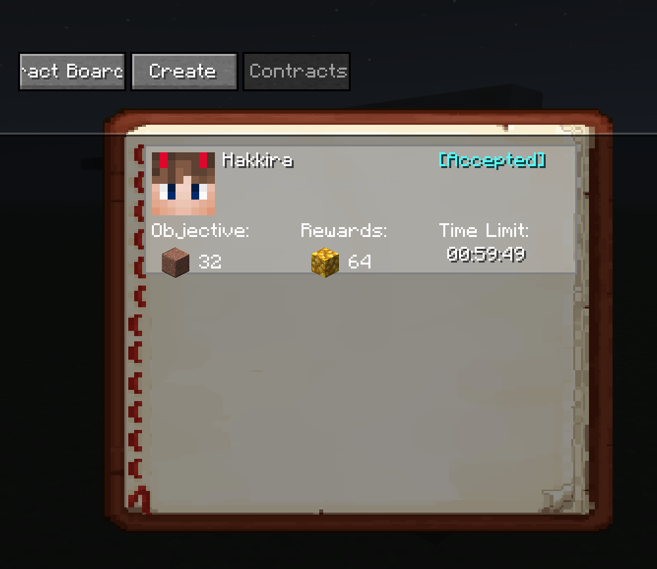
Each row shows the relevant player’s head, the creator, the objective, the rewards and the remaining time.
Crafting Recipe

The Notice board
Creation Menu
GUI
常见问题
PlayerNoticeBoard 支持哪些 Minecraft 版本?
PlayerNoticeBoard 支持 Minecraft Java 版 1.21.1–26.3,共 6 个版本,可用的加载器:Fabric。下载时注意选择和你游戏版本一致的文件。
PlayerNoticeBoard 怎么安装?
先用 PCL2 或 HMCL 启动器安装对应版本的 Fabric,再把下载的 .jar 文件放进游戏目录的 mods 文件夹,重新启动游戏即可。开启了版本隔离的,mods 文件夹在 versions/版本名 下面。运行环境:客户端和服务端都要装。
评论
登录后评论和评分