
截图




介绍

Designed with Creative in mind
This should not affect vanilla gameplay but use it with caution
Regular Simple Scaling
Simple Scaling is a datapack that you can include in your world that allows you to Scale Entities (and/or Players with operator).
Added Commands
Trigger Commands
Note, All Trigger commands are available to all players.
Scales Nearest Entities
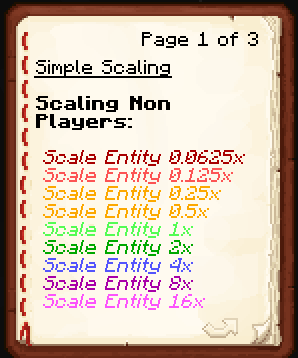
/trigger SetScale0.0625x1/16th Normal Scale/trigger SetScale0.125x1/8th Normal Scale/trigger SetScale0.25x1/4th Normal Scale/trigger SetScale0.5x1/2th Normal Scale/trigger SetScale1xNormal Scale/trigger SetScale2x2x the Normal Scale/trigger SetScale4x4x Normal Scale/trigger SetScale8x8x Normal Scale/trigger SetScale16x16x Normal Scale
Scales Yourself
/trigger SelfScale0.0625x1/16th Normal Scale/trigger SelfScale0.125x1/8th Normal Scale/trigger SelfScale0.25x1/4th Normal Scale/trigger SelfScale0.5x1/2th Normal Scale/trigger SelfScale1xNormal Scale/trigger SelfScale2x2x the Normal Scale/trigger SelfScale4x4x Normal Scale/trigger SelfScale8x8x Normal Scale/trigger SelfScale16x16x Normal Scale
Gives you The Scaling Book
/trigger ScalingBook
Function Commands
Scales Go from 0.0625 to 16!
Note, Function Commands Require _Operator_ Permissions
/function simplescaling:entity/setcustomscale {scale:x}Replacing “x” with a Number sets the Nearest Entities Scale to that Number/function simplescaling:player_self/setcustomscale {scale:x}Replacing “x” with a Number sets your Scale to that Number/function simplescaling:player_other/setcustomscale {scale:x}Replacing “x” with a Number sets the Nearest Player’s Scale to that Number/function simplescaling:player_name/setcustomscale {scale:x,player:username}Select a player by Replacing “username” with a player name & Replace “x” with a Number, this sets the Selected Player’s Scale to that Number.
常见问题
Simple Scaling 支持哪些 Minecraft 版本?
Simple Scaling 支持 Minecraft Java 版 1.20.5–1.21.1,共 4 个版本,可用的加载器:Fabric / Forge / NeoForge / Quilt。下载时注意选择和你游戏版本一致的文件。
Simple Scaling 怎么安装?
先用 PCL2 或 HMCL 启动器安装对应版本的 Fabric / Forge / NeoForge / Quilt,再把下载的 .jar 文件放进游戏目录的 mods 文件夹,重新启动游戏即可。开启了版本隔离的,mods 文件夹在 versions/版本名 下面。运行环境:客户端 / 服务端。
n1n 的其他作品
查看全部 →
Better Enchantment Order
A Simple, Visual Only, Datapack that changes the Tooltip Order of Enchantments!

Cobblemon Midnight
A Dark themed GUI Texture Pack for the Cobblemon Mod. Cobblemon GUIs Only.

Super Gamemode Switcher
A Server Tool to allow switching gamemodes without Operator. Customizable selections & Spectator Glowing

Simple Displays
A datapack that makes Display Entity Placement and Simple Modifications Easier.
评论
登录后评论和评分